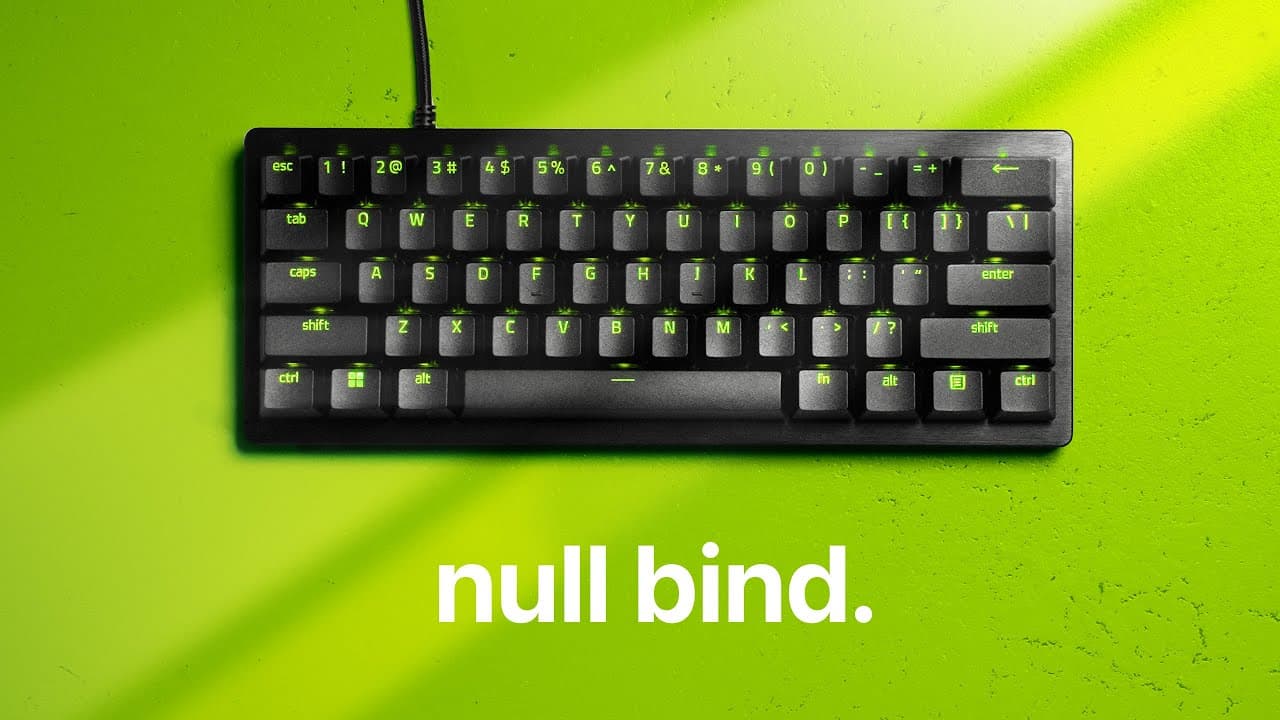
Razer's new keyboard is basically cheating.
TL;DR
Razer's Snaptap feature enhances gaming precision, eliminating movement overlap and input delay.
Transcript
this is what game movement looks like on razer's new keyboard it achieves perfect strafing inputs no movement overlap no delay between Direction changes this movement accuracy is 100% Impossible on a normal keyboard and in the past this way of input handling has been determined as cheating Razer though are calling it snaptap it's a free update that... Read More
Key Insights
- 🦔 Razer's Snaptap feature revolutionizes gaming keyboards by eliminating movement input overlap, offering a distinct competitive edge.
- 😥 Enhanced actuation points reduce input lag, translating into faster response times for gamers and improving overall gameplay efficiency.
- 👻 Counter strafing in Counter-Strike is made almost effortless with the Snaptap feature, allowing players to maximize accuracy.
- 🤨 The potential implications of such technology raise questions about what constitutes cheating in competitive gaming environments.
- ✋ Snaptap exemplifies a shift in keyboard technology, as gaming peripherals become increasingly optimized for high-stakes scenarios.
- 🦻 While the feature significantly aids precise movement, experts argue that it might diminish the value of traditional skill development over time.
- 🧡 Comparatively, alternatives like Wooting's "wrappy snappy" prioritize different inputs, showcasing a range of innovative approaches to preventing overlap in gaming.
Install to Summarize YouTube Videos and Get Transcripts
Explore YouTube Video Summarizer or Get YouTube Transcript Extractor
Questions & Answers
Q: How does Razer's Snaptap feature improve input responsiveness?
Snaptap eliminates movement overlap by activating only the last pressed input, allowing gamers to switch directions without input delay. This design feature enhances player responsiveness, crucial in competitive scenarios where every millisecond counts, enabling more accurate gameplay without traditional keyboard limitations.
Q: What competitive advantage does Snaptap provide in games like Counter-Strike?
In Counter-Strike, the Snaptap feature allows for perfect counter strafing, a movement technique essential for achieving maximum shooting accuracy. By instantly switching direction without overlap, players can stop moving more effectively, helping them fire accurately much quicker than standard keyboards, thus enhancing performance in high-stakes situations.
Q: Are there any concerns regarding the Snaptap feature being classified as cheating?
While the Snaptap feature could raise concerns about competitive integrity due to its enhancement of player inputs, it is reportedly accepted at high-level ESL tournaments. This contrasts with similar cheat scripts used in FPS games, highlighting the need for clear guidelines on defining fairness in competitive gaming.
Q: Can Snaptap be effectively used in games other than Counter-Strike?
Yes, while Snaptap is most beneficial in Counter-Strike for techniques like counter strafing, it can also improve movement in games like Overwatch. However, its advantages are less pronounced in titles where counter strafing is not crucial, allowing for efficient direction changes with no input overlap.
Summary & Key Takeaways
-
Razer's new Snaptap feature on Huntsman V3 keyboards ensures seamless movement inputs, making it impossible to overlap movement keys while gaming. This results in precise direction changes without any input lag.
-
In competitive games like Counter-Strike, Snaptap allows players to execute counter strafing with perfect accuracy, significantly improving shooting precision and overall gameplay experience.
-
The keyboard's innovative design bypasses traditional input limitations, providing gamers with an edge in fast-paced environments and raising questions about fairness in competitive gaming.
Read in Other Languages (beta)
Share This Summary 📚
Summarize YouTube Videos and Get Video Transcripts with 1-Click
Try YouTube Summary with ChatGPT & Claude or YouTube Transcript Generator
Explore More Summaries from optimum 📚
Summarize YouTube Videos and Get Video Transcripts with 1-Click
Try YouTube Summary with ChatGPT & Claude or YouTube Transcript Generator