What Common Mistakes to Avoid When Building a PC?
TL;DR
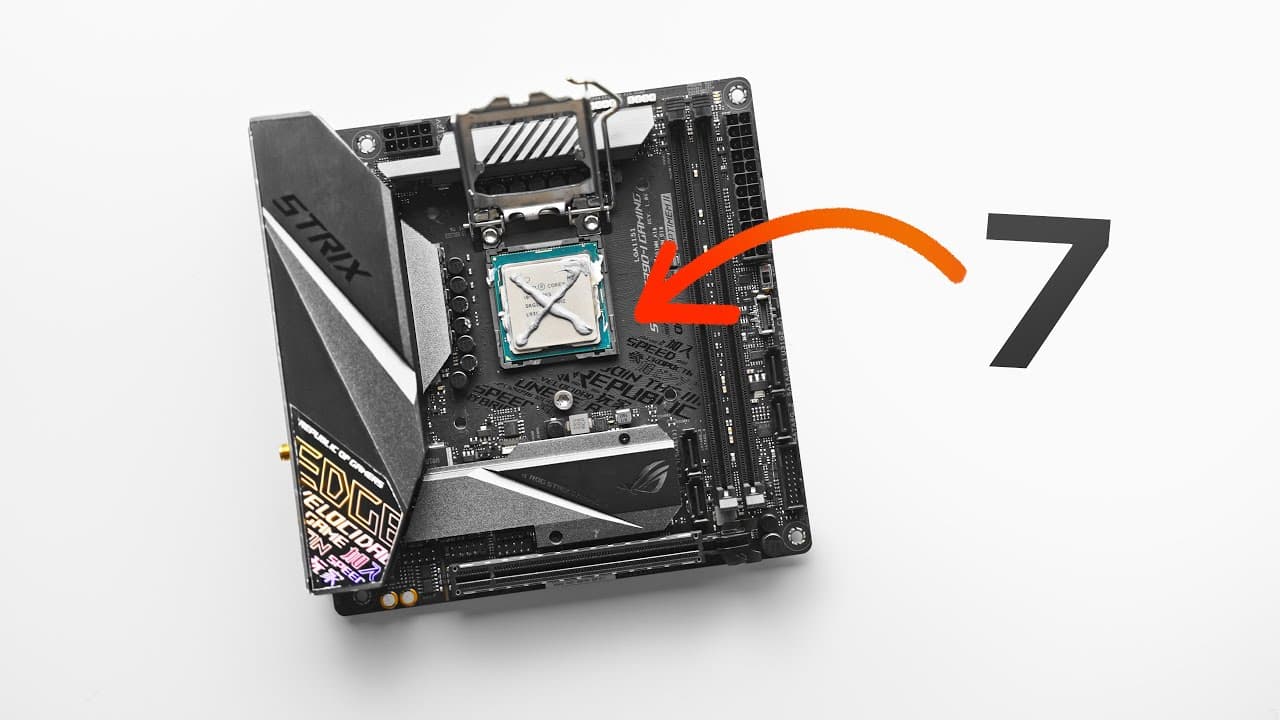
To avoid common PC building mistakes, ensure careful handling of the CPU and motherboard to prevent damage, and always perform a fresh install of Windows when changing platforms. Utilize tools like PC Part Picker for compatibility checks and external fan controllers to optimize cooling based on GPU temperature. Paying attention to these details can help ensure a successful build and prevent costly errors.
Transcript
Read and summarize the transcript of this video on Glasp Reader (beta).
Key Insights
- Mishandling the CPU and motherboard socket is a common mistake that can lead to hardware damage. Proper research and careful installation are crucial.
- Unstable memory often causes blue screens, especially in AMD Ryzen systems. Updating the BIOS and adjusting memory settings can help stabilize the system.
- Reusing a boot drive without a fresh install can cause performance issues. A fresh Windows install is recommended, especially when switching platforms.
- Correctly using fan headers and configuring them in the BIOS is essential for optimal fan operation. Mismatched settings can lead to unexpected fan behavior.
- Mixing power supply cables from different models can damage components. Always use the cables provided with your power supply.
- Overspending on CPUs for gaming is unnecessary. Investing in a better GPU offers more performance benefits than a high-end CPU.
- Using PC Part Picker helps avoid compatibility issues and find the best prices for components, making it a valuable tool for planning builds.
- External fan controllers like NZXT Cam allow for better GPU cooling by adjusting fan speeds based on GPU temperature, improving overall system cooling.
Install to Summarize YouTube Videos and Get Transcripts
Explore YouTube Video Summarizer or Get YouTube Transcript Extractor
Questions & Answers
Q: What is the most common mistake when building a PC?
The most common mistake is mishandling the CPU and motherboard socket, which can lead to bent pins and damaged hardware. This often happens due to a lack of focus or improper installation methods. It is crucial to research the specific socket type and installation process to avoid this error.
Q: How can unstable memory affect a PC build?
Unstable memory can cause frequent blue screens and system errors. This issue is prevalent in AMD Ryzen systems and can also occur in current-gen DDR5 systems. Solutions include updating the motherboard's BIOS, adjusting memory settings, and ensuring compatibility with the system's components.
Q: Why is a fresh Windows install recommended when building a new PC?
A fresh Windows install is recommended to avoid performance issues that arise from using an old boot drive in a new system. Different platforms and components may not interact well with existing installations, leading to errors. A fresh install ensures compatibility and optimal performance.
Q: What is the benefit of using PC Part Picker for planning a PC build?
PC Part Picker helps avoid compatibility issues by checking component compatibility, such as CPUs, motherboards, and cases. It also provides pricing information from various retailers, assisting builders in finding the best deals. This tool streamlines the planning process and ensures a successful build.
Q: How can improper use of fan headers affect a PC build?
Improper use of fan headers can lead to unexpected fan behavior, such as higher than expected speeds or inefficient cooling. Builders should ensure that fan headers are correctly configured in the BIOS for PWM or DC operation, depending on the fan type, to maintain optimal cooling performance.
Q: Why is mixing power supply cables a bad idea?
Mixing power supply cables from different models can result in incompatible connections, potentially frying hardware components. Each power supply unit may have different pinouts, so it's crucial to use the cables provided with the power supply to prevent damage and ensure safe operation.
Q: What is the advantage of using an external fan controller like NZXT Cam?
An external fan controller like NZXT Cam allows users to base fan curves on GPU temperature, providing more effective cooling for gaming PCs. This approach is more practical than relying solely on CPU temperature, as the GPU typically requires more cooling, especially in high-performance gaming scenarios.
Q: What is the recommended memory speed for DDR4 in a PC build?
The recommended memory speed for DDR4 in a PC build is around 3600 to 3800 MHz. This range offers the best performance without requiring desynchronized operation with the CPU's memory controller. Higher speeds may not provide additional benefits and can result in lower performance due to desynchronization.
Summary & Key Takeaways
-
Building a PC can be fraught with mistakes, from mishandling components to software issues. Understanding common pitfalls can help builders avoid costly errors and ensure a smooth build process.
-
Proper installation and configuration of components like CPUs, memory, and fans are vital. Builders should research specific requirements and settings to prevent damage and optimize performance.
-
Utilizing tools like PC Part Picker and external fan controllers can greatly enhance the building experience, ensuring compatibility and effective cooling solutions for gaming PCs.
Read in Other Languages (beta)
Share This Summary 📚
Summarize YouTube Videos and Get Video Transcripts with 1-Click
Try YouTube Summary with ChatGPT & Claude or YouTube Transcript Generator
Explore More Summaries from optimum 📚


Summarize YouTube Videos and Get Video Transcripts with 1-Click
Try YouTube Summary with ChatGPT & Claude or YouTube Transcript Generator