Edit Your Photos With JUST ONE TOOL - Lightroom Pro Tip
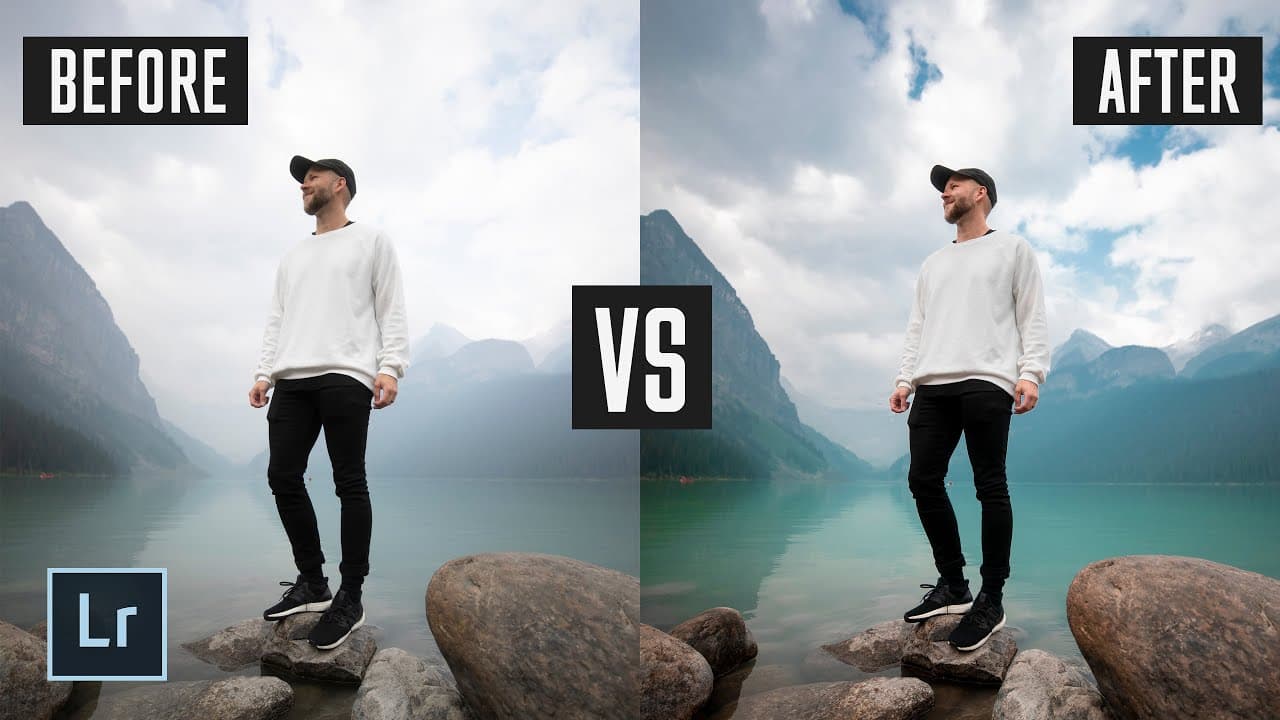
TL;DR
Lightroom's HSL tool is a powerful and precise editing tool for manipulating colors, perfect for both color correction and color grading.
Transcript
hey guys welcome to another episode of quick little pro tip I was inspired by being with film riot and shooting that short film do I actually use my c300 which I haven't used for a little bit and do a little bit of a different lighting setup today we're gonna talk about one of the most powerful if not the most powerful tool inside of Lightroom and ... Read More
Key Insights
- 🔨 The HSL tool in Lightroom is a powerful and precise tool for editing colors in photos.
- ❓ It can be used for both color correction and color grading.
- 👀 The HSL tool is especially useful for adjusting skin tones and creating specific looks.
- 👻 It allows for fine-tuning and enhances the overall quality of color correction and grading.
- 👤 By experimenting with each color slider, users can learn how different adjustments affect their images.
- 🔨 The HSL tool is an essential tool for photographers and those seeking advanced color editing options in Lightroom.
- 🎮 It offers a significant level of control and customization in color editing.
Install to Summarize YouTube Videos and Get Transcripts
Explore YouTube Video Summarizer or Get YouTube Transcript Extractor
Questions & Answers
Q: What is the HSL tool in Lightroom and how does it work?
The HSL tool stands for Hue, Saturation, Luminance, and it allows for precise color editing in Lightroom. By adjusting sliders for each color, users can change the shade, vibrancy, and brightness of specific colors in an image.
Q: How can the HSL tool be used for color correction?
The HSL tool is especially useful for tweaking skin tones in an image. By isolating the specific color (e.g. orange), users can easily adjust its hue, saturation, or luminance to achieve the desired look without affecting the rest of the image.
Q: Can the HSL tool be used for overall color grading?
Yes, the HSL tool can be used to create specific looks or color grades for an image. By manipulating different color sliders, such as green and yellow, users can achieve cinematic teal looks or other desired color effects.
Q: What makes the HSL tool a pro tool in Lightroom?
The HSL tool allows for precise and specific color editing, allowing users to fine-tune each color individually. It helps achieve that last 5 or 10 percent of tweaking that takes a photo from good to great, making it a valuable tool for professionals.
Summary & Key Takeaways
-
The HSL (Hue, Saturation, Luminance) section in Lightroom is a powerful tool for editing photos.
-
The HSL tool is great for color correction, especially for quickly adjusting skin tones.
-
It is also useful for color grading, allowing for the creation of specific looks by manipulating different color sliders.
Read in Other Languages (beta)
Share This Summary 📚
Summarize YouTube Videos and Get Video Transcripts with 1-Click
Try YouTube Summary with ChatGPT & Claude or YouTube Transcript Generator
Explore More Summaries from Matti Haapoja 📚





Summarize YouTube Videos and Get Video Transcripts with 1-Click
Try YouTube Summary with ChatGPT & Claude or YouTube Transcript Generator