Stable Diffusion Inpainting with Segment Anything Model (SAM)
TL;DR
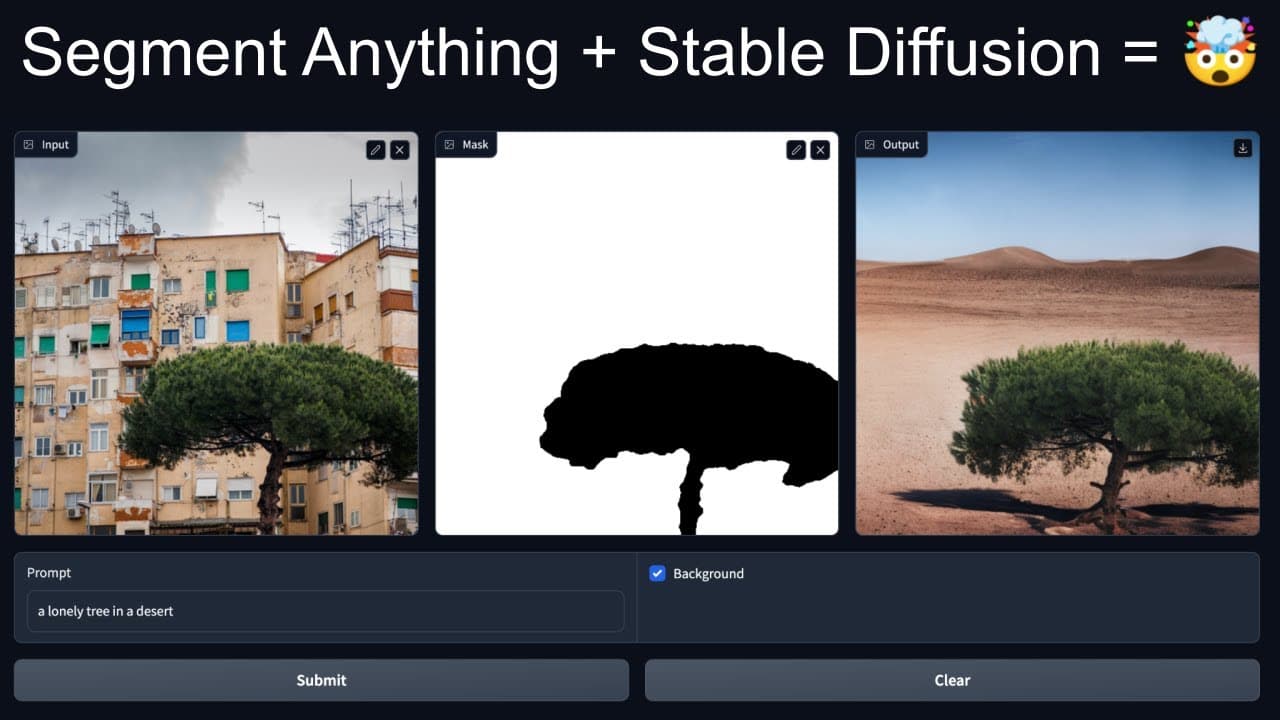
Learn how to combine the segment editing model and stable diffusion model to create impressive image manipulations using open-source libraries.
Transcript
hello everyone and welcome to my YouTube channel uh in today's video we are going to take a look at how we can combine segment editing model with the stable diffusion model to create something really really cool so I'm not going into details of how segment anything model works I think a lot of people have already done that and you can also read the... Read More
Key Insights
- 🤗 The combined use of the segment editing and stable diffusion models opens up endless possibilities for image manipulation.
- 👨💻 The provided code and instructions make it easy for users to get started with the project.
- 👤 Users can upload their own images and experiment with different prompts and background changes.
- ❓ The resulting image manipulations are impressive and can be used for various creative purposes.
- 🤗 The open-source nature of the models allows for further customization and development.
- 🏛️ The video tutorial is well-explained and provides a step-by-step approach to building the image editing demo.
- 🏑 The demo showcases the potential of machine learning models in the field of image processing.
Install to Summarize YouTube Videos and Get Transcripts
Explore YouTube Video Summarizer or Get YouTube Transcript Extractor
Questions & Answers
Q: What is the benefit of combining the segment editing and stable diffusion models?
By combining these models, users can leverage the power of both models to create more advanced and accurate image manipulations. The segment editing model allows for precise selection, while the stable diffusion model provides realistic inpainting.
Q: How can I install the required libraries for this project?
The video provides instructions on how to install the necessary libraries, including the segment editing model from the GitHub repository and stable diffusion from the Hugging Face Diffusers library. Simply follow the provided steps to install them.
Q: Can I use my own images in the image editing demo?
Yes, you can use your own images in the demo. The video demonstrates uploading an image and selecting parts of it for manipulation. You can experiment with various images and see the results.
Q: Is there a limit to the number of manipulations I can make on an image?
There is no set limit to the number of manipulations you can make on an image. You can keep selecting and replacing parts of the image or changing the background as much as you like. Each manipulation will provide a different result.
Summary & Key Takeaways
-
The content introduces the concept of combining the segment editing and stable diffusion models for image manipulation.
-
It provides instructions on how to install the required libraries and download the necessary weights.
-
The video demonstrates building a simple image editing demo where users can select parts of an image and replace them with prompts or change the background.
Read in Other Languages (beta)
Share This Summary 📚
Summarize YouTube Videos and Get Video Transcripts with 1-Click
Try YouTube Summary with ChatGPT & Claude or YouTube Transcript Generator
Explore More Summaries from Abhishek Thakur 📚
Summarize YouTube Videos and Get Video Transcripts with 1-Click
Try YouTube Summary with ChatGPT & Claude or YouTube Transcript Generator