How to Fix an Aperture Image Offline : Apple Aperture
TL;DR
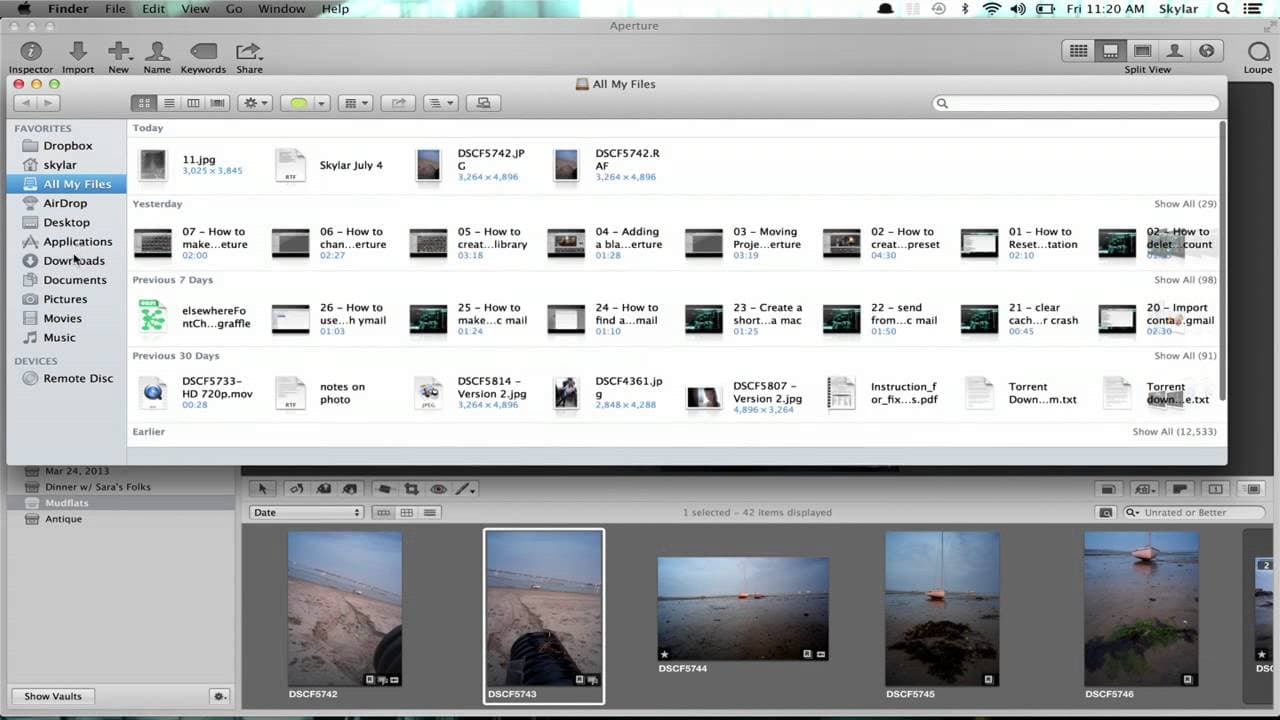
Learn about the differences between managed and referenced files in Aperture, and how to fix offline images by reconnecting references.
Transcript
hi I'm Skyler aperture has two different ways of storing your files one is managed and the other is referenced managed files are stored in the aperture Library whereas reference files are stored elsewhere and then referred to by aperture there are advantages and disadvantages to both methods and there's a web page you might want to check out which ... Read More
Key Insights
- 📁 Aperture offers two methods of file storage: managed files within the Aperture Library and referenced files stored externally.
- 📁 Managed files are easier to manage and backup, while referenced files allow for external organization and easy migration.
- 📁 When an image goes offline in Aperture, it can be fixed by either relocating the original file for managed files or reconnecting the reference file for referenced files.
- 😚 Aperture can track the relocation of reference folders, making it convenient to move them without losing connection.
Install to Summarize YouTube Videos and Get Transcripts
Explore YouTube Video Summarizer or Get YouTube Transcript Extractor
Questions & Answers
Q: What is the difference between managed and referenced files in Aperture?
Managed files are stored in the Aperture Library, while referenced files are stored outside and referred to by Aperture. Managed files are easier to manage and backup, while referenced files allow for external organization and easy migration.
Q: How can I fix an offline image in Aperture?
To fix an offline image, go to File, then Relocate Original for managed files, or Locate Referenced File for referenced files. Choose the appropriate file(s) and select the new location where they can be found to reconnect them in Aperture.
Q: Can I move a reference folder to a different location without losing connection in Aperture?
Yes, Aperture can track the relocation of reference folders. If you move a reference folder to a new location, Aperture will still know the file's location and keep the references connected.
Q: What should I do if my images go offline after moving them to an external hard drive?
When moving images to an external hard drive, make sure it is plugged in and accessible. In Aperture, go to File, then Locate Referenced File, select the offline images, and reconnect them by browsing to the correct location on the external hard drive.
Summary & Key Takeaways
-
Aperture offers two ways of storing files: managed files are stored within the Aperture Library, while reference files are stored elsewhere and referred to by Aperture.
-
Managing files within the Aperture Library provides advantages and disadvantages compared to referencing files stored in separate locations.
-
When an image goes offline in Aperture, it can be fixed by relocating the original file or reconnecting the reference file.
Read in Other Languages (beta)
Share This Summary 📚
Summarize YouTube Videos and Get Video Transcripts with 1-Click
Try YouTube Summary with ChatGPT & Claude or YouTube Transcript Generator
Explore More Summaries from ehow 📚




Summarize YouTube Videos and Get Video Transcripts with 1-Click
Try YouTube Summary with ChatGPT & Claude or YouTube Transcript Generator