Stanford CS105: Introduction to Computers | 2021 | Lecture 10.2 Webpage Example: Blog
TL;DR
Learn about the use of classes in HTML and CSS to format a web page and the concept of micro formats for reviews and business cards.
Transcript
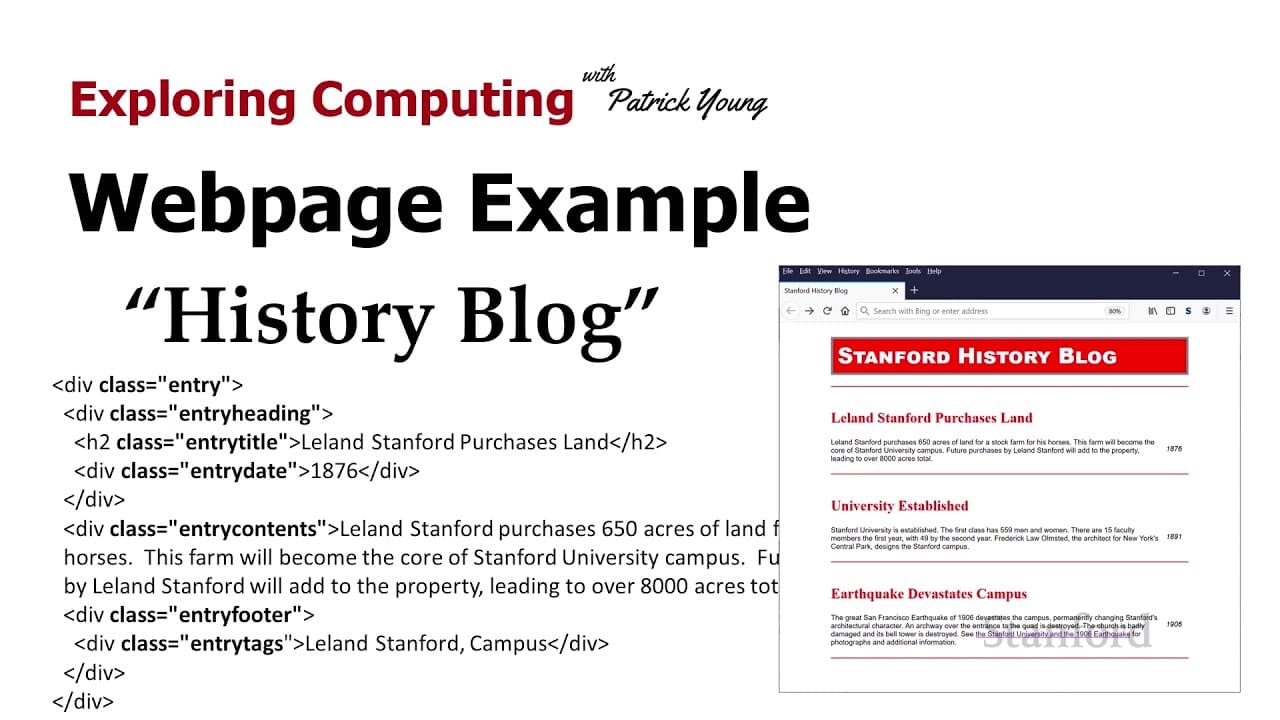
welcome to exploring computing today's video is web page example history blog so in our last example we saw the use of class in a number of places we saw that we created a class for captions and a class for photographs and a separate class for write photographs versus love photographs and this idea of taking divs or other elements we've been giving... Read More
Key Insights
- 😒 The use of classes in HTML and CSS is a powerful way to format elements in a web page, allowing for targeted styling and consistent design.
- 😒 Blogs often use classes to classify different elements like entries, headings, and footers, enabling specific formatting for each.
- 💁 Micro formats, such as h-review and h-card, use classes to provide semantic information and enable data extraction by tools.
- 👪 Multiple font families can be listed in the font-family property, giving the browser options to choose from based on availability.
- 💨 Display:none and visibility:hidden are techniques to make elements disappear in different ways.
- 😫 Setting float and width on elements can control their placement and prevent unwanted expansion.
- 😫 Multiple values in padding and margin properties can set different values for different edges of an element.
- 🏛️ Adding specific classes or using pseudo-classes like :last-child can help style elements that don't have built-in selectors.
Install to Summarize YouTube Videos and Get Transcripts
Explore YouTube Video Summarizer or Get YouTube Transcript Extractor
Questions & Answers
Q: How are classes used to format elements in a web page?
Classes are added to elements in HTML, allowing for targeted styling in CSS. By giving elements specific classes, different formatting can be applied to them using CSS rules.
Q: What are some examples of elements commonly found in blogs?
Some common elements in blogs include entries (divs), headings (h2), dates, footers, and tags. Each of these elements can be given a class for classification and styling purposes.
Q: What are micro formats and how are they used?
Micro formats are specific formats that use classes in HTML to provide semantic information. For example, h-review is used for reviews, and h-card is used for virtual business cards. Tools designed to work with micro formats can extract data by looking for specific classes.
Q: How can multiple font families be specified for an element?
Multiple font families can be listed in the font-family property in CSS, separated by commas. The browser will try to use the first available font in the list, moving to the next if it's not available.
Summary & Key Takeaways
-
The video discusses the use of classes in HTML and CSS to format elements in a web page, using an example of a history blog.
-
Different elements in a blog, such as headings, content, footers, and tags, can be classified using classes, allowing for targeted styling.
-
Micro formats, such as h-review for reviews and h-card for virtual business cards, use specific classes to provide semantic information and enable data extraction by tools.
Read in Other Languages (beta)
Share This Summary 📚
Summarize YouTube Videos and Get Video Transcripts with 1-Click
Try YouTube Summary with ChatGPT & Claude or YouTube Transcript Generator
Explore More Summaries from Stanford Online 📚





Summarize YouTube Videos and Get Video Transcripts with 1-Click
Try YouTube Summary with ChatGPT & Claude or YouTube Transcript Generator