Windows 10 VDI with NVIDIA GRID vPC - Healthcare
TL;DR
Healthcare organizations are using Nvidia's virtual GPU solutions to enhance user experience and productivity in graphically intensive applications, resulting in improved quality of care and cost savings.
Transcript
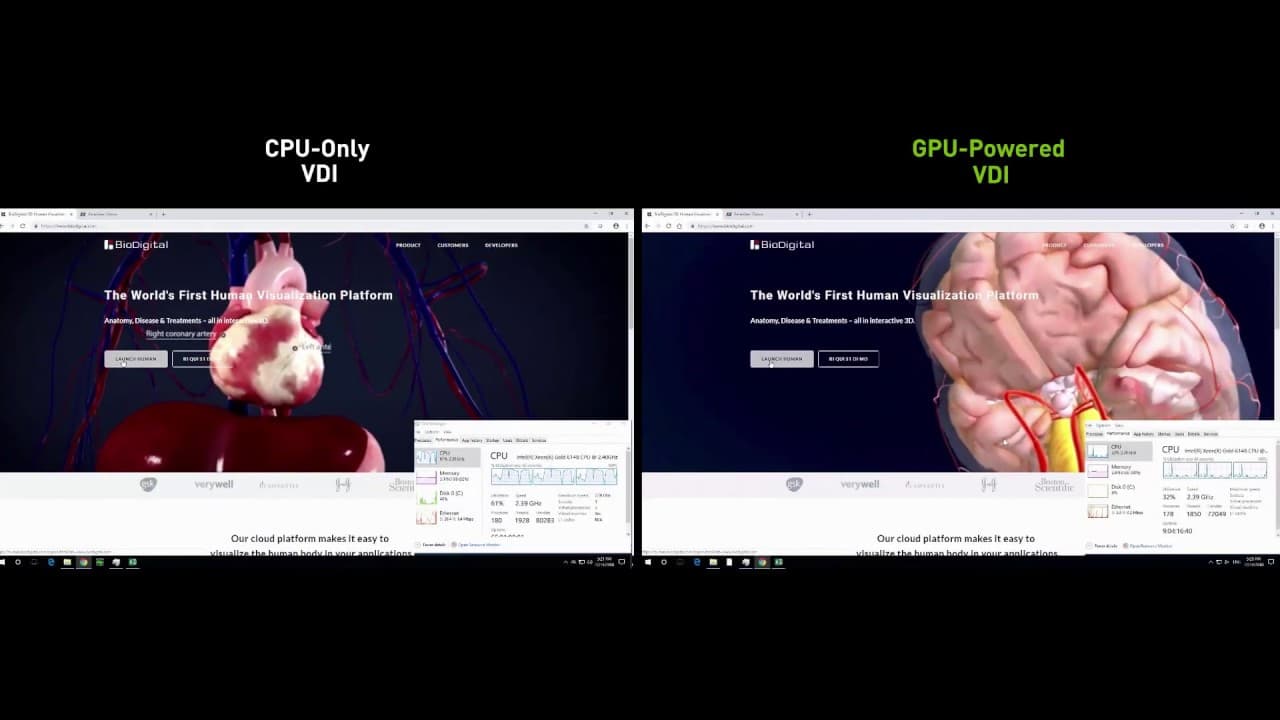
in their search for improved quality of care and lower costs health care organizations are embracing graphics-intensive applications powered by Nvidia virtual GPU solutions see the difference for yourself in this comparison between a CPU only virtual desktop and a GPU accelerated virtual desktop powered by Nvidia grid a dual HD monitor setup was co... Read More
Key Insights
- 😘 Healthcare organizations are leveraging graphics-intensive applications powered by Nvidia virtual GPUs for improved quality of care and lower costs.
- 💨 GPU-accelerated virtual desktops provide smoother video playback, faster loading times, and better responsiveness in applications.
- 👻 GPUs significantly enhance the performance of web graphics, allowing for faster rotation and manipulation of 2D and 3D structures.
- 💻 CPU-only virtual desktops struggle with high CPU utilization, while GPU-accelerated virtual desktops free up CPU cycles for other users.
Install to Summarize YouTube Videos and Get Transcripts
Explore YouTube Video Summarizer or Get YouTube Transcript Extractor
Questions & Answers
Q: What benefits do healthcare organizations gain from using GPU-accelerated virtual desktops?
GPU-accelerated virtual desktops provide smoother video playback, faster loading times, and better responsiveness in applications, enhancing user experience and productivity in healthcare settings.
Q: How do GPUs improve web graphics in healthcare applications?
GPUs significantly enhance the performance of web graphics, allowing for faster rotation and manipulation of 2D and 3D structures, providing healthcare professionals with a more efficient workflow.
Q: How do CPU-only virtual desktops compare to GPU-accelerated virtual desktops in terms of CPU utilization?
CPU-only virtual desktops struggle with high CPU utilization, often hitting 100%. In contrast, GPU-accelerated virtual desktops have consistently low CPU utilization, freeing up CPU cycles for other users.
Q: How do Nvidia's virtual GPU solutions benefit healthcare professionals?
Nvidia's virtual GPU solutions ensure healthcare professionals get the best user experience on graphically intensive websites and medical applications, enabling productivity from anywhere and improving the quality of care.
Summary & Key Takeaways
-
Health care organizations are embracing graphics-intensive applications powered by Nvidia virtual GPU solutions for improved quality of care and lower costs.
-
GPU-accelerated virtual desktops provide smoother video playback, faster loading times, and better responsiveness in applications like Excel.
-
GPUs significantly enhance the performance of web graphics, allowing for faster rotation and manipulation of 3D structures.
-
CPU-only virtual desktops struggle with high CPU utilization, while GPU-accelerated virtual desktops free up CPU cycles for other users.
-
Nvidia's virtual GPU solutions ensure healthcare professionals get the best user experience on graphically intensive websites and medical applications, enabling productivity from anywhere.
Read in Other Languages (beta)
Share This Summary 📚
Summarize YouTube Videos and Get Video Transcripts with 1-Click
Try YouTube Summary with ChatGPT & Claude or YouTube Transcript Generator
Explore More Summaries from NVIDIA 📚



Summarize YouTube Videos and Get Video Transcripts with 1-Click
Try YouTube Summary with ChatGPT & Claude or YouTube Transcript Generator