A subscriber spent 8 hours debugging this code
TL;DR
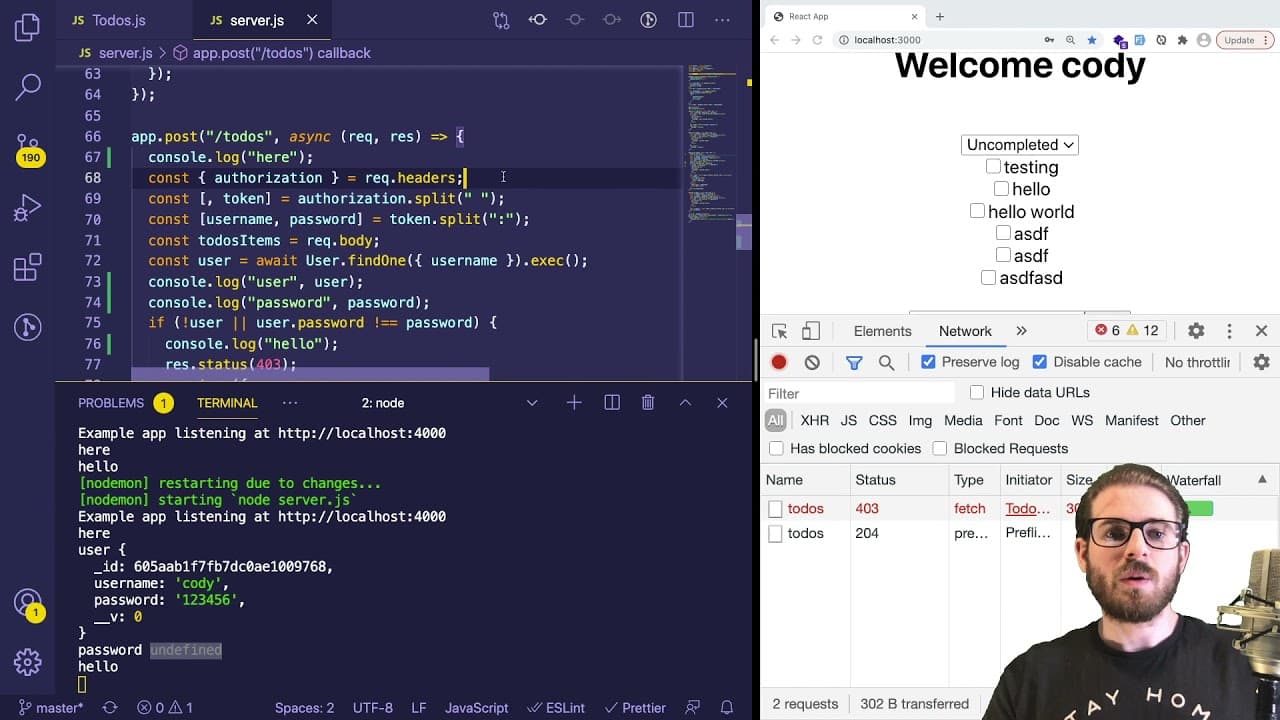
A developer shares insights on debugging a 403 error in a MERN stack application.
Transcript
hey everyone i hope you guys are having a great day welcome back to another web dev junkie video so in this one i'm going to be walking through a real life bug that one of my discord users kind of ran into um he said he spent about eight hours trying to figure this one out and i thought i would just kind of show you the thought process of how i typ... Read More
Key Insights
- ❓ Debugging requires a systematic approach, focusing first on inspecting the network and requests being made between frontend and backend.
- 👨💻 Console logging is invaluable for tracing code execution and verifying data flow, helping to isolate problems effectively.
- 🥺 Authorization headers must be correctly formatted, as small errors can lead to significant issues like receiving a 403 forbidden error.
- 🐛 It is crucial to verify not just the request but also the server's handling of that request to find bugs accurately.
- ⌛ Developers often encounter hidden bugs that seem trivial at first but can consume hours of debugging time; persistence is key.
- ❤️🩹 Both the client side (frontend) and server side (backend) must be scrutinized when problems arise, as the issue may originate from either end.
- 😀 Engaging with the developer community, like Discord, can provide valuable insight and assistance when faced with technical challenges.
Install to Summarize YouTube Videos and Get Transcripts
Explore YouTube Video Summarizer or Get YouTube Transcript Extractor
Questions & Answers
Q: What was the initial issue that prompted the debugging session?
The initial issue involved a user receiving a 403 error when attempting to add items to a to-do list in a MERN stack application. This indicated that something was wrong with either the request being sent to the server or how the server was handling it, frustrating the user who spent extensive time troubleshooting this problem.
Q: What debugging strategies were recommended in the video?
The video encourages developers to start with inspecting the network tab to view the requests and responses, confirm if the correct endpoint is being hit, and check headers and payloads. Additionally, it suggests using console logging extensively to see the flow of data and identify exactly where things may be going awry.
Q: Why is console logging emphasized as a valuable tool in debugging?
Console logging is highlighted as it allows developers to trace the execution of their code and examine the values of variables at different points in their application. This approach provides immediate feedback and can help identify issues quickly, especially when backend responses or incoming requests do not match expectations.
Q: How did the structure of the authorization header contribute to the problem?
The problem stemmed from the authorization header having unnecessary spaces surrounding the username and password. This formatting error prevented the server from properly interpreting the credentials, leading to the application returning a 403 forbidden error when the user attempted to authenticate.
Q: What takeaway did the developer mention regarding debugging trivial issues?
The developer noted that even seemingly trivial bugs, such as an extra space or missing semicolon, can consume significant debugging time. The key takeaway is to remain methodical and patient, recognizing that the simplest errors are often the most elusive, requiring attention to detail to resolve.
Q: How important is it to check both the frontend and backend during debugging?
It's critically important to check both the frontend and backend during the debugging process as issues can arise from either side. Understanding how requests are constructed in the frontend and how they are processed in the backend allows developers to more accurately identify where the problem lies.
Q: What should developers do if they cannot find an issue through initial checks?
If developers cannot identify the issue through initial checks, they should delve deeper by using console logs to print out variable states and flow. They can also leverage debug tools to step through their code, ultimately gathering more information to guide them toward a solution.
Q: What encouragement did the developer offer to those facing similar debugging challenges?
The developer encouraged viewers to persist through debugging challenges, emphasizing that encountering such obstacles is a normal part of the coding process. They urged viewers to stay focused, develop their debugging skills, and not feel discouraged by setbacks in finding solutions.
Summary & Key Takeaways
-
The video demonstrates a real-life debugging scenario where a developer addresses a 403 error encountered by a user in a MERN stack application, emphasizing the importance of understanding both frontend and backend interactions.
-
Key debugging steps include inspecting network requests, checking authorization headers, and utilizing console logs to reveal deeper insights into the code execution process, ultimately pinpointing the issue of improperly formatted authorization information.
-
The tutorial aims to enhance viewers' debugging skills by sharing systematic approaches and encouraging persistence in resolving coding issues, even when they seem trivial.
Read in Other Languages (beta)
Share This Summary 📚
Summarize YouTube Videos and Get Video Transcripts with 1-Click
Try YouTube Summary with ChatGPT & Claude or YouTube Transcript Generator
Explore More Summaries from Web Dev Cody 📚





Summarize YouTube Videos and Get Video Transcripts with 1-Click
Try YouTube Summary with ChatGPT & Claude or YouTube Transcript Generator