Making a Shared Space for In-Person and Remote Learners
TL;DR
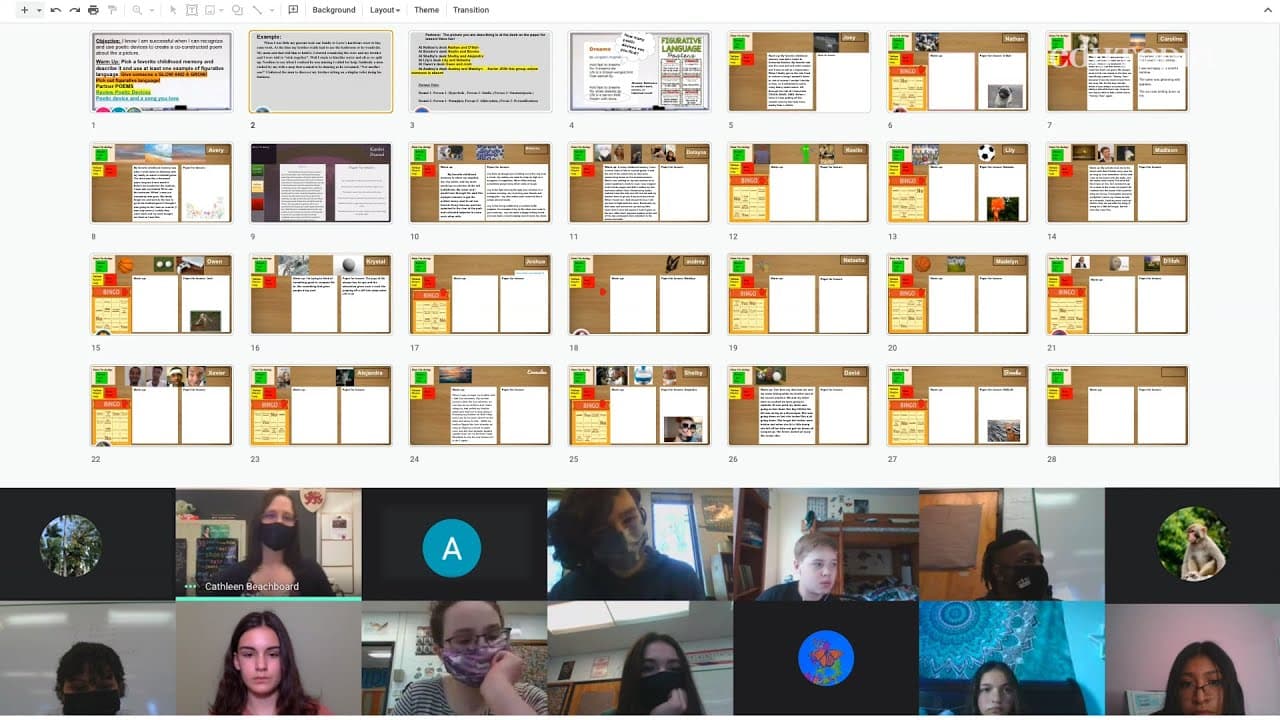
Digital desks on Google Slides offer a solution to connect students in a virtual classroom, fostering engagement and normalcy.
Transcript
Cathleen: All right, there we go. Everybody's popping in. Ready to do this? >>The multiple transitions that have taken place this year have impacted all of my students. We started off the year virtual, as one giant class and then when we came back hybrid, they were split apart. >>Keelin: It has been a lot harder to connect with my teacher and oth... Read More
Key Insights
- 🧑🎓 Multiple transitions due to the pandemic have impacted students, making it harder for them to connect with teachers and peers.
- 💁 Digital desks on Google Slides offer a solution to connect students by providing individual workspaces and real-time interaction.
- 😒 Students are becoming more confident in their writing through the use of digital desks, as they are encouraged to showcase their best work.
- 💦 The ability to see classmates' work and provide feedback fosters engagement and a collaborative learning environment.
- 👻 Digital desks allow students to maintain a sense of normalcy and belonging in the classroom, regardless of their physical location.
- 💁 The color-coded system on digital desks helps students indicate their progress and seek assistance when needed.
- 💦 Teachers can easily monitor students' work and spot any issues through the aerial view feature of Google Slides.
Install to Summarize YouTube Videos and Get Transcripts
Explore YouTube Video Summarizer or Get YouTube Transcript Extractor
Questions & Answers
Q: How do digital desks connect students in a virtual classroom?
Digital desks provide students with individual spaces on a Google Slides deck, allowing personalization and real-time interactions. Students can see each other's work and provide feedback, fostering connectivity despite being physically apart.
Q: What benefits do digital desks offer for student engagement?
By having their own digital workspace, students become more confident in their writing and are encouraged to put their best effort forward. They can also engage with classmates through feedback, creating a collaborative learning environment.
Q: How does the color-coded system work on digital desks?
The color-coded system allows students to indicate their progress. Green means they are good, while red signals the need for immediate assistance. This system replicates the raising of hands in a physical classroom, ensuring timely support.
Q: How do digital desks help maintain a sense of normalcy in the classroom?
Students having their own digital desks, regardless of their physical location, gives them a consistent space that represents them in the classroom. This creates a sense of familiarity and continuity, contributing to a normal classroom experience.
Summary & Key Takeaways
-
The use of digital desks in a virtual classroom setting helps to bridge the gap between students attending in-person and virtually, creating a sense of normalcy during the pandemic.
-
Each student has their own individual desk on a Google Slides deck, allowing personalization and daily copying for classwork.
-
Digital desks enable real-time interaction and feedback among students, promoting engagement and confidence in their writing.
Read in Other Languages (beta)
Share This Summary 📚
Summarize YouTube Videos and Get Video Transcripts with 1-Click
Try YouTube Summary with ChatGPT & Claude or YouTube Transcript Generator
Explore More Summaries from Edutopia 📚



Summarize YouTube Videos and Get Video Transcripts with 1-Click
Try YouTube Summary with ChatGPT & Claude or YouTube Transcript Generator