Points after rotation | Transformations | Geometry | Khan Academy
TL;DR
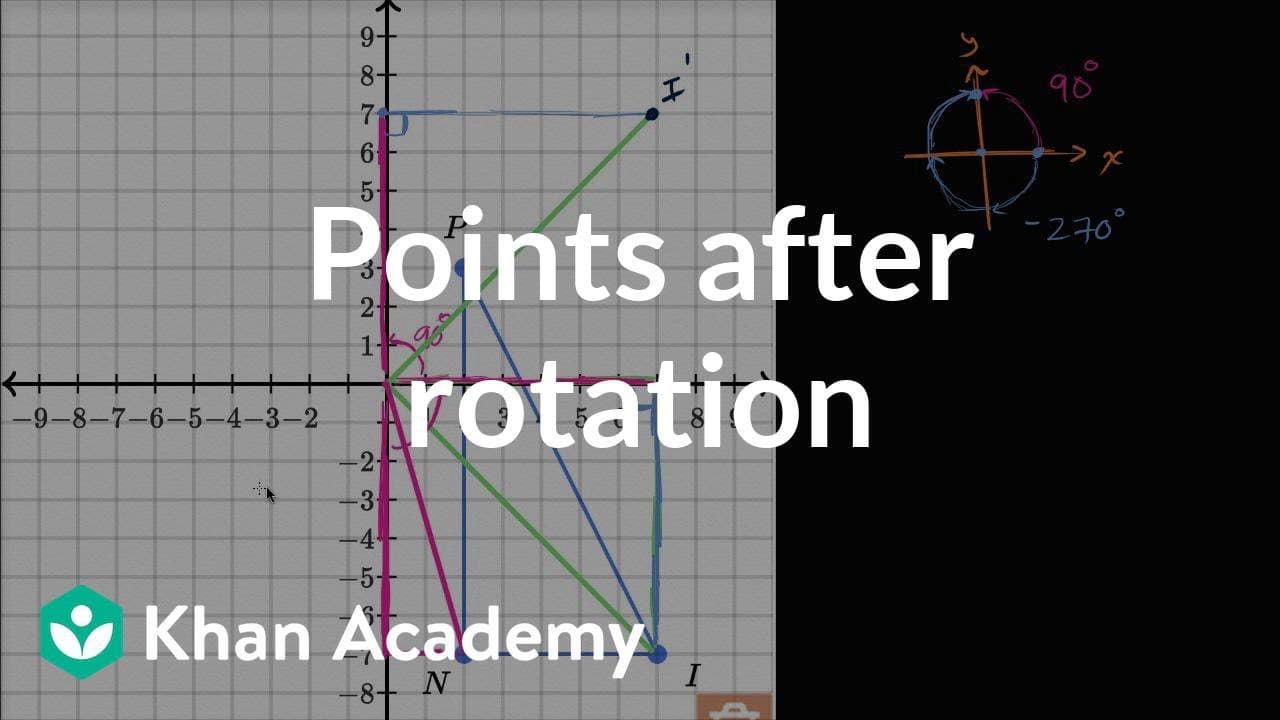
Learn how to rotate a triangle negative 270 degrees about the origin using an interactive graph tool.
Transcript
- [Voiceover] We're told that triangle PIN is rotated negative 270 degrees about the origin. So this is the triangle PIN and we're gonna rotate it negative 270 degrees about the origin. Draw the image of this rotation using the interactive graph. The direction of rotation by a positive angle is counter-clockwise. So positive is counter-clockwise, w... Read More
Key Insights
- 🔺 A negative 270 degree rotation is equivalent to rotating the points of a triangle by positive 90 degrees.
- 👉 The image of a point after rotation can be determined by drawing a right triangle and finding the new coordinates of the corresponding sides after rotation.
- 🔨 The interactive graph tool is a helpful tool for visualizing geometric transformations.
- ❓ Understanding the concepts of rotation and coordinate geometry is crucial in solving geometry problems involving rotational transformations.
- 🔺 Rotating points around the origin can result in both positive and negative angle rotations, which have different effects on the final position of the points.
- 🔺 The shape and orientation of a triangle can change after rotation depending on the angle and direction of rotation.
- 🗯️ Knowledge of trigonometry and right triangles is beneficial for understanding and solving rotational transformation problems.
Install to Summarize YouTube Videos and Get Transcripts
Explore YouTube Video Summarizer or Get YouTube Transcript Extractor
Questions & Answers
Q: How is a negative 270 degree rotation defined?
A negative 270 degree rotation means rotating in a clockwise direction around the origin by a total angle of 270 degrees. It is the same as rotating in the positive direction by 90 degrees.
Q: How can the image of a point after rotation be determined?
To find the image of a point after rotation, draw a right triangle with one side being the hypotenuse connecting the origin to the point. Then, rotate the triangle by the desired angle. The new location of the point can be determined by finding the corresponding sides of the triangle after rotation.
Q: Why is it sufficient to rotate the vertices of the triangle to determine the image of the entire triangle?
Rotating the vertices of the triangle is sufficient because the triangle's shape is determined by its vertices. By understanding the rotation of the vertices, the overall rotation of the triangle can be visualized.
Q: How is the interactive graph tool used in this video?
The interactive graph tool allows users to input points and draw lines. In this video, it is used to demonstrate the rotation of the triangle by placing points and connecting them to form the image of the rotated triangle.
Summary & Key Takeaways
-
The content explains how to rotate a triangle, specifically the points I, N, and P, negative 270 degrees around the origin.
-
The video uses an interactive graph tool to visually demonstrate the rotation.
-
By rotating each point individually by positive 90 degrees, the image of the triangle after rotation can be determined.
Read in Other Languages (beta)
Share This Summary 📚
Summarize YouTube Videos and Get Video Transcripts with 1-Click
Try YouTube Summary with ChatGPT & Claude or YouTube Transcript Generator
Explore More Summaries from Khan Academy 📚



Summarize YouTube Videos and Get Video Transcripts with 1-Click
Try YouTube Summary with ChatGPT & Claude or YouTube Transcript Generator