Why using the classnames library will clean up your react code
TL;DR
The Class Names library streamlines class management in React components, improving code readability.
Transcript
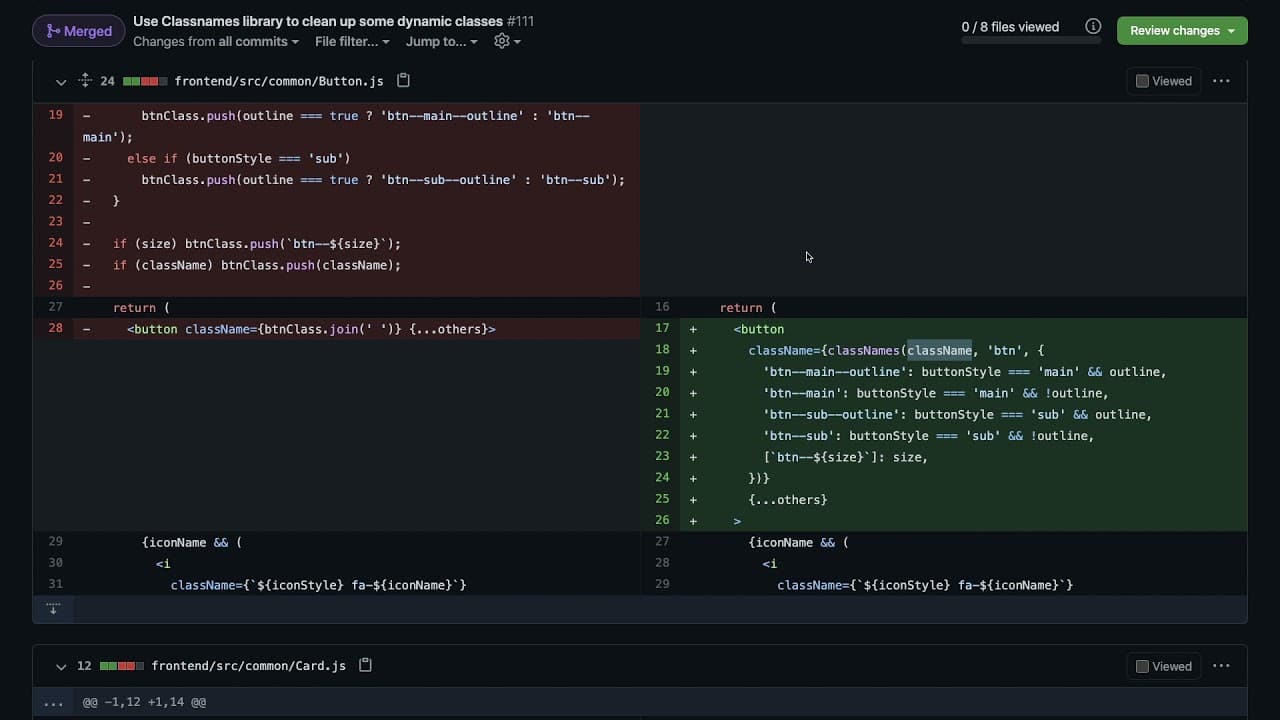
hey everyone i hope you guys are having a great day welcome back to another web dev junkie video so i wanted to talk about the class names library and how you can use it to kind of clean up your react code especially when it's related to adding classes so this is a pull request that's against dennis ivey's project called mumble he's a maintainer of... Read More
Key Insights
- 🏛️ The Class Names library simplifies the process of adding dynamic and conditional class names in React components.
- 😒 It uses ES6 syntax effectively to streamline class management, reducing the need for complex array manipulations.
- 👶 Cleaner code generated by the library makes it easier for new developers to understand style logic in components.
- 😑 The library encourages a more declarative approach, allowing developers to express styling rules without extensive branching logic.
- 👷 Utilizing libraries like Class Names can significantly reduce potential errors related to manual string construction.
- 👨💻 Simplifying component styling can enhance collaboration and code reviews, as clearer code is easier to understand for team members.
- 👨💻 The video highlights the benefits of reducing nested conditional statements to improve code maintainability.
Install to Summarize YouTube Videos and Get Transcripts
Explore YouTube Video Summarizer or Get YouTube Transcript Extractor
Questions & Answers
Q: What problem does the Class Names library solve for React developers?
The Class Names library addresses the complexity and verbosity of managing dynamic class strings in React components. By simplifying the way class names are concatenated based on props, developers can write cleaner and more maintainable code, reducing the cognitive load associated with tracking multiple conditions and variable checks.
Q: How does the Class Names library improve code readability compared to manual string concatenation?
The Class Names library enhances readability by avoiding extensive conditional checks and multiple statements. It allows developers to utilize an object syntax where class names are defined alongside boolean values indicating their inclusion, making it instantly clear which classes will be applied based on the component’s props without scrolling through complex logic.
Q: Can you provide an example of how to use the Class Names library in a React component?
In a React component, you would first import the library and install it via npm. Then, you might define your class names using the function like so: classNames('button', { 'button-main': buttonStyle === 'main', 'button-outline': outline }); This would create a class string that includes 'button' and conditionally adds 'button-main' or 'button-outline', streamlining your class management process.
Q: What are the performance implications of using the Class Names library versus manual concatenation?
While using the Class Names library can lead to slightly longer initial load times due to the additional dependency, it generally doesn’t significantly affect performance in terms of rendering speed. Instead, the primary benefits lie in maintainability and developer productivity. Clean code often leads to fewer bugs and increases in development speed, ultimately benefiting performance indirectly.
Summary & Key Takeaways
-
The Class Names library helps manage dynamic class names in React, allowing developers to simplify their code significantly.
-
Instead of manually constructing class strings, developers can use the library to handle conditional classes efficiently and cleanly.
-
Using object syntax with the Class Names library reduces complex conditional logic, making the code easier to read and maintain.
Read in Other Languages (beta)
Share This Summary 📚
Summarize YouTube Videos and Get Video Transcripts with 1-Click
Try YouTube Summary with ChatGPT & Claude or YouTube Transcript Generator
Explore More Summaries from Web Dev Cody 📚





Summarize YouTube Videos and Get Video Transcripts with 1-Click
Try YouTube Summary with ChatGPT & Claude or YouTube Transcript Generator