Green Screen Videos Bring Content to Life
TL;DR
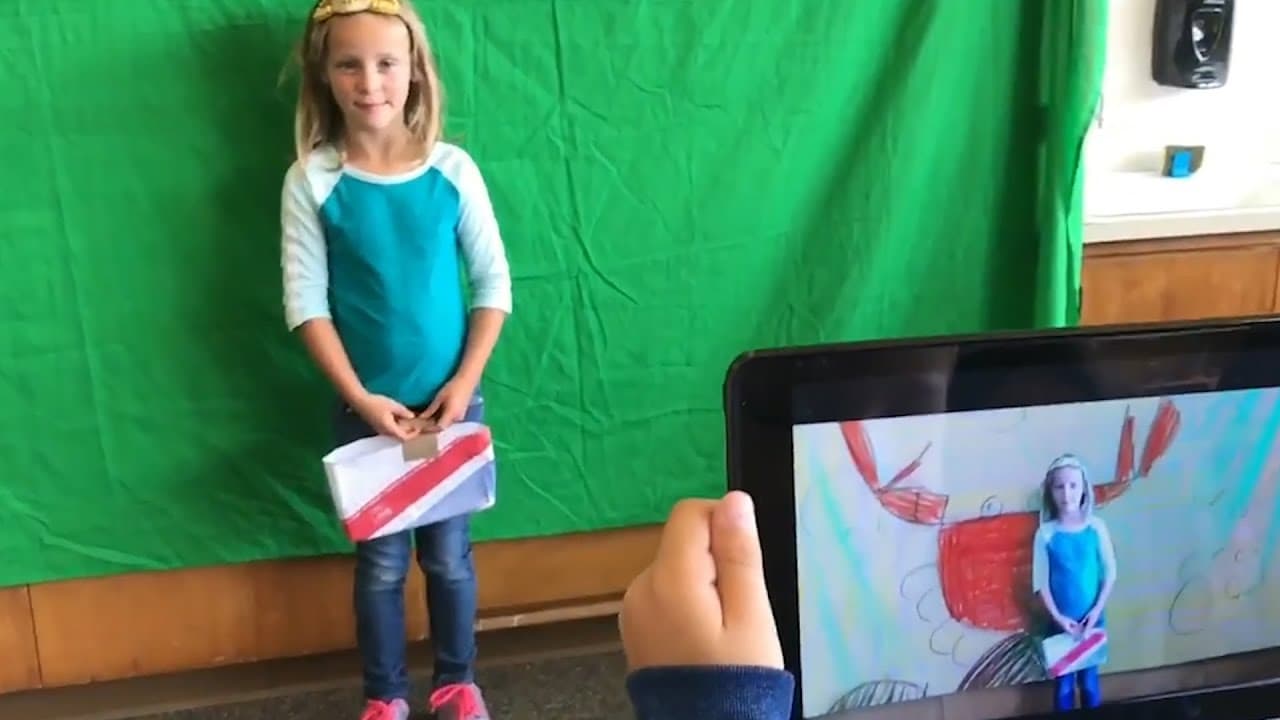
Green screens in education provide a creative and engaging way for students to explore different subjects and show their thinking.
Transcript
Justine: There's magic with the green screen, a wow factor. It makes the students feel like they can do anything, be anywhere, and that's something really special, especially now in the world that we're in, where it feels like we're under a lot of constraints. The green screen is a way that we can explore so much more. >>Student: Here we are on p... Read More
Key Insights
- 👻 Green screens offer a sense of magic and freedom, allowing students to feel like they can be anywhere and do anything.
- 🧑🎓 They provide a platform for students to take ownership of their projects and showcase their creativity.
- 📗 Green screens can be applied across various subjects, including weather reporting, virtual field trips, math explanations, book reviews, and self-reflections.
- 🤔 The technology promotes engagement and deeper thinking, enabling students to research, evaluate, and consider their audience.
- 😒 The use of green screens in education creates enthusiasm, purpose, and real-world connections.
Install to Summarize YouTube Videos and Get Transcripts
Explore YouTube Video Summarizer or Get YouTube Transcript Extractor
Questions & Answers
Q: What is a green screen and how does it work?
A green screen is a production tool that allows users to merge two or more images or videos by using a green backdrop. This layered effect creates a seamless integration of different elements.
Q: How can green screens be used in math lessons?
In math, students can use green screens to explain their thinking by taking a picture of their journal and presenting it behind them. They can point to specific sections to add a verbal element and provide a more comprehensive explanation.
Q: Can green screens enhance reading comprehension?
Yes, green screens are a great tool for exploring text. Students can choose or create images associated with a book and present their own interpretation. They can even create their own book reviews using the green screen technology.
Q: How can green screens facilitate self-reflections?
Students can use green screens to have a conversation with themselves on the screen. This activity allows them to set goals, reflect on their progress, and showcase their personal growth throughout the year.
Summary & Key Takeaways
-
Green screens allow students to merge images or videos to create layered effects and showcase their creativity and thinking.
-
Students can use green screens in various subjects like weather reporting, virtual field trips, math explanations, book reviews, and self-reflections.
-
Green screens enhance student engagement, enthusiasm, and transfer of learning to real-world applications.
Read in Other Languages (beta)
Share This Summary 📚
Summarize YouTube Videos and Get Video Transcripts with 1-Click
Try YouTube Summary with ChatGPT & Claude or YouTube Transcript Generator
Explore More Summaries from Edutopia 📚
Summarize YouTube Videos and Get Video Transcripts with 1-Click
Try YouTube Summary with ChatGPT & Claude or YouTube Transcript Generator