How To Make Text To Voice Converter Using JavaScript | Text To Speech Generator
TL;DR
Create a text-to-speech app with voice options using JavaScript.
Transcript
Read and summarize the transcript of this video on Glasp Reader (beta).
Key Insights
- The tutorial demonstrates creating a text-to-speech converter using HTML, CSS, and JavaScript, ideal for beginners.
- Users can input text and convert it to speech with a single click using a 'Listen' button.
- The app allows users to select different voices from a dropdown menu, enhancing user experience.
- The project involves setting up a basic HTML structure, styling with CSS, and adding functionality with JavaScript.
- JavaScript's SpeechSynthesis API is used to handle text-to-speech conversion and voice selection.
- The tutorial emphasizes a step-by-step approach, making it accessible for learners and suitable for portfolios.
- Visual Studio Code is recommended for editing, with a live server extension for real-time browser updates.
- The tutorial includes downloading additional resources like images for better UI design.
Install to Summarize YouTube Videos and Get Transcripts
Explore YouTube Video Summarizer or Get YouTube Transcript Extractor
Questions & Answers
Q: What is the primary objective of this tutorial?
The primary objective of the tutorial is to teach users how to create a text-to-speech converter application using HTML, CSS, and JavaScript. The tutorial is designed for beginners and aims to provide a step-by-step guide to implementing text-to-speech functionality, including voice selection options, using JavaScript's SpeechSynthesis API.
Q: How does the text-to-speech conversion work in this project?
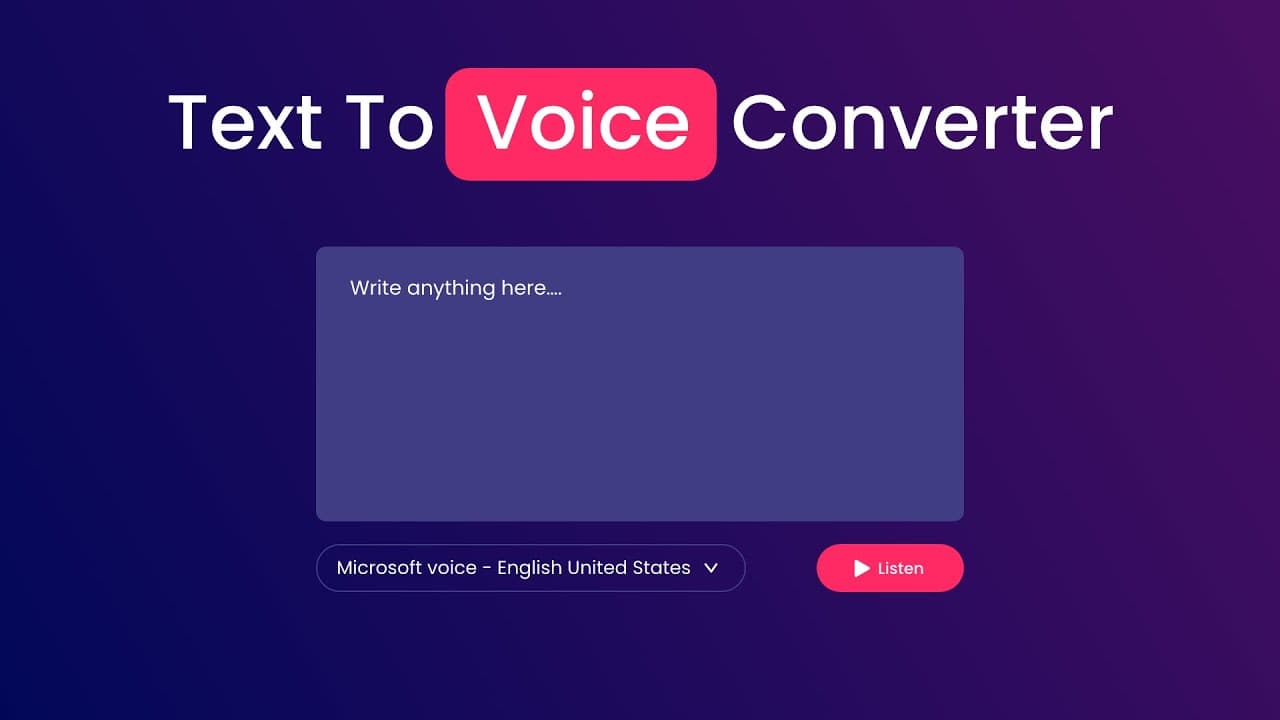
The text-to-speech conversion is achieved using JavaScript's SpeechSynthesis API. The tutorial demonstrates how to capture text input from a text area and convert it to speech by triggering a 'Listen' button. The SpeechSynthesis API is used to create a new speech synthesis utterance and speak the text input using the selected voice from a dropdown menu.
Q: What are the key components of the user interface in this project?
The key components of the user interface include a text area for inputting text, a 'Listen' button to trigger the text-to-speech conversion, and a dropdown menu for selecting different voices. The interface is styled using CSS to ensure a visually appealing layout, with a focus on usability and accessibility for users.
Q: How is the voice selection feature implemented in the application?
The voice selection feature is implemented using a dropdown menu populated with available voices from the SpeechSynthesis API. JavaScript is used to dynamically populate the dropdown with voice options, and an event listener is added to update the speech synthesis voice based on the user's selection, allowing for customizable audio output.
Q: What development tools are recommended for following this tutorial?
The tutorial recommends using Visual Studio Code as the primary code editor. It suggests installing the live server extension to enable real-time updates in the browser while coding. This setup helps streamline the development process, allowing users to see changes immediately as they work on the project.
Q: What additional resources are provided with the tutorial?
The tutorial provides additional resources such as images and icon files required for designing the user interface. These resources can be downloaded from the provided links, ensuring that users have all necessary files to replicate the project as demonstrated in the tutorial, enhancing the learning experience.
Q: Why is this project suitable for beginners and portfolios?
This project is suitable for beginners because it offers a clear, step-by-step guide to implementing a functional text-to-speech application using fundamental web technologies. It covers essential concepts in HTML, CSS, and JavaScript, providing a practical example that can be showcased in a portfolio to demonstrate proficiency in web development.
Q: What are the potential applications of this text-to-speech converter?
The text-to-speech converter can be used in various applications, such as accessibility tools for visually impaired users, language learning apps, or any web application requiring audio output of text content. Its ability to change voices adds versatility, making it useful in diverse scenarios where different speech outputs are needed.
Summary & Key Takeaways
-
This tutorial guides users through creating a text-to-speech converter using HTML, CSS, and JavaScript. It covers setting up the HTML structure, applying CSS styles, and implementing JavaScript functionality to convert text input into speech. The project is suitable for beginners and provides a practical example for portfolios.
-
The tutorial introduces JavaScript's SpeechSynthesis API to convert text to speech and offers a feature to change voices using a dropdown menu. Users can select from multiple voice options, enhancing the application's usability. The guide is detailed and includes necessary resources for building the project.
-
Visual Studio Code is used as the primary code editor, with the live server extension for real-time updates. The tutorial provides a comprehensive walkthrough, from setting up the project files to implementing the text-to-speech functionality, making it an excellent resource for learning web development basics.
Read in Other Languages (beta)
Share This Summary 📚
Summarize YouTube Videos and Get Video Transcripts with 1-Click
Try YouTube Summary with ChatGPT & Claude or YouTube Transcript Generator
Explore More Summaries from GreatStack 📚

Summarize YouTube Videos and Get Video Transcripts with 1-Click
Try YouTube Summary with ChatGPT & Claude or YouTube Transcript Generator