How to Analyze 3D Building Models in Post-Processing
TL;DR
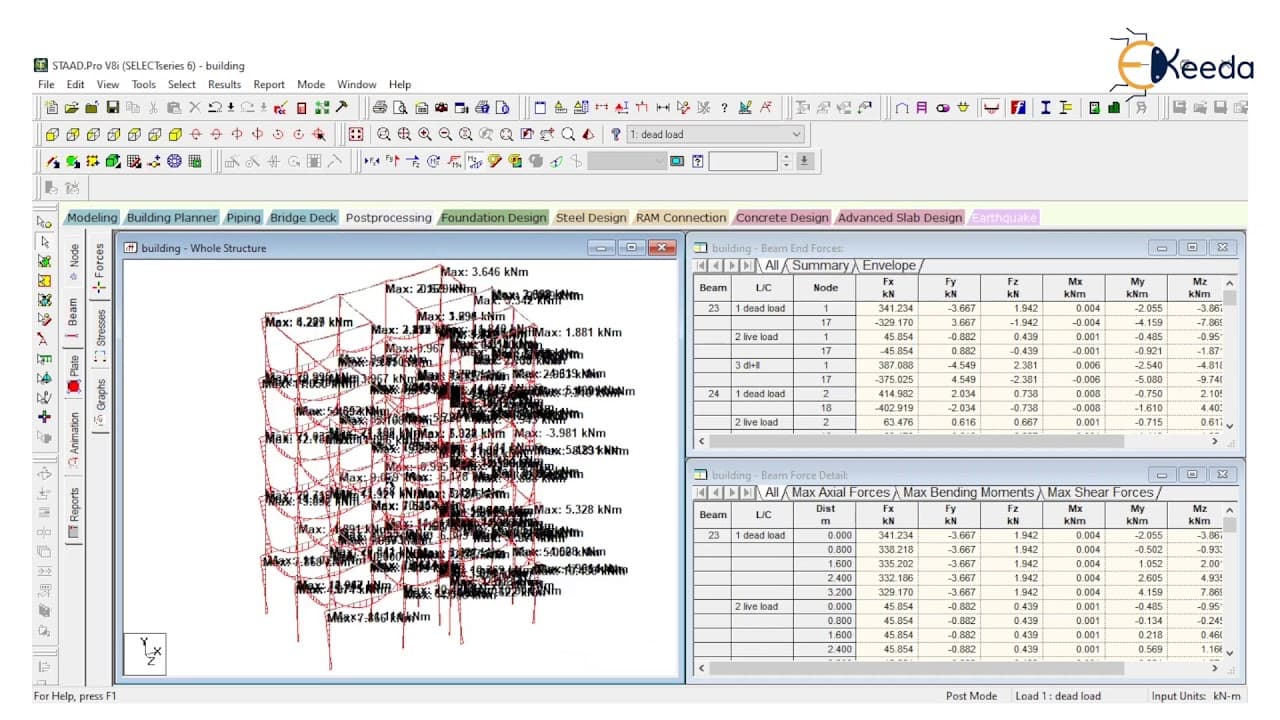
To analyze 3D building models in post-processing, switch to the post-processing mode to examine deflection and reactions under various load cases like dead load and live load. Use the software's tables and graphs to visualize bending moments, shear forces, and axial forces, allowing for detailed inspections of individual beams and columns.
Transcript
hey guys welcome back in this lecture we will learn how to read a data of post processing mode of 3d building structure look at this building if the building is in 3d or it is so many floors a length and width of this building is very big in size there is so many members so many beams and columns so it is very difficult to read data instead probe n... Read More
Key Insights
- 😁 Reading data in post-processing mode helps analyze complex 3D building structures with multiple beams and columns.
- 💀 Load types, such as dead load, live load, and combination loads, can be changed to understand their effects on the structure's deflection and reactions.
- 😁 Tables provide valuable information about deflection, beam displacements, and support reactions for different load cases.
- 😁 Graphs help visualize and analyze bending moments, shear forces, and axial forces in specific beams or columns.
- 😁 The software tool allows for the selection of individual beams or columns to focus on specific data.
- 💨 Different load combinations, such as wind load or snow load, can be analyzed in further lectures.
Install to Summarize YouTube Videos and Get Transcripts
Explore YouTube Video Summarizer or Get YouTube Transcript Extractor
Questions & Answers
Q: How does the post-processing mode help in reading and analyzing data in 3D building structures?
The post-processing mode allows users to visualize and analyze data, such as deflection, reactions, bending moments, shear forces, and axial forces, making it easier to interpret and understand the structural behavior.
Q: How can the load types be changed to observe the effects on the building structure?
Load types can be changed by selecting different load cases, such as dead load, live load, or a combination of loads. By changing these load types, the deflection and reactions of the building structure can be examined and compared.
Q: What information can be obtained from the tables in the software tool?
The tables provide data for each load case, including deflection in the y-direction, beam displacements, and support reactions. Users can find specific values for individual members or nodes by selecting them in the table.
Q: How can the graphs assist in analyzing the data for specific beams or columns?
The software tool offers graphs for bending moments, shear forces, and axial forces of individual beams or columns. By selecting a specific beam or column, users can observe the graphical representation of these forces for different load cases.
Summary & Key Takeaways
-
Reading data in large 3D building structures with numerous beams, columns, and members can be challenging, but with the post-processing mode, it becomes easier to analyze data.
-
By changing the load types (dead load, live load, combination loads), the deflection and reactions of the building structure can be observed and analyzed.
-
The software tool provides tables and graphs to display data for different load cases, including deflection, reactions, bending moments, shear forces, and axial forces.
Read in Other Languages (beta)
Share This Summary 📚
Summarize YouTube Videos and Get Video Transcripts with 1-Click
Try YouTube Summary with ChatGPT & Claude or YouTube Transcript Generator
Explore More Summaries from Ekeeda 📚





Summarize YouTube Videos and Get Video Transcripts with 1-Click
Try YouTube Summary with ChatGPT & Claude or YouTube Transcript Generator