Products
Features
YouTube Video Summarizer
Summarize YouTube videos
Web & PDF Highlighter
Highlight web pages & PDFs
Chat with PDF
Ask any PDF questions with AI
Ask AI Clone
Chat with your highlights & memories
Audio Transcriber
Transcribe audio files to text
Glasp Reader
Read and highlight articles
Kindle Highlight Export
Export your Kindle highlights
Idea Hatch
Hatch ideas from your highlights
Integrations
Obsidian Plugin
Notion Integration
Pocket Integration
Instapaper Integration
Medium Integration
Readwise Integration
Snipd Integration
Hypothesis Integration
Apps & Extensions
Chrome Extension
Safari Extension
Edge Add-ons
Firefox Add-ons
iOS App
Android App
Discover
Discover
Ideas
Discover new ideas and insights
Articles
Curated articles and insights
Books
Book recommendations by great minds
Posts
Essays and notes from readers
Quotes
Inspiring quotes collection
Videos
Curated videos and summaries
Explore Glasp
Glasp Newsletter
Weekly insights and updates
Glasp Talk
Interview series with great minds
Glasp Blog
Latest news and articles
Glasp Use Cases
Learn how others use Glasp
Build & Support
Glasp API
Access Glasp's API for developers
MCP Connector
Connect Glasp to Claude & ChatGPT
Community
Glasp Reddit Community
Students
Student discount and benefits
FAQs
Frequently Asked Questions
AboutPricing
DashboardLog inSign up

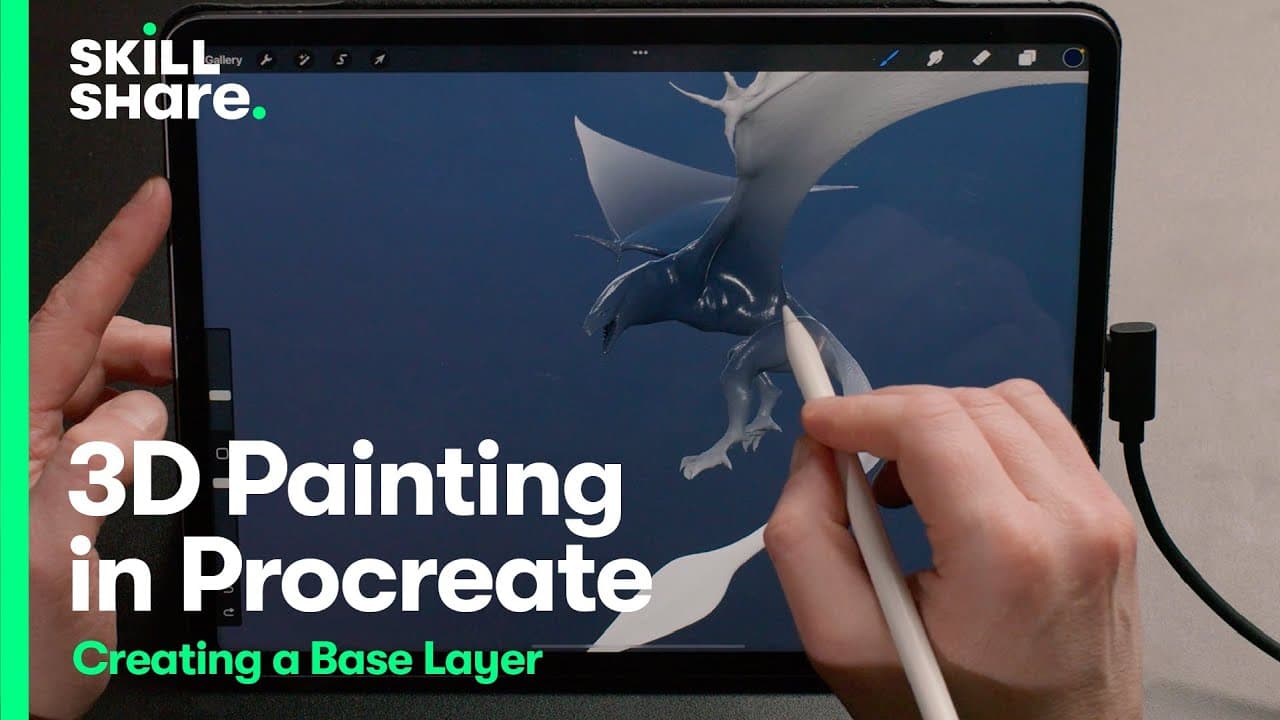
Creating a 3D Painting Base Layer in Procreate 5
5.4K views
•
March 29, 2022
by
Skillshare
YouTube video player
Creating a 3D Painting Base Layer in Procreate 5

TL;DR

Learn 3D painting techniques using Procreate 5.2 on Skillshare.

Transcript

hi i'm stefan borrez i'm a 3d artist and a motion graphics designer and today we're going to have a quick sneak peek of my new skillshare class we are going to paint on a 3d model using procreate 5.2 let's have a look we are going to start with the base layer so i've gone back to the blank dragon here and i've created a new layer called base color ... Read More

Key Insights

  • ❓ Demonstrates 3D painting techniques using Procreate 5.2 on a digital model.
  • ⚾ Explains the importance of filling base color layers and adding roughness texture separately.
  • 🛀 Shows different methods for filling layers with color and creating texture using various brushes.
  • 🪡 Emphasizes the need for detailed painting to enhance the realism of 3D models.
  • 🥶 Provides a link to download a free dragon model for practicing 3D painting.
  • 🫵 Encourages viewers to join Stefan's Skillshare class for in-depth learning.
  • ❓ Highlights the efficiency of Procreate 5.2 in simplifying 3D painting processes.

Install to Summarize YouTube Videos and Get Transcripts

Explore YouTube Video Summarizer or Get YouTube Transcript Extractor

Questions & Answers

Q: How does Stefan Borrez demonstrate painting on a 3D model using Procreate 5.2?

Stefan begins by creating a base color layer and filling it with a dark blue color, showing the projection of paint on the model using different brushes.

Q: What is the significance of creating separate layers for color and roughness texture in 3D painting?

By separating layers, artists can control and adjust color and texture independently, allowing for more detailed and realistic 3D painting.

Q: How does Procreate 5.2 simplify the process of filling an entire layer with a specific color?

Procreate offers multiple ways, such as using "fill layer" function or selecting the color sub channel, to quickly fill entire layers with desired colors in 3D painting.

Q: Why is it important to add roughness texture to a 3D model when painting?

Adding roughness texture creates depth and realism to the 3D model by simulating different surface textures and reflections.

Summary & Key Takeaways

  • Stefan Borrez, a 3D artist, teaches painting on a 3D model using Procreate 5.2.

  • Demonstrates filling base color layer and adding roughness texture with various brushes.

  • Explains different methods for filling layers and creating texture on the 3D model.


Read in Other Languages (beta)

English

Share This Summary 📚

Summarize YouTube Videos and Get Video Transcripts with 1-Click

Download browser extensions on:

Try YouTube Summary with ChatGPT & Claude or YouTube Transcript Generator

Explore More Summaries from Skillshare 📚
Shooting Complementary Colors and Light Sources with Steve Sweatpants thumbnail
Shooting Complementary Colors and Light Sources with Steve Sweatpants
Skillshare
Creating a Moodboard in Canva thumbnail
Creating a Moodboard in Canva
Skillshare
What Is Web 3.0? Learn with pplpleasr thumbnail
What Is Web 3.0? Learn with pplpleasr
Skillshare
How To Use Lomography Cameras thumbnail
How To Use Lomography Cameras
Skillshare
JPEG vs. RAW Comparison for Photo Editing in Lightroom thumbnail
JPEG vs. RAW Comparison for Photo Editing in Lightroom
Skillshare
Basic Knife Skills for Home Chefs thumbnail
Basic Knife Skills for Home Chefs
Skillshare

Summarize YouTube Videos and Get Video Transcripts with 1-Click

Download browser extensions on:

Try YouTube Summary with ChatGPT & Claude or YouTube Transcript Generator

Apps & Extensions

  • Chrome Extension
  • Safari Extension
  • Edge Add-ons
  • Firefox Add-ons
  • iOS App
  • Android App

Key Features

  • YouTube Video Summarizer
  • Web & PDF Summarizer
  • Web & PDF Highlighter
  • Chat with PDF
  • Ask AI Clone
  • Audio Transcriber
  • Glasp Reader
  • Kindle Highlight Export
  • Idea Hatch

Integrations

  • Obsidian Plugin
  • Notion Integration
  • Pocket Integration
  • Instapaper Integration
  • Medium Integration
  • Readwise Integration
  • Snipd Integration
  • Hypothesis Integration

More Features

  • APIs
  • MCP Connector
  • Blog & Post
  • Embed Links
  • Image Highlight
  • Personality Test
  • Quote Shots

Company

  • About us
  • Blog
  • Community
  • FAQs
  • Job Board
  • Newsletter
  • Pricing
Terms

•

Privacy

•

Guidelines

© 2026 Glasp Inc. All rights reserved.




