Collaboration: Ideation and Brainstorming
TL;DR
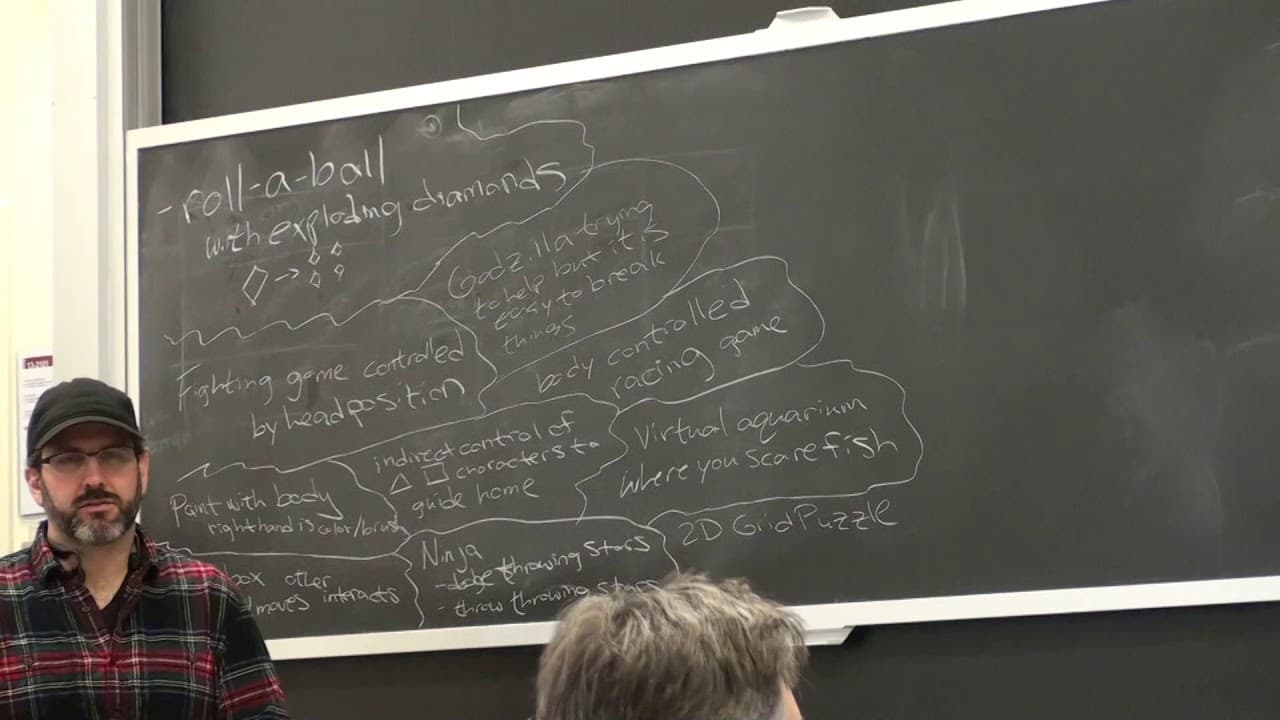
Students brainstorm ideas for Kinect-based games, including fighting games, painting with body movements, and guiding characters indirectly using gestures.
Transcript
PROFESSOR: Okey dokey. So anybody else with a specific idea? [INAUDIBLE] AUDIENCE: A fighting game that you control with your head. PROFESSOR: All right. AUDIENCE: You have to also-- you have to move your head. [INAUDIBLE] PROFESSOR: All right, is that sufficient to remember? All right, I don't think we need any more details on that one. That seeme... Read More
Key Insights
- 🤗 The Kinect opens up possibilities for new interaction mechanics in game design.
- 🎮 Gesture-based controls allow for intuitive and immersive gameplay experiences.
- 👾 The Kinect's capabilities, such as detecting body movements and tracking objects, can be utilized to create unique and engaging games.
- 🥺 Collaborative game development can lead to innovative ideas and diverse perspectives.
Install to Summarize YouTube Videos and Get Transcripts
Explore YouTube Video Summarizer or Get YouTube Transcript Extractor
Questions & Answers
Q: Can the Kinect distinguish between open and closed hands?
Yes, the Kinect can distinguish between open and closed hands with around 70% accuracy. This can be used to create gesture-based interactions in games.
Q: How accurate is the Kinect in resolving a position if you jump from one point to another?
The Kinect can see feet very well as long as it is pointed downwards. However, the accuracy may vary depending on the specific movements and environment.
Q: Are there any game ideas that involve rotating objects in 3D?
Yes, one game idea involves rotating 3D Tetris-like pieces to match a target orientation. This could be achieved by recognizing Kinect gestures for rotation.
Q: Can the Kinect detect movement and control objects based on force?
While the Kinect may not directly measure force, it can track movement and gestures that could simulate the effect of applying force to objects in a game.
Summary & Key Takeaways
-
Students suggest game ideas that involve controlling the game using head movements, body movements for painting, puzzles using hand interactions, throwing swords, and guiding characters indirectly using body physics.
-
Other ideas include a racing game that teaches about the mechanics of the Kinect and a virtual aquarium where fish react to the user's movements.
-
One student also suggests building 2D grid puzzles and quickly deploying them using Unity for multi-platform gameplay.
Read in Other Languages (beta)
Share This Summary 📚
Summarize YouTube Videos and Get Video Transcripts with 1-Click
Try YouTube Summary with ChatGPT & Claude or YouTube Transcript Generator
Explore More Summaries from MIT OpenCourseWare 📚
Summarize YouTube Videos and Get Video Transcripts with 1-Click
Try YouTube Summary with ChatGPT & Claude or YouTube Transcript Generator