How to Build Financial Dashboards in Excel
TL;DR
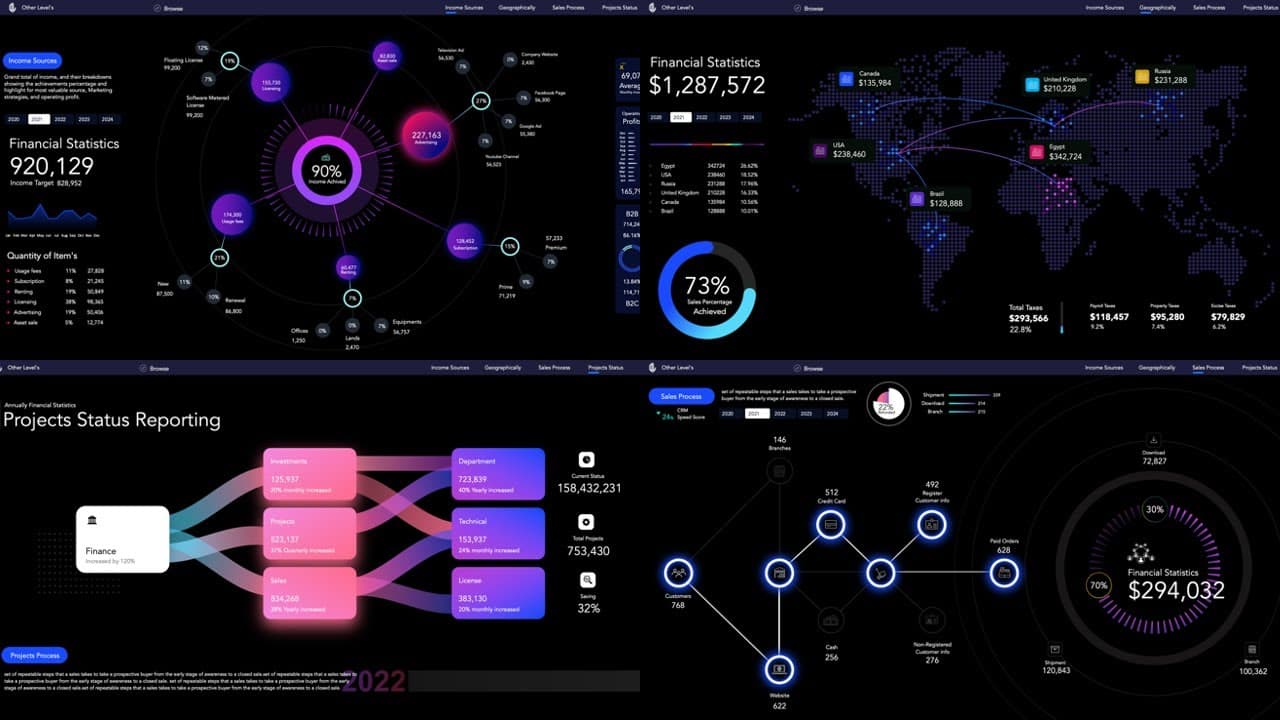
Create powerful financial dashboards in Excel without VBA, featuring innovative charts and graphs. This system includes income analysis, profit breakdown by country, sales process tracking, and workflow reports, all enhanced with dynamic elements for improved data visualization.
Transcript
Welcome to Other Level's today we present this "Powerful Financial Statistics System" with multiple dashboards using Microsoft Excel which contains many of innovative graphs and data visualization without using VBA codes the first dashboard contains a dynamic web chart analyzes in detail all sources of income and the percentage of each source ... Read More
Key Insights
- 📈 The financial statistics system in Excel features multiple dashboards with innovative graphs and data visualization.
- ℹ️ The first dashboard analyzes various sources of income, highlighting the highest value source and presenting insights into income achieved and target percentages.
- ❓ The second dashboard focuses on profit analysis by country, showcasing the most profitable country and providing details on profit percentages achieved.
- 😥 The third dashboard offers insights into the sales process status, highlighting stages and showcasing sales details by points of sale.
- 📽️ The fourth dashboard presents a project's workflow report with key performance indicators, providing a comprehensive overview of the project's progress and performance.
- 👻 The system allows for easy navigation between the dashboards and offers customization options.
- 😒 The use of separate sheets for formulas and pivot tables helps maintain dashboard speed and size.
Install to Summarize YouTube Videos and Get Transcripts
Explore YouTube Video Summarizer or Get YouTube Transcript Extractor
Questions & Answers
Q: How does the first dashboard analyze sources of income?
The first dashboard uses a dynamic web chart to analyze sources of income, displaying the percentage of each source and highlighting the source with the highest value. It also includes a doughnut chart showing the achieved percentage from the target and various other charts for income analysis.
Q: How are profits analyzed by country in the second dashboard?
In the second dashboard, profits are analyzed by country using a dynamic map chart. The chart highlights the most profitable country and displays profit percentages achieved from each country. It also includes a doughnut chart with circular edges to showcase the profits achieved.
Q: What does the third dashboard focus on?
The third dashboard focuses on the sales process status, explaining the stages that sales processes go through. It highlights the number of customers going through each stage and showcases the most frequently used stages. It also includes a doughnut chart for total sales and displays sales details by points of sale.
Q: What does the fourth dashboard contain?
The fourth dashboard contains a project's workflow report with several key performance indicators. It presents the main KPIs in a beautiful design and provides insights into the project's progress and performance.
Summary & Key Takeaways
-
The video introduces a financial statistics system in Excel that utilizes creative charts and graphs without VBA codes.
-
The first dashboard analyzes different sources of income, highlighting the highest value source and displaying a doughnut chart for income achieved percentage. It also includes line charts, bar charts, and monthly operating profit analysis.
-
The second dashboard analyzes profit values by country using a dynamic map chart, and also showcases tax details and profit percentages achieved from each country. It is fully controlled by a yearly slicer. The third dashboard focuses on sales process status, highlighting the stages that sales processes go through and showing sales details by points of sale. The fourth dashboard presents a project's workflow report with various main key performance indicators.
Read in Other Languages (beta)
Share This Summary 📚
Summarize YouTube Videos and Get Video Transcripts with 1-Click
Try YouTube Summary with ChatGPT & Claude or YouTube Transcript Generator