How to Digitally Add and Warp Fabrics in Photoshop
TL;DR
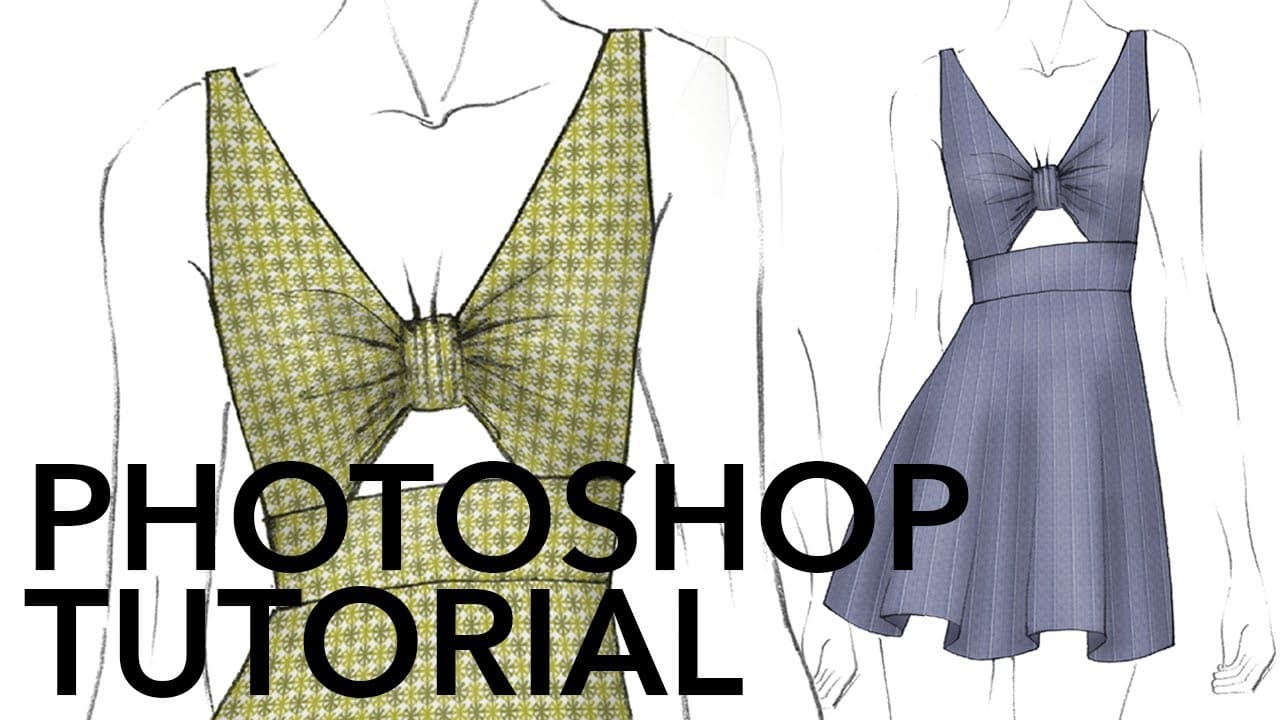
To digitally drape fabric on a fashion illustration in Photoshop, start by creating a seamless repeat pattern of your fabric. Use the 'Warp' tool to adapt the fabric shape to the model's contours and add shading and highlights for realism. Implement smart objects for easy updates to fabric designs without losing adjustments.
Transcript
hi gang it's Robyn Schneider and I'm glad to be back as a guest lecturer on Zoe's channel this week I'm going to show you how to add fabric to a fashion illustration and make it look like it's wrapped around the body digital draping if you will Zoe did a quick sketch scanned it in and sent it off to me and she also scanned in some fabric and sent t... Read More
Key Insights
- 🪜 Creating seamless repeat patterns is crucial for adding fabric to fashion illustrations digitally.
- 🆘 Shadows and highlights help enhance the realism and depth of the fabric draping.
- 😚 Using smart objects allows for easy modification of fabric designs without losing the applied effects.
- ⚖️ Paying attention to scale and proportions while adding fabric to illustrations is essential.
- 👀 Digital fabric draping requires precision and attention to detail to make the illustration look realistic.
- 🤩 Practice and patience are key in mastering digital fabric draping techniques.
- 🔨 Utilizing Photoshop tools like warp and transform can help achieve realistic fabric draping effects.
Install to Summarize YouTube Videos and Get Transcripts
Explore YouTube Video Summarizer or Get YouTube Transcript Extractor
Questions & Answers
Q: How does Robyn Schneider create seamless repeat patterns for fabric in fashion illustrations?
Robyn uses Photoshop to copy a section of fabric, define a pattern, and apply it to different parts of the illustration to create a seamless repeat effect.
Q: What technique does Robyn use to add shading and highlights to the fabric draping in the illustration?
Robyn creates separate shading and highlight layers, using a soft brush to apply shadows and highlights accordingly, enhancing the depth and realism of the fabric.
Q: Why does Robyn emphasize the use of smart objects in the tutorial?
Smart objects allow for easy modifications and updates to the fabric design, ensuring flexibility and efficiency in changing fabric types or patterns within the illustration.
Q: How does Robyn show the versatility of changing fabric designs in the digital illustration?
By double-clicking on the smart object for the fabric pattern fill and swapping out different designs, Robyn demonstrates how simple it is to change fabric types while keeping the draping intact.
Summary & Key Takeaways
-
Guest lecturer Robyn Schneider demonstrates how to digitally drape fabric over a fashion illustration.
-
Using Photoshop, she creates seamless repeat patterns and applies them to different parts of the illustration.
-
Shadows and highlights are added to give depth and realism to the fabric draping.
Read in Other Languages (beta)
Share This Summary 📚
Summarize YouTube Videos and Get Video Transcripts with 1-Click
Try YouTube Summary with ChatGPT & Claude or YouTube Transcript Generator
Explore More Summaries from Zoe Hong 📚


Summarize YouTube Videos and Get Video Transcripts with 1-Click
Try YouTube Summary with ChatGPT & Claude or YouTube Transcript Generator