Get MORE Facebook Leads with This Simple Tweak
TL;DR
Change a default Facebook setting to increase lead generation.
Transcript
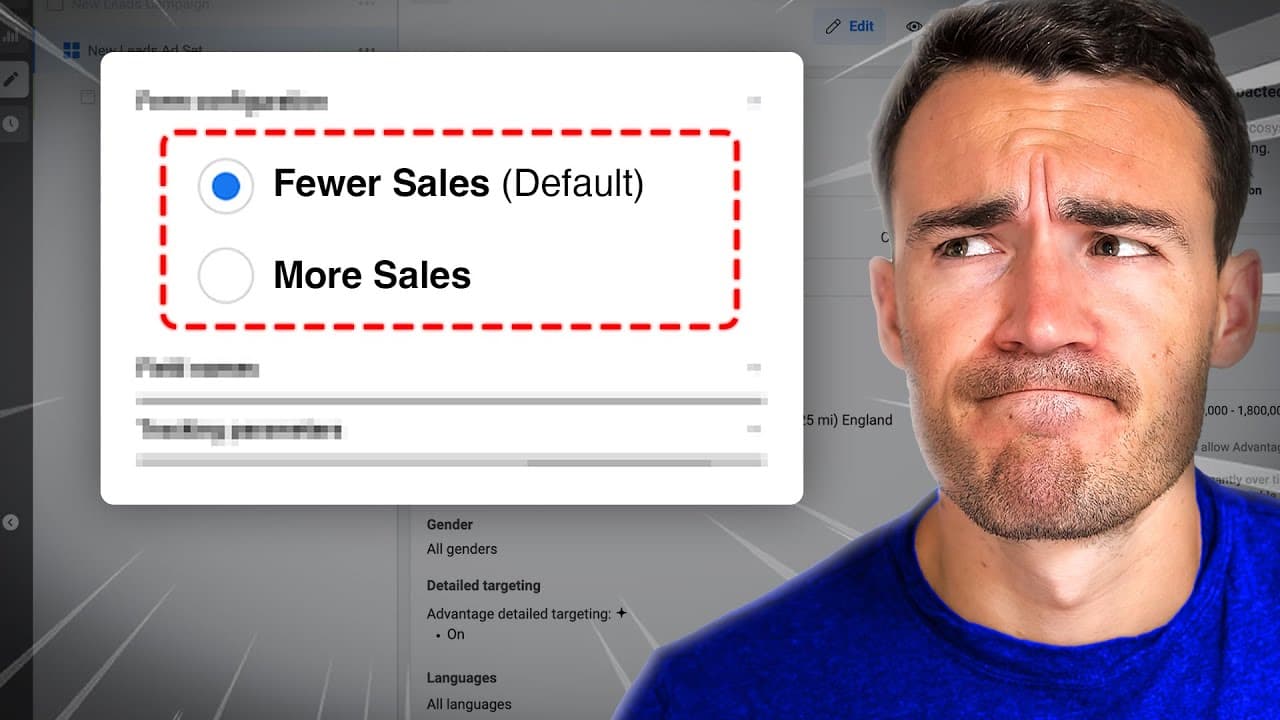
there is a setting that you need to change in your Facebook lead campaigns Right Now the default is to have it turned on but it is guaranteed to reduce the number of leads that you're generating and in this video I'm going to show you what this is and how to turn it off so to show you what this sneaky setting is probably haven't heard of probably h... Read More
Key Insights
- Facebook's default setting for lead forms is 'restricted', limiting lead generation through shared ads. Changing to 'open' can increase leads.
- The 'restricted' setting only allows direct ad viewers to submit forms, missing potential leads from shared ads.
- Switching to 'open' allows anyone who sees the shared ad to submit their information, increasing organic lead potential.
- Businesses can track the source of leads (ad-generated or shared) by exporting lead data, providing insights into lead generation effectiveness.
- The default 'restricted' setting may be a tactic to encourage higher ad spending by limiting organic lead opportunities.
- Changing the setting is simple and quick, yet many advertisers overlook it due to its placement in the settings tab.
- Marketers should monitor the difference in lead numbers between Ads Manager and their CRM to understand the impact of the setting change.
- Testing new lead types introduced by Meta can offer additional opportunities for lead generation through Facebook and Instagram ads.
Install to Summarize YouTube Videos and Get Transcripts
Explore YouTube Video Summarizer or Get YouTube Transcript Extractor
Questions & Answers
Q: What is the default setting for Facebook lead forms and why is it problematic?
The default setting for Facebook lead forms is 'restricted', which means only individuals who directly view the ad can submit their information. This setting is problematic because it prevents people who see the ad through shares from becoming leads, significantly reducing the potential reach and effectiveness of lead generation campaigns.
Q: How can changing the lead form setting to 'open' benefit advertisers?
Changing the lead form setting to 'open' allows anyone who sees the ad, whether directly or through shares, to submit their information. This increases the potential for organic lead generation, as shared ads can reach a wider audience without additional ad spend, thereby improving the overall effectiveness and cost-efficiency of campaigns.
Q: Why might Meta have chosen 'restricted' as the default setting for lead forms?
Meta may have chosen 'restricted' as the default setting to encourage advertisers to spend more on ads. By limiting organic lead generation through shared ads, businesses may feel compelled to increase their ad budgets to reach more potential leads directly, thus benefiting Meta's revenue from advertising.
Q: What should advertisers monitor after changing the lead form setting to 'open'?
After changing the lead form setting to 'open', advertisers should monitor the difference in lead numbers between their CRM or exported lead data and Ads Manager. This comparison will highlight the increase in leads generated through shared ads, providing insights into the effectiveness of the setting change and the proportion of organic leads captured.
Q: How does the 'open' setting impact the visibility of shared ads?
The 'open' setting allows shared ads to be fully functional, meaning that anyone who sees the ad, regardless of how they encountered it, can submit their contact information. This increases the ad's visibility and interaction potential, as more people can engage with the ad and become leads, enhancing the campaign's reach and effectiveness.
Q: What are some scenarios where the 'restricted' setting might be preferable?
The 'restricted' setting might be preferable in scenarios where advertisers want to control who sees and interacts with their ads. For example, if a business is offering a promotion exclusive to new customers, they might want to prevent existing customers from seeing and sharing the ad, ensuring it reaches only the intended audience.
Q: What role does ad sharing play in lead generation?
Ad sharing plays a significant role in lead generation by expanding the reach of an ad beyond its initial audience. When an ad is shared, it can reach new potential leads organically, without additional ad spend. This can lead to increased lead generation and brand awareness, particularly if the ad content is engaging and share-worthy.
Q: What is the significance of tracking lead sources in Ads Manager and CRM?
Tracking lead sources in Ads Manager and CRM is significant because it provides insights into the effectiveness of different lead generation strategies. By understanding whether leads are coming from direct ads or shared content, advertisers can optimize their campaigns to focus on the most productive channels, improving ROI and campaign performance.
Summary & Key Takeaways
-
The video reveals a crucial setting in Facebook lead campaigns that most advertisers overlook, potentially limiting lead generation. By changing the default 'restricted' setting to 'open', advertisers can significantly increase the number of leads from shared ads, tapping into organic reach and reducing reliance on paid ads.
-
The 'restricted' setting prevents individuals who see shared ads from submitting their information, which can drastically reduce the potential leads businesses can capture. By switching to 'open', businesses can allow anyone who views the ad to submit their information, increasing the effectiveness of their lead generation efforts.
-
Advertisers can track the effectiveness of this change by comparing lead data in their CRM with Ads Manager. The video also suggests that the default setting may be a strategic move by Meta to encourage higher ad spending, but changing it is straightforward and can lead to a significant increase in organic leads.
Read in Other Languages (beta)
Share This Summary 📚
Summarize YouTube Videos and Get Video Transcripts with 1-Click
Try YouTube Summary with ChatGPT & Claude or YouTube Transcript Generator
Explore More Summaries from Ben Heath 📚

Summarize YouTube Videos and Get Video Transcripts with 1-Click
Try YouTube Summary with ChatGPT & Claude or YouTube Transcript Generator