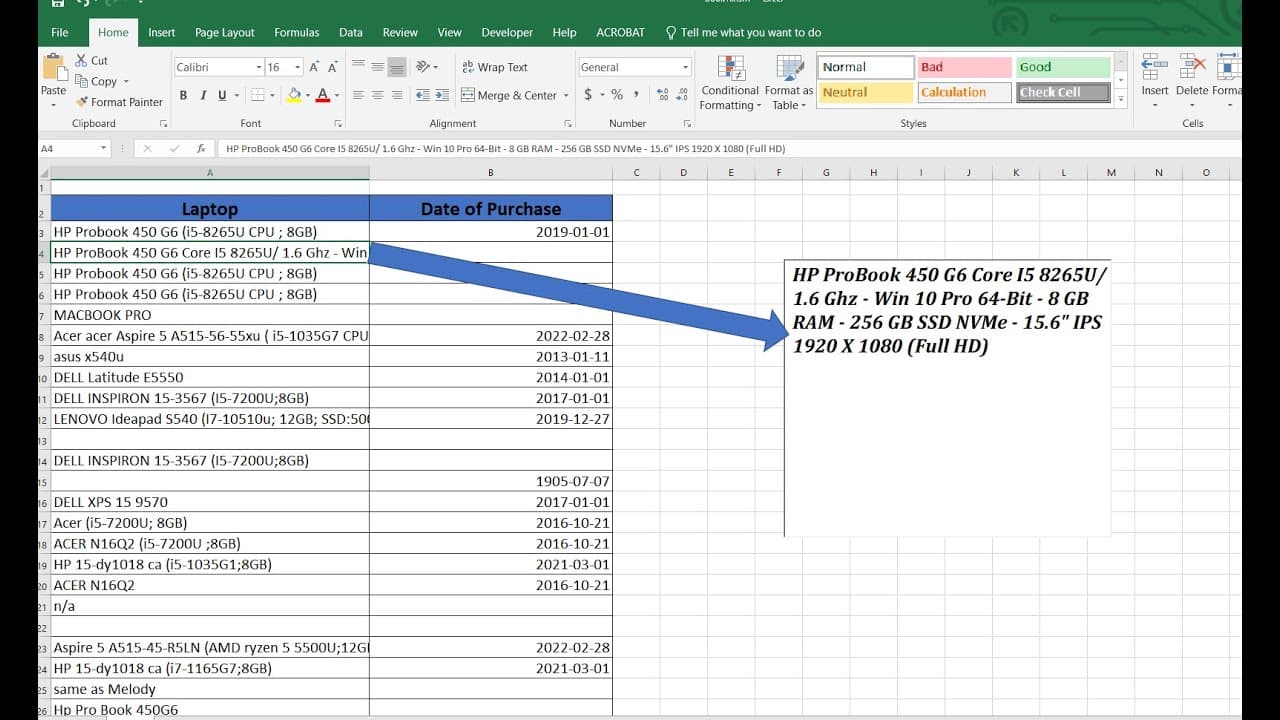
MS Excel show click cell text in text box 1
TL;DR
Learn how to create a text box in Excel that displays cell content.
Transcript
foreign we'll talk about how to create a text box that shows the shell then click the shell it will show the Sun the contents of the shell yeah text box so because the the songs here is too small and it has lots of the information so I want to click it it will show up over here so to do that you need a developer mode enabled so to you if you're not... Read More
Key Insights
- 💁 Enabling developer mode is essential for accessing advanced tools in Excel, including form controls.
- 👻 VBA scripting provides powerful customization options, allowing users to make their worksheets interactive.
- 😫 Properly setting text box properties can significantly enhance readability and user experience within Excel spreadsheets.
- 🫵 The dynamic linking of text boxes to cells facilitates real-time data representation, making it easier for users to view necessary information.
- 🗯️ Saving Excel files in the right format is critical to maintaining the integrity of embedded macros and functionalities.
- 👻 Multiline text options for text boxes allow for better display of lengthy data entries, improving usability.
- 👨💻 The procedure of coding in Excel requires understanding both the interface and applicable coding elements to achieve desired outcomes.
Install to Summarize YouTube Videos and Get Transcripts
Explore YouTube Video Summarizer or Get YouTube Transcript Extractor
Questions & Answers
Q: How do you enable the Developer tab in Excel?
To enable the Developer tab in Excel, go to the File menu, select Options, then click on Customize Ribbon. In the right panel, check the box for Developer under the main tabs section. Once this is done, the Developer tab will appear on the ribbon, allowing access to advanced features including form controls and VBA coding.
Q: What steps are involved in inserting a text box in Excel?
To insert a text box in Excel, click on the Developer tab, then select the Insert option. Choose the text box control from the Form Controls section and click on the worksheet where you want to place it. This will create a text box that can be formatted and linked to specific cell values using VBA code.
Q: How can you use VBA code to link a text box to a specific cell?
You can link a text box to a specific cell by writing VBA code that assigns the text box’s content to the value of that cell. This is often done by referencing the cell with code like TextBox1.Text = Cells(Target.Row, 1).Value, where 'Target' represents the active cell. This way, the text box will dynamically display data from the assigned cell.
Q: What properties can be adjusted for a text box in Excel?
Properties that can be adjusted for a text box include font size, font style, enabling multiline text, and adjusting the text alignment. For instance, to allow the text box to display multiple lines of text, you would set the property MultiLine to true. These customizations enhance the visual appeal and usability of the text box.
Q: Why is it necessary to save the workbook as a macro-enabled file?
When working with VBA code in Excel, it is crucial to save the workbook as a macro-enabled file (.xlsm) to ensure the embedded code functions properly. Regular Excel files do not support macros, and saving in the correct format preserves the code and any interactive functionalities created.
Q: How can you ensure that the text box updates dynamically when data changes?
To ensure that the text box updates dynamically, you must include VBA code that responds to cell changes. For example, using the Worksheet_Change event, you can write a script that refreshes the text box whenever the relevant cell's value is modified, keeping the displayed information current.
Summary & Key Takeaways
-
The video demonstrates how to enable developer mode in Excel, allowing users to access the necessary tools to create and customize a text box.
-
Viewers are guided through inserting a text box on a worksheet, including steps to write VBA code for displaying the contents of specific cells.
-
Enhancements are made to the text box, such as increasing font size and enabling multiline text for better visibility of longer entries.
Read in Other Languages (beta)
Share This Summary 📚
Summarize YouTube Videos and Get Video Transcripts with 1-Click
Try YouTube Summary with ChatGPT & Claude or YouTube Transcript Generator
Explore More Summaries from E Micro Tech 📚

Summarize YouTube Videos and Get Video Transcripts with 1-Click
Try YouTube Summary with ChatGPT & Claude or YouTube Transcript Generator