8.2.6 An Introduction to Linear Optimization - Video 4: Solving the Problem
TL;DR
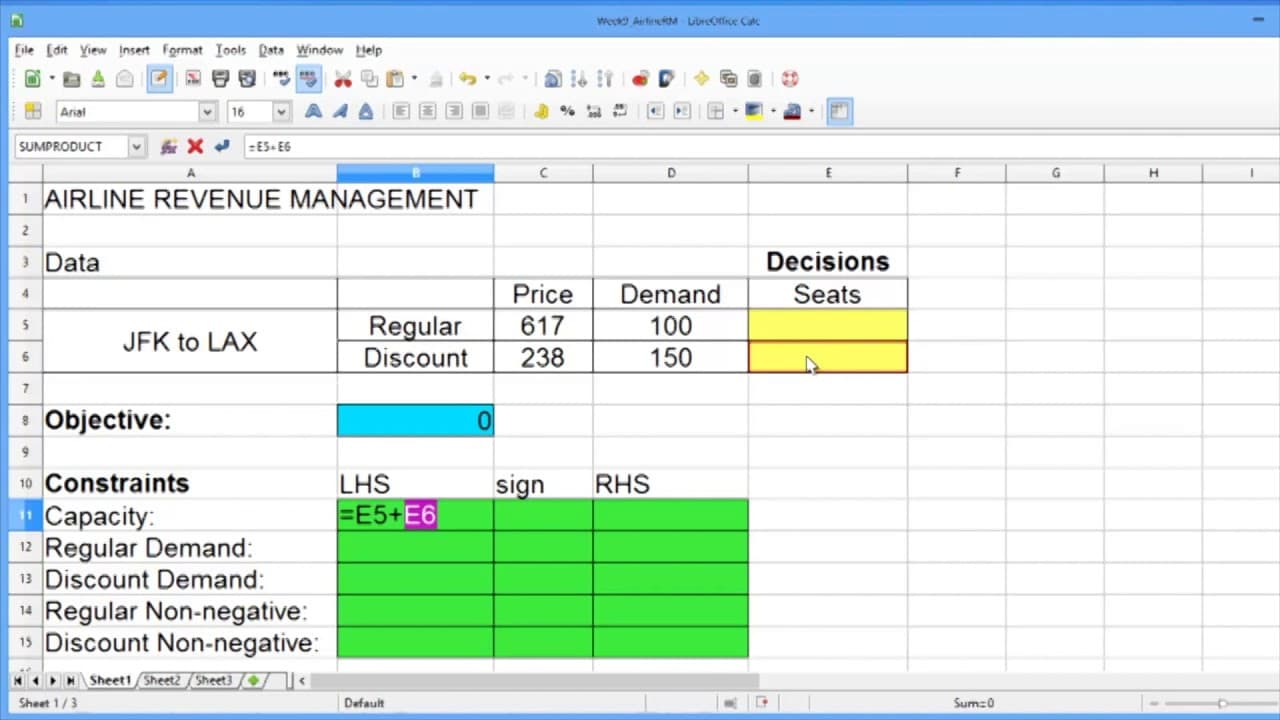
Learn how to solve linear optimization problems in LibreOffice, a free and open-source software similar to Microsoft Excel, by using the Solver tool.
Transcript
In this video, we'll solve our linear optimization problem in the software LibreOffice. LibreOffice is similar to Microsoft Excel, but it's an open source software, and is available for free on the internet. Another option we could use is OpenOffice. You're welcome to use Excel, OpenOffice, or LibreOffice in this course, and whenever we mention Lib... Read More
Key Insights
- 🤗 LibreOffice is a free and open-source software that can be used as an alternative to Microsoft Excel for solving linear optimization problems.
- 🇨🇷 The objective of a linear optimization problem is to maximize or minimize a certain value, such as total revenue or cost.
- ❓ Constraints in linear optimization problems define the limitations and restrictions on the values of the decision variables.
- 🔨 The Solver tool in LibreOffice helps to find the optimal solution for a linear optimization problem by adjusting the decision variables within the given constraints.
Install to Summarize YouTube Videos and Get Transcripts
Explore YouTube Video Summarizer or Get YouTube Transcript Extractor
Questions & Answers
Q: What is LibreOffice, and how is it different from Microsoft Excel?
LibreOffice is a free and open-source software similar to Microsoft Excel. The main difference is that LibreOffice is available for free on the internet, while Microsoft Excel requires a paid subscription.
Q: How do you set up the objective in LibreOffice for a linear optimization problem?
In LibreOffice, the objective is set by creating a formula in a cell that calculates the total revenue. This formula multiplies the price of regular seats by the number of regular seats sold and adds it to the price of discount seats multiplied by the number of discount seats sold.
Q: How do you define constraints in LibreOffice for a linear optimization problem?
Constraints in LibreOffice are defined by creating formulas that represent the left-hand side (LHS) and right-hand side (RHS) of each constraint equation. The formulas use the decision variables and constants to define the relationship between the LHS and RHS.
Q: Why is the Solver tool used in LibreOffice for solving linear optimization problems?
The Solver tool in LibreOffice is used to find the optimal solution for a linear optimization problem by adjusting the values of the decision variables within the given constraints. It facilitates the process of finding the maximum or minimum value of the objective.
Summary & Key Takeaways
-
The video introduces LibreOffice as a free alternative to Microsoft Excel for solving linear optimization problems.
-
It demonstrates how to set up the objective, constraints, and decision variables in LibreOffice for a given problem.
-
The video explains how to use the Solver tool in LibreOffice to find the optimal solution for the problem.
Read in Other Languages (beta)
Share This Summary 📚
Summarize YouTube Videos and Get Video Transcripts with 1-Click
Try YouTube Summary with ChatGPT & Claude or YouTube Transcript Generator
Explore More Summaries from MIT OpenCourseWare 📚


Summarize YouTube Videos and Get Video Transcripts with 1-Click
Try YouTube Summary with ChatGPT & Claude or YouTube Transcript Generator