My YouTube Setup: How I Make Videos with an iPhone - Starting a YouTube Channel!
TL;DR
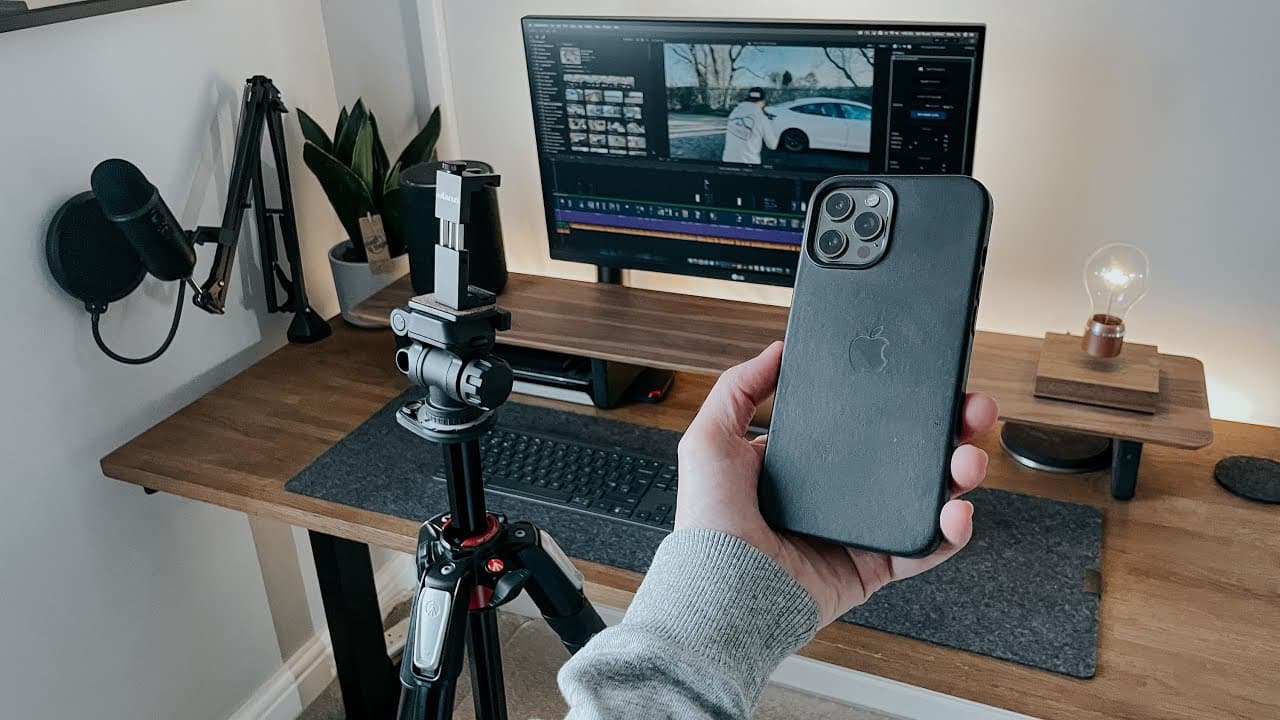
Learn how I create YouTube videos using my iPhone, tripod, gimbal, and other accessories, and get tips for starting your own channel.
Transcript
hello everyone it's spawnpoint and welcome back to another video so i've been uploading to this channel for just over a year now and during that time i've received quite a few questions about how i create my content and that's what i'm going to do today i'm going to show you everything that i do to create these videos i'll be showing you how i reco... Read More
Key Insights
- 👶 Using an iPhone, particularly the newer models, can be a convenient and capable tool for recording YouTube videos, especially for beginners.
- 🎮 Accessories such as tripods, gimbals, and clamps can enhance video quality and stability.
- 🚚 The content creator emphasizes the importance of planning content ideas and writing scripts to stay organized and deliver engaging videos.
- 🎮 Editing plays a crucial role in the video creation process, and tools like Final Cut Pro can help enhance the overall quality.
Install to Summarize YouTube Videos and Get Transcripts
Explore YouTube Video Summarizer or Get YouTube Transcript Extractor
Questions & Answers
Q: Why do you prefer using your iPhone for recording videos instead of a dedicated camera?
I find my iPhone, especially the iPhone 12 Pro Max, to be easy to use, always accessible, and capable of capturing high-quality footage in 4K. It may not match the quality of expensive camera setups, but it hasn't hindered my channel's growth.
Q: What lenses do you use when shooting with your iPhone?
I primarily use the wide lens for most shots, but I also utilize the telephoto lens for depth of field and the ultra-wide lens for wider-angle shots. Note that the ultra-wide lens can be noisy in low-light situations.
Q: Do you recommend a specific tripod for recording videos?
While I use a Manfrotto tripod, any tripod will work. As long as it provides stability and allows for smooth panning shots, it is suitable for recording videos.
Q: How do you achieve stable handheld shots?
I rely on a DJI mobile gimbal, specifically the Osmo Mobile 3, to stabilize my footage. It helps eliminate juddering and vibration when walking or panning.
Q: What lighting setup do you use for your videos?
I mostly rely on natural light for my videos. However, when natural lighting is insufficient, I use softbox lights that I purchased for about £50. While they may not be the best lights available, they serve their purpose.
Q: What microphone do you use for recording audio?
I use a Blue Yeti USB microphone, which I connect directly to my MacBook. It offers excellent audio quality, and I also use a pop filter to prevent plosives during recordings.
Q: How long does it take you to create a video?
The time required varies depending on the video's subject and length. On average, it takes me three to five hours to plan, record, edit, and publish a 15-minute video.
Q: What advice do you have for someone starting a YouTube channel?
Start with the equipment you already have, such as your phone, and gradually upgrade as necessary. Focus on creating content you're passionate about, and don't chase money as it will come later with effort and dedication.
Summary & Key Takeaways
-
The content creator explains how he uses his iPhone, specifically the iPhone 12 Pro Max, to shoot videos for his YouTube channel.
-
He highlights the benefits of using an iPhone, including its 4K recording capabilities, stabilization, and ease of use.
-
The creator discusses the accessories he uses, such as tripods, gimbals, clamps, and softbox lights, to enhance the quality of his videos.
-
He shares his video creation process, from idea generation and scripting to recording audio and editing.
-
The creator offers advice and recommendations for aspiring YouTubers, emphasizing the importance of starting with what they already have and gradually upgrading equipment as needed.
Read in Other Languages (beta)
Share This Summary 📚
Summarize YouTube Videos and Get Video Transcripts with 1-Click
Try YouTube Summary with ChatGPT & Claude or YouTube Transcript Generator
Explore More Summaries from SpawnPoiint 📚
Summarize YouTube Videos and Get Video Transcripts with 1-Click
Try YouTube Summary with ChatGPT & Claude or YouTube Transcript Generator