Products
Features
YouTube Video Summarizer
Summarize YouTube videos
Web & PDF Highlighter
Highlight web pages & PDFs
Chat with PDF
Ask any PDF questions with AI
Ask AI Clone
Chat with your highlights & memories
Audio Transcriber
Transcribe audio files to text
Glasp Reader
Read and highlight articles
Kindle Highlight Export
Export your Kindle highlights
Idea Hatch
Hatch ideas from your highlights
Integrations
Obsidian Plugin
Notion Integration
Pocket Integration
Instapaper Integration
Medium Integration
Readwise Integration
Snipd Integration
Hypothesis Integration
Apps & Extensions
Chrome Extension
Safari Extension
Edge Add-ons
Firefox Add-ons
iOS App
Android App
Discover
Discover
Ideas
Discover new ideas and insights
Articles
Curated articles and insights
Books
Book recommendations by great minds
Posts
Essays and notes from readers
Quotes
Inspiring quotes collection
Videos
Curated videos and summaries
Explore Glasp
Glasp Newsletter
Weekly insights and updates
Glasp Talk
Interview series with great minds
Glasp Blog
Latest news and articles
Glasp Use Cases
Learn how others use Glasp
Build & Support
Glasp API
Access Glasp's API for developers
MCP Connector
Connect Glasp to Claude & ChatGPT
Community
Glasp Reddit Community
Students
Student discount and benefits
FAQs
Frequently Asked Questions
AboutPricing
DashboardLog inSign up

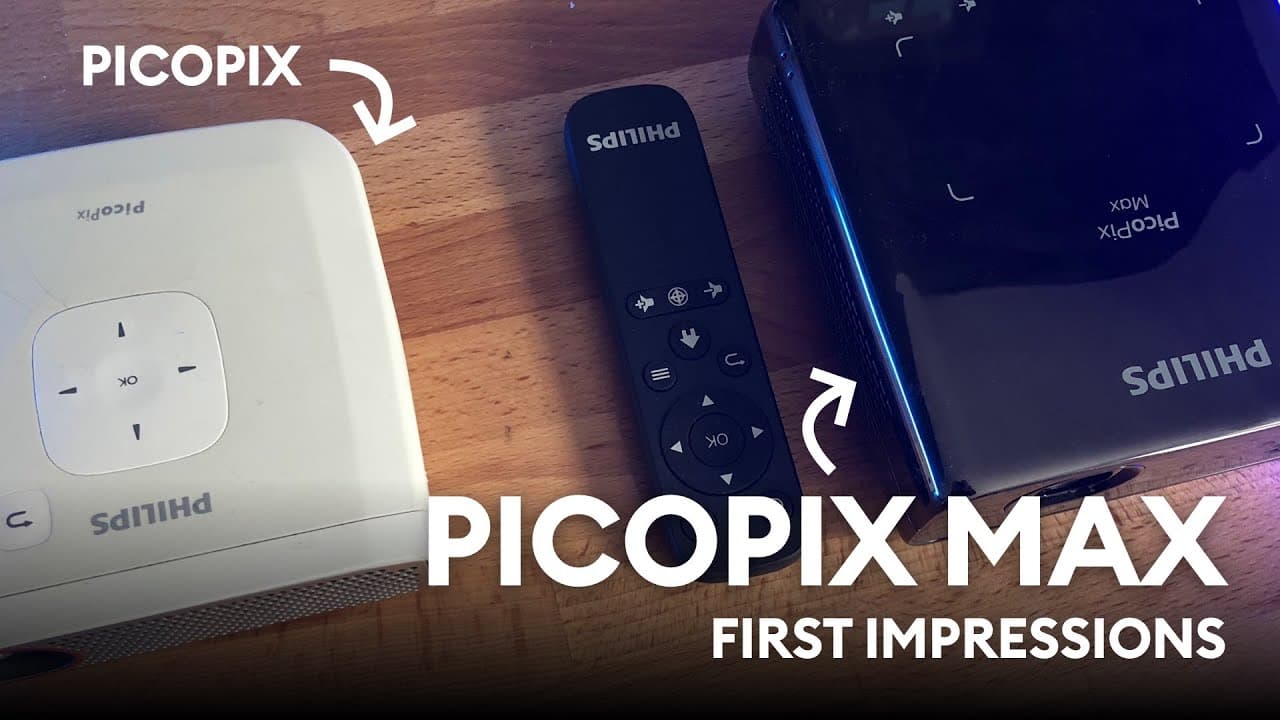
Philips PicoPix Max - mini review
9.7K views
•
June 7, 2020
by
Malewicz
YouTube video player
Philips PicoPix Max - mini review

TL;DR

Upgraded to Full HD projector, impressive image and audio quality, perfect for movie watching and gaming.

Transcript

Hey so I don't really watch that many movies or TV shows and actually I don't really watch pretty much anything so my total watch time every month is just maybe a couple hours but I don't binge anything so I'm not an avid watcher and because of that I don't really have a TV but I do have a projector and I've been using a projector as my main source... Read More

Key Insights

  • 📽️ Upgraded from a 720p projector to a new full HD projector with improved image quality and audio clarity.
  • 🫵 New projector offers automatic adjustment features for sharper images and better overall viewing experience.
  • 🌥️ User recommends the projector for those who prefer a large screen experience over traditional TVs.
  • 😄 Portability and ease of use make the projector a convenient entertainment option.
  • 😮 Impressed with the color calibration and brightness of the new projector.
  • 🫵 Automatic image sharpness adjustment and Keystone correction enhance viewing experience.

Install to Summarize YouTube Videos and Get Transcripts

Explore YouTube Video Summarizer or Get YouTube Transcript Extractor

Questions & Answers

Q: What motivated the user to upgrade to a full HD projector?

The user noticed an announcement on a crowdfunding platform from Philips about a new full HD projector, which piqued their interest, leading to the upgrade.

Q: How does the audio quality of the new projector compare to the user's previous setup?

The audio quality is significantly better in the new projector, enhancing the overall viewing experience, especially when paired with an external sound system.

Q: What features of the new projector impressed the user the most?

The automatic image sharpness adjustment, increased brightness, natural color calibration, and improved Keystone correction were standout features for the user.

Q: Why does the user recommend the full HD projector over traditional TVs?

The user appreciates the large screen experience, portability, and impressive image quality of the projector, making it a great choice for movie watching and gaming enthusiasts.

Summary & Key Takeaways

  • User upgrades from a 720p projector to a full HD one after a year of waiting for a crowdfunding project.

  • New projector offers improved image quality, audio clarity, and automatic adjustment features for a better viewing experience.

  • User recommends the projector for those who prefer a large screen experience over a TV.


Read in Other Languages (beta)

English

Share This Summary 📚

Summarize YouTube Videos and Get Video Transcripts with 1-Click

Download browser extensions on:

Try YouTube Summary with ChatGPT & Claude or YouTube Transcript Generator

Explore More Summaries from Malewicz 📚

The hidden UX tricks of Uber thumbnail
The hidden UX tricks of Uber
Malewicz
The most important UI skill is BORING thumbnail
The most important UI skill is BORING
Malewicz
How to Design Better Products - The method of Raspberry, Blueberry, Tomato, Brick thumbnail
How to Design Better Products - The method of Raspberry, Blueberry, Tomato, Brick
Malewicz
Looking at your designs - UI UX audit and tutorial thumbnail
Looking at your designs - UI UX audit and tutorial
Malewicz
Dark Mode UI Course 2 thumbnail
Dark Mode UI Course 2
Malewicz
High-fidelity UI design - Google UX Course review by a senior designer - part 5 thumbnail
High-fidelity UI design - Google UX Course review by a senior designer - part 5
Malewicz

Summarize YouTube Videos and Get Video Transcripts with 1-Click

Download browser extensions on:

Try YouTube Summary with ChatGPT & Claude or YouTube Transcript Generator

Apps & Extensions

  • Chrome Extension
  • Safari Extension
  • Edge Add-ons
  • Firefox Add-ons
  • iOS App
  • Android App

Key Features

  • YouTube Video Summarizer
  • Web & PDF Summarizer
  • Web & PDF Highlighter
  • Chat with PDF
  • Ask AI Clone
  • Audio Transcriber
  • Glasp Reader
  • Kindle Highlight Export
  • Idea Hatch

Integrations

  • Obsidian Plugin
  • Notion Integration
  • Pocket Integration
  • Instapaper Integration
  • Medium Integration
  • Readwise Integration
  • Snipd Integration
  • Hypothesis Integration

More Features

  • APIs
  • MCP Connector
  • Blog & Post
  • Embed Links
  • Image Highlight
  • Personality Test
  • Quote Shots

Company

  • About us
  • Blog
  • Community
  • FAQs
  • Job Board
  • Newsletter
  • Pricing
Terms

•

Privacy

•

Guidelines

© 2026 Glasp Inc. All rights reserved.