Graph trig functions on GeoGebra
TL;DR
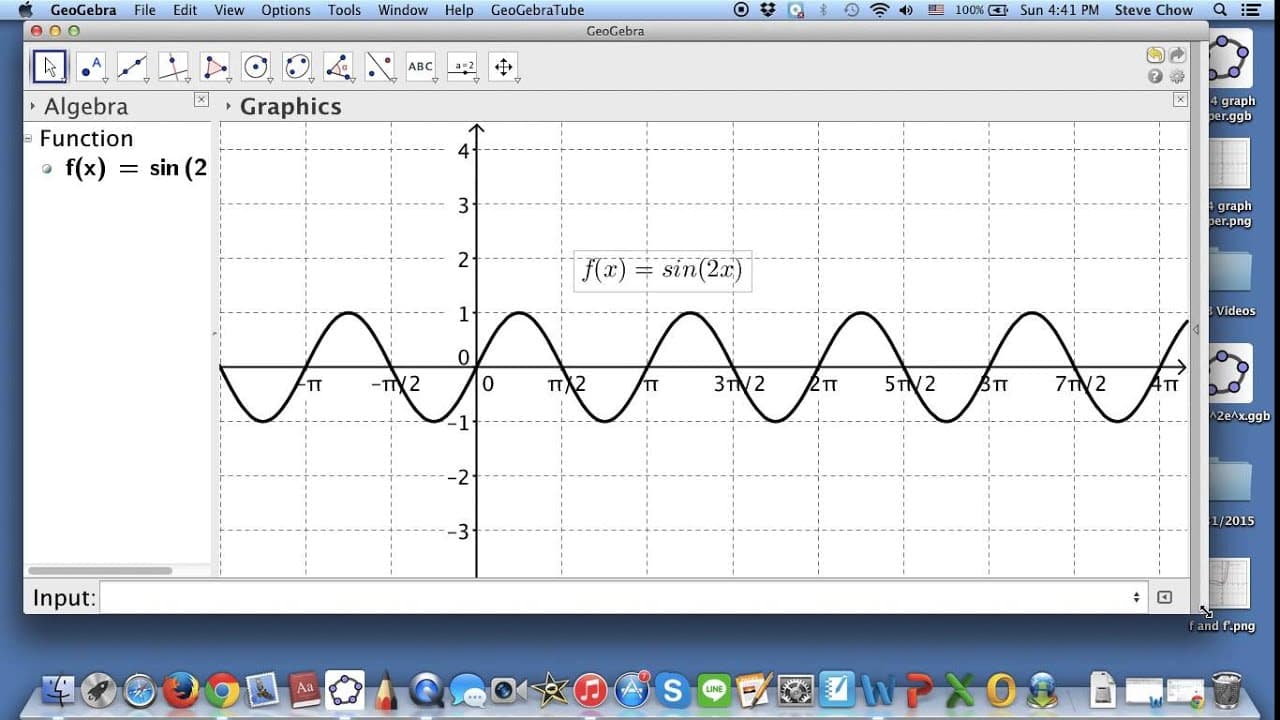
Use Geogebra to graph trig functions like sine 2x with customizable properties and options for annotations.
Transcript
hi I wanted to show you how we can use geogebra to graph trig functions so right here let me open this this is the default window that I set up earlier then we can just go directly to input I can type in either YT equal to sine X or maybe if you like f of X is equal to sine X both of them are the same so if you just type that again you get a usual ... Read More
Key Insights
- 🫥 Geogebra allows for customization of trig functions with variables like sine 2x and options to adjust colors, line thickness, and curve style.
- ☺️ Display values like PI on the graph paper in Geogebra by adjusting the x-axis distance steps.
- 👤 Users can compute derivatives of functions in Geogebra and display or hide them on the graph for analysis.
Install to Summarize YouTube Videos and Get Transcripts
Explore YouTube Video Summarizer or Get YouTube Transcript Extractor
Questions & Answers
Q: How can Geogebra be used to graph trig functions?
Geogebra enables users to input trig functions like sine 2x and customize properties such as colors, line thickness, and style for visually appealing graphs.
Q: Can Geogebra display values like PI on the graph paper?
Yes, users can right-click, go to graphics, select the x-axis, and set the distance step to display values like PI on the graph paper in Geogebra.
Q: How can users compute derivatives of trig functions in Geogebra?
By entering the derivative function like f prime of X, Geogebra computes the derivative of functions, such as 2cosine 2x, with the option to display or hide the derivative on the graph.
Q: How can users export graphs from Geogebra?
Users can save the Geogebra file and export graphs as pictures to include in reports by clicking on file, saving the graph, and exporting as an image for further use.
Summary & Key Takeaways
-
Geogebra allows users to graph trig functions like sine 2x with customizable properties and labels.
-
Users can adjust colors, line thickness, and style of curves in Geogebra to create visually appealing graphs.
-
Geogebra also offers options to display values like PI on the graph paper and compute derivatives of functions.
Read in Other Languages (beta)
Share This Summary 📚
Summarize YouTube Videos and Get Video Transcripts with 1-Click
Try YouTube Summary with ChatGPT & Claude or YouTube Transcript Generator
Explore More Summaries from blackpenredpen 📚
Summarize YouTube Videos and Get Video Transcripts with 1-Click
Try YouTube Summary with ChatGPT & Claude or YouTube Transcript Generator