Top 5 iOS 11 Features! (Why You Should Update!)
TL;DR
iOS 11 brings exciting new features, making it worth the upgrade.
Transcript
hey everybody what is up dude I was 11 just became officially released yesterday actually and a lot of you guys probably want to go ahead and download it so I kind of wanted to compile like the top 5 features of iOS 11 on like why I think you should upgrade now I want to preface all this by saying I was 11 this is the first build so this is the off... Read More
Key Insights
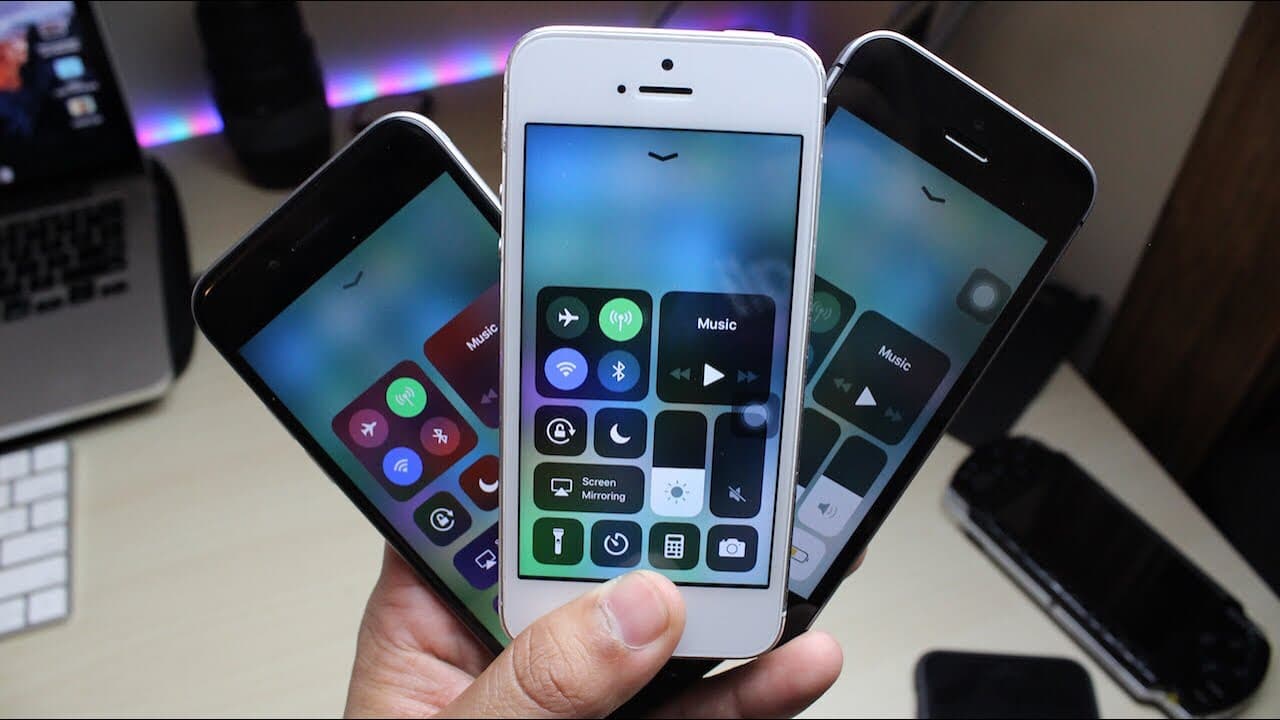
- 🎮 The revamped control center in iOS 11 simplifies access to often-used settings by consolidating them onto one page.
- 😀 The new Files app revolutionizes document organization, making it easier for users to manage disparate file services in one interface.
- 😀 iOS 11 introduces advanced multitasking capabilities on the iPad, enabling users to utilize two apps simultaneously without the need to switch back and forth.
- 💨 Smart Invert colors provide a way for users to benefit from a dark mode while retaining some aspects of original interface design, thus enhancing accessibility.
- 😀 Stock apps have undergone significant redesigns, aligning with contemporary design trends and improving functionality and usability.
- 💦 Users with iPhones and iPads are encouraged to check individual device performance reviews to understand better how iOS 11 will work for them.
- 👤 Although initial glitches may occur, timely updates from Apple may alleviate many early release issues, encouraging users to stay engaged with the platform.
Install to Summarize YouTube Videos and Get Transcripts
Explore YouTube Video Summarizer or Get YouTube Transcript Extractor
Questions & Answers
Q: What are the significant changes in the control center with iOS 11?
The control center in iOS 11 has been redesigned to display all controls on a single page, unlike the previous version, which used two pages. This improves accessibility and navigation while introducing customizable controls, allowing users to add shortcuts for features like low power mode and screen recording.
Q: How does the new Files app enhance productivity on iOS devices?
The Files app consolidates all files stored on the device and in cloud services into a single, organized interface. Users can easily access documents from iCloud, Google Drive, and other services, with functionalities like creating folders and adapting the interface to resemble macOS, improving overall productivity and file management.
Q: What multitasking features does iOS 11 offer for iPad users?
iOS 11 enhances multitasking by allowing users to pull apps from the dock and run them side-by-side. This feature enables seamless operation between apps, significantly boosting efficiency in tasks that require simultaneous usage functionalities, such as browsing and note-taking.
Q: Can you explain the Smart Invert feature in iOS 11?
Smart Invert is a new accessibility feature in iOS 11 that inverts colors intelligently, improving the overall visual experience without applying a standard color inversion to images. While it provides a dark mode-like visual effect, there may be some errors with specific images, which Apple intends to refine in future updates.
Q: What updates have been made to stock apps in iOS 11?
iOS 11 has updated several stock apps, including the App Store, Maps, and Music, with a more modern, card-like layout that resembles Material Design seen on Android. This design overhaul aims to enhance usability and aesthetics, presenting content in a more engaging and responsive manner.
Q: Is it advisable to upgrade to iOS 11 immediately?
While many users will find the features and improvements compelling enough to upgrade, it’s wise to be prepared for potential minor glitches typical of early software releases. Users should check compatibility with their devices and explore feedback from early adopters to ensure a smooth transition.
Q: How can users provide feedback about iOS 11 issues?
Users can report issues or glitches they encounter on iOS 11 through social media, tech forums, or directly to Apple through their official support channels. Engaging with other users on platforms like Reddit can also help highlight common problems and pressures Apple to address them in upcoming updates.
Summary & Key Takeaways
-
iOS 11 introduces a revamped control center, consolidating controls on a single page, enhancing user experience by replacing the previous two-page design.
-
The new Files app in iOS 11 organizes documents and syncs with cloud services, providing a streamlined interface for file management across devices.
-
iPad users benefit from improved multitasking and updated stock apps, including redesigned layouts and a new keyboard feature that enhances typing efficiency.
Read in Other Languages (beta)
Share This Summary 📚
Summarize YouTube Videos and Get Video Transcripts with 1-Click
Try YouTube Summary with ChatGPT & Claude or YouTube Transcript Generator
Explore More Summaries from Simple Alpaca 📚





Summarize YouTube Videos and Get Video Transcripts with 1-Click
Try YouTube Summary with ChatGPT & Claude or YouTube Transcript Generator