EZ WordPress Setup
TL;DR
Learn to set up a self-hosted WordPress blog quickly.
Transcript
hi I'm Michael hayatt from michaelhyatt.com and author of The New York Times bestseller platform get noticed in a noisy World welcome to easy WordPress setup in this short video I'm going to teach you how to launch a self-hosted WordPress blog in 20 minutes or less and as a bonus I'll show you how to write and publish your first blog post you're no... Read More
Key Insights
- Self-hosted WordPress blogs offer more control compared to hosted ones, making them ideal for serious bloggers.
- Bluehost is recommended for hosting due to its reliability, support, ease of use, and alignment with certain ethical standards.
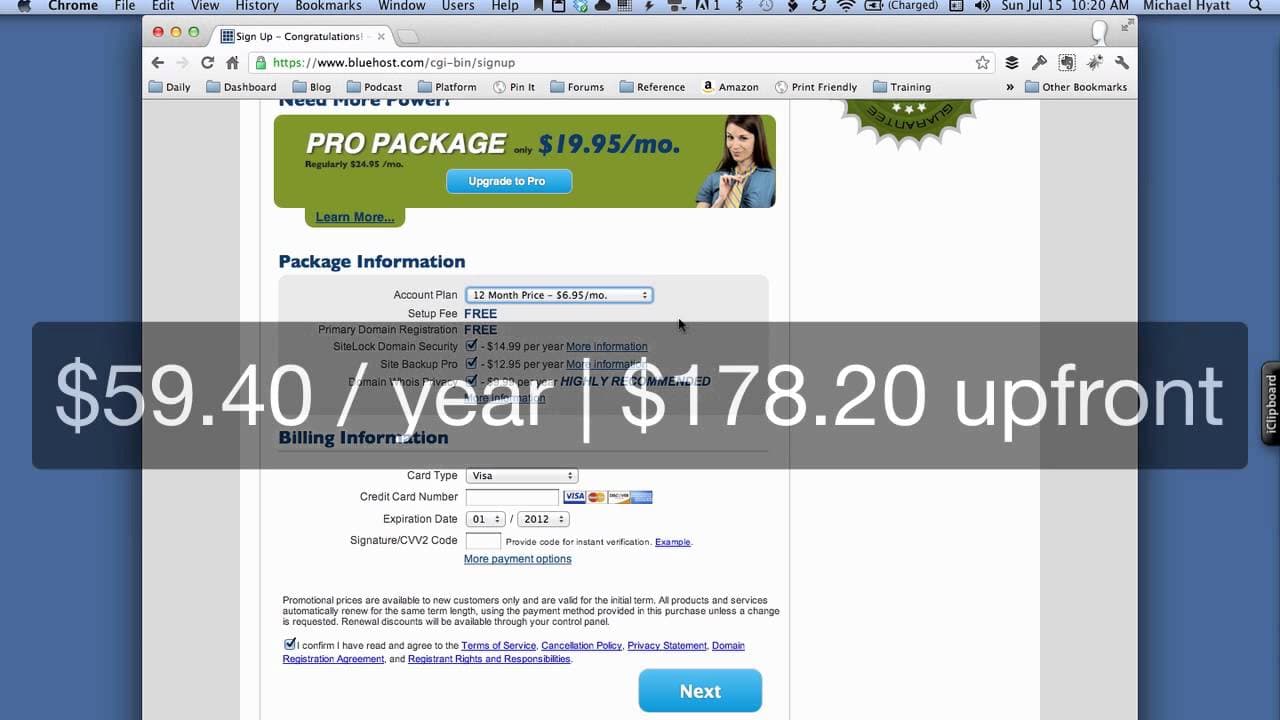
- Setting up a WordPress blog requires a domain name, a hosting account, and about 20 minutes of your time.
- Bluehost offers unlimited disk space, bandwidth, domains, and email accounts, making it a cost-effective choice.
- The tutorial emphasizes the importance of securing your account with strong passwords and unique usernames.
- Installing WordPress on Bluehost is simplified to a few clicks, making it accessible even for beginners.
- WordPress offers extensive customization options through themes and plugins, allowing users to tailor their blogs.
- Bookmarking both the front and back ends of your WordPress blog ensures easy access for future management.
Install to Summarize YouTube Videos and Get Transcripts
Explore YouTube Video Summarizer or Get YouTube Transcript Extractor
Questions & Answers
Q: What is the primary focus of the video tutorial?
The primary focus of the video tutorial is to guide viewers through the process of launching a self-hosted WordPress blog in 20 minutes or less. Michael Hyatt provides a step-by-step walkthrough, ensuring that even those without technical expertise can follow along and successfully set up their blog.
Q: Why does Michael Hyatt recommend Bluehost for hosting?
Michael Hyatt recommends Bluehost for hosting due to its excellent 24/7 support, reliability with a 99.9% uptime, ease of use, and affordability. Additionally, Bluehost aligns with certain ethical standards, such as prohibiting adult content, which resonates with Hyatt's personal values.
Q: What are the key requirements for setting up a WordPress blog?
The key requirements for setting up a WordPress blog include a domain name, a hosting account, and approximately 20 minutes of time. Michael Hyatt emphasizes that no technical expertise is necessary, as the process is straightforward and can be completed by following his tutorial.
Q: How does Bluehost simplify the WordPress installation process?
Bluehost simplifies the WordPress installation process by offering a user-friendly interface that requires only a few clicks to complete the installation. This ease of use makes it accessible for beginners, eliminating the need for technical knowledge or experience in setting up a blog.
Q: What customization options does WordPress offer?
WordPress offers extensive customization options through a wide range of themes and plugins. Users can choose from thousands of themes to change the appearance of their blog and can add functionality through plugins, allowing them to tailor their site to meet specific needs and preferences.
Q: What security measures does Michael Hyatt recommend?
Michael Hyatt recommends using strong, unique passwords and avoiding common usernames like 'admin' to enhance security. He also suggests using a password manager, such as 1Password, to generate and store complex passwords, ensuring that accounts are protected against unauthorized access.
Q: Why is it important to bookmark your blog's front and back ends?
Bookmarking your blog's front and back ends is important for easy access. By saving these links, users can quickly view their blog as visitors see it (front end) and access the administrative dashboard (back end) to manage posts, customize themes, and perform other tasks efficiently.
Q: What ethical standards does Bluehost enforce?
Bluehost enforces ethical standards by prohibiting pornography and other adult content on its servers. This policy aligns with Michael Hyatt's values, as he prefers not to have his blog hosted on the same server as such content. Bluehost is one of the few hosting services with this standard.
Summary & Key Takeaways
-
The tutorial by Michael Hyatt guides users through setting up a self-hosted WordPress blog using Bluehost. It highlights the advantages of self-hosting, such as increased control, and offers step-by-step instructions for beginners.
-
Bluehost is recommended for its reliability, support, and ethical standards. The tutorial simplifies the process of setting up a hosting account, installing WordPress, and publishing the first blog post.
-
Users are advised to secure their accounts with strong passwords and to bookmark their blog's front and back ends for easy future access. The tutorial emphasizes customization options available through WordPress themes and plugins.
Read in Other Languages (beta)
Share This Summary 📚
Summarize YouTube Videos and Get Video Transcripts with 1-Click
Try YouTube Summary with ChatGPT & Claude or YouTube Transcript Generator
Explore More Summaries from Michael Hyatt 📚



Summarize YouTube Videos and Get Video Transcripts with 1-Click
Try YouTube Summary with ChatGPT & Claude or YouTube Transcript Generator