Products
Features
YouTube Video Summarizer
Summarize YouTube videos
Web & PDF Highlighter
Highlight web pages & PDFs
Chat with PDF
Ask any PDF questions with AI
Ask AI Clone
Chat with your highlights & memories
Audio Transcriber
Transcribe audio files to text
Glasp Reader
Read and highlight articles
Kindle Highlight Export
Export your Kindle highlights
Idea Hatch
Hatch ideas from your highlights
Integrations
Obsidian Plugin
Notion Integration
Pocket Integration
Instapaper Integration
Medium Integration
Readwise Integration
Snipd Integration
Hypothesis Integration
Apps & Extensions
Chrome Extension
Safari Extension
Edge Add-ons
Firefox Add-ons
iOS App
Android App
Discover
Discover
Ideas
Discover new ideas and insights
Articles
Curated articles and insights
Books
Book recommendations by great minds
Posts
Essays and notes from readers
Quotes
Inspiring quotes collection
Videos
Curated videos and summaries
Explore Glasp
Glasp Newsletter
Weekly insights and updates
Glasp Talk
Interview series with great minds
Glasp Blog
Latest news and articles
Glasp Use Cases
Learn how others use Glasp
Build & Support
Glasp API
Access Glasp's API for developers
MCP Connector
Connect Glasp to Claude & ChatGPT
Community
Glasp Reddit Community
Students
Student discount and benefits
FAQs
Frequently Asked Questions
AboutPricing
DashboardLog inSign up

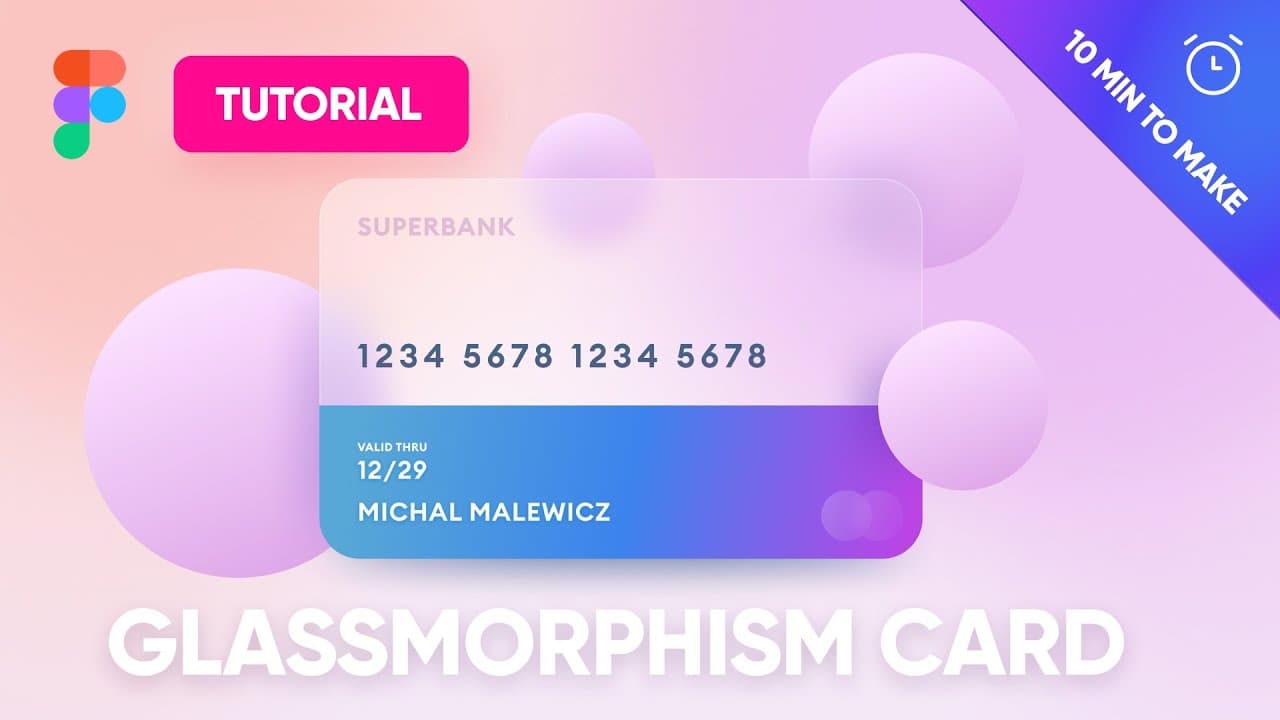
Glassmorphism UI - Free Figma Tutorial - 100 000 designers took it!
154.4K views
•
December 14, 2020
by
Malewicz
YouTube video player
Glassmorphism UI - Free Figma Tutorial - 100 000 designers took it!

TL;DR

Learn to create a realistic glassmorphic credit card design in Figma with gradients, shadows, and text.

Transcript

hey guys so many of you have asked me to create a figma tutorial on glassmorphism but instead of just playing around with random shapes uh you wanted me to make something more real and of course i would have preferred to do it in sketch but many of you have asked me to actually do it in figma so here we go so what we're gonna do here is one of the ... Read More

Key Insights

  • 😎 Glassmorphism is a design trend replicating frosted glass's translucent and glossy appearance.
  • 🎨 Figma offers tools like gradients, shadows, and layer effects to create realistic glassmorphic designs.
  • 🎨 Attention to detail with layer blurs, shadow placements, and color palettes enhances the 3D effect.
  • 🪜 Using radial gradients and opacities adds depth and reflection to glassmorphic elements.
  • 😒 Strategic use of shadows and overlays enhances the illusion of objects floating in 3D space.
  • 🗯️ Text visibility in glassmorphic designs can be improved by choosing the right colors and gradients.
  • 💠 Experimenting with background blur, shapes, and shadow placement refines the glassmorphic aesthetic.

Install to Summarize YouTube Videos and Get Transcripts

Explore YouTube Video Summarizer or Get YouTube Transcript Extractor

Questions & Answers

Q: What is glassmorphism and why is it popular in design?

Glassmorphism is a design trend that mimics the frosted glass effect, popular for its modern and sleek look. It adds depth and realism to digital interfaces.

Q: How can radial gradients be used to enhance the glassmorphic effect?

Radial gradients can create a reflective surface on objects like a credit card, giving the illusion of glass. By adjusting opacities and colors, a glossy finish is achieved.

Q: Why is it important to pay attention to shadows in glassmorphic design?

Shadows play a crucial role in creating a 3D effect in glassmorphic design. By using layer blur effects and strategic positioning, objects appear to float and interact realistically.

Q: How can color choices and gradients impact the visibility of text in glassmorphic designs?

High contrast colors and gradients ensure that text remains legible against glassmorphic backgrounds. Adjusting font sizes, colors, and opacity levels can enhance readability.

Summary & Key Takeaways

  • Tutorial on creating a glassmorphic credit card design in Figma.

  • Tips on using gradients, shadows, and text for a realistic effect.

  • Guidance on adjusting background blur, layer effects, and color palettes.


Read in Other Languages (beta)

English

Share This Summary 📚

Summarize YouTube Videos and Get Video Transcripts with 1-Click

Download browser extensions on:

Try YouTube Summary with ChatGPT & Claude or YouTube Transcript Generator

Explore More Summaries from Malewicz 📚
The most important UI skill is BORING thumbnail
The most important UI skill is BORING
Malewicz
Dark Mode UI Course 2 thumbnail
Dark Mode UI Course 2
Malewicz
Anyone can be a UX designer thumbnail
Anyone can be a UX designer
Malewicz
How to Design Better Products - The method of Raspberry, Blueberry, Tomato, Brick thumbnail
How to Design Better Products - The method of Raspberry, Blueberry, Tomato, Brick
Malewicz
Aurora UI trend for 2021 - soft-blur backgrounds thumbnail
Aurora UI trend for 2021 - soft-blur backgrounds
Malewicz
99% of designers MESS UP their resume thumbnail
99% of designers MESS UP their resume
Malewicz

Summarize YouTube Videos and Get Video Transcripts with 1-Click

Download browser extensions on:

Try YouTube Summary with ChatGPT & Claude or YouTube Transcript Generator

Apps & Extensions

  • Chrome Extension
  • Safari Extension
  • Edge Add-ons
  • Firefox Add-ons
  • iOS App
  • Android App

Key Features

  • YouTube Video Summarizer
  • Web & PDF Summarizer
  • Web & PDF Highlighter
  • Chat with PDF
  • Ask AI Clone
  • Audio Transcriber
  • Glasp Reader
  • Kindle Highlight Export
  • Idea Hatch

Integrations

  • Obsidian Plugin
  • Notion Integration
  • Pocket Integration
  • Instapaper Integration
  • Medium Integration
  • Readwise Integration
  • Snipd Integration
  • Hypothesis Integration

More Features

  • APIs
  • MCP Connector
  • Blog & Post
  • Embed Links
  • Image Highlight
  • Personality Test
  • Quote Shots

Company

  • About us
  • Blog
  • Community
  • FAQs
  • Job Board
  • Newsletter
  • Pricing
Terms

•

Privacy

•

Guidelines

© 2026 Glasp Inc. All rights reserved.