What Are the Key Features of the NVIDIA Broadcast App?
TL;DR
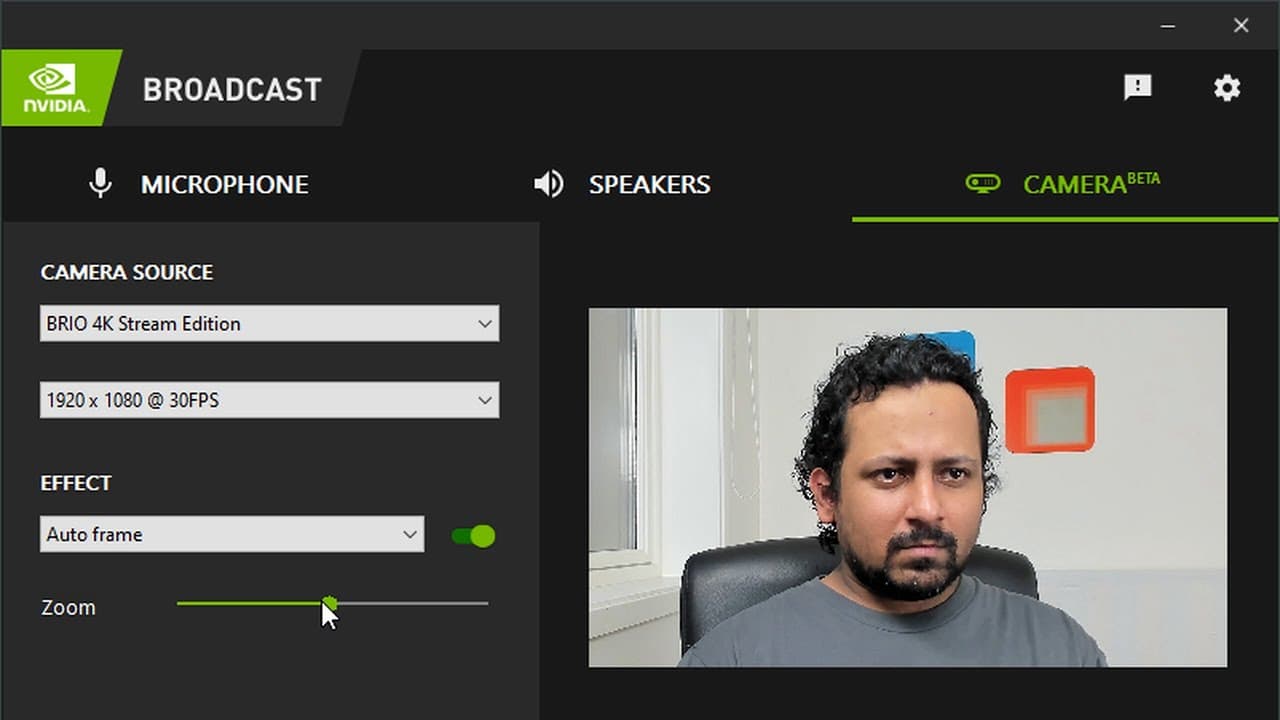
The NVIDIA Broadcast app enhances audio and video quality for Windows 10 users with features like AI-powered noise removal, background blur, background replacement, and auto-framing. It improves microphone audio clarity for meetings and broadcasts by allowing users to select Nvidia as their audio source, making calls and streams look more professional.
Transcript
hello everyone and welcome to my youtube channel in this video i'm going to talk a little bit about the new app from nvidia it's called nvidia broadcast and this app is currently only available for windows 10 so when nvidia announced the 30 series gpus they also announced this app and along with that they announced some other things but let's look ... Read More
Key Insights
- 😀 Nvidia Broadcast app is a powerful tool that utilizes AI to enhance audio and video quality on Windows 10.
- 😀 The app offers features like noise removal, background blur, background replacement, and auto-framing for video calls and recordings.
- 👤 Users can switch their microphone and speaker sources to Nvidia Broadcast for improved audio quality during meetings and streaming.
- 🎮 Video features like background blur and replacement allow users to create a professional-looking backdrop for video calls or streaming.
- 😀 Auto-framing feature in the app automatically tracks and frames the user's face, making video calls more engaging and visually appealing.
- 🍏 Nvidia Broadcast app has limitations in certain scenarios, such as fuzzy edges on the video background removal feature and the requirement of a green screen for the best results.
- 😀 The app is not limited to sponsored content and has gained positive feedback from the reviewer due to its usefulness and effectiveness.
Install to Summarize YouTube Videos and Get Transcripts
Explore YouTube Video Summarizer or Get YouTube Transcript Extractor
Questions & Answers
Q: What is the main purpose of the Nvidia Broadcast app?
The main purpose of the Nvidia Broadcast app is to leverage artificial intelligence to enhance audio and video quality in Windows 10, specifically for noise removal, background blur, background replacement, and auto-framing.
Q: How does the noise removal feature work?
The noise removal feature in Nvidia Broadcast uses AI algorithms to eliminate background noise from your microphone audio, resulting in much clearer and improved audio quality.
Q: Can the app be used for video enhancement?
Yes, the app offers several video enhancement features. For example, you can use background blur to blur out your surroundings, or even replace your background with a different video or image. Additionally, the app has an auto-framing feature that can track and position your face automatically.
Q: Is the Nvidia Broadcast app only compatible with Windows 10?
Yes, currently, the Nvidia Broadcast app is only available for Windows 10 users.
Summary & Key Takeaways
-
Nvidia Broadcast is a new app designed for Windows 10 that offers powerful AI-based features for audio and video enhancement.
-
The app includes a noise removal feature for improving microphone audio quality in meetings and broadcasts.
-
It also offers features such as background blur, background replacement, and auto-framing for video enhancement.
Read in Other Languages (beta)
Share This Summary 📚
Summarize YouTube Videos and Get Video Transcripts with 1-Click
Try YouTube Summary with ChatGPT & Claude or YouTube Transcript Generator
Explore More Summaries from Abhishek Thakur 📚
Summarize YouTube Videos and Get Video Transcripts with 1-Click
Try YouTube Summary with ChatGPT & Claude or YouTube Transcript Generator