Samsung One UI 6 vs Android 14: Which Is Better?
TL;DR
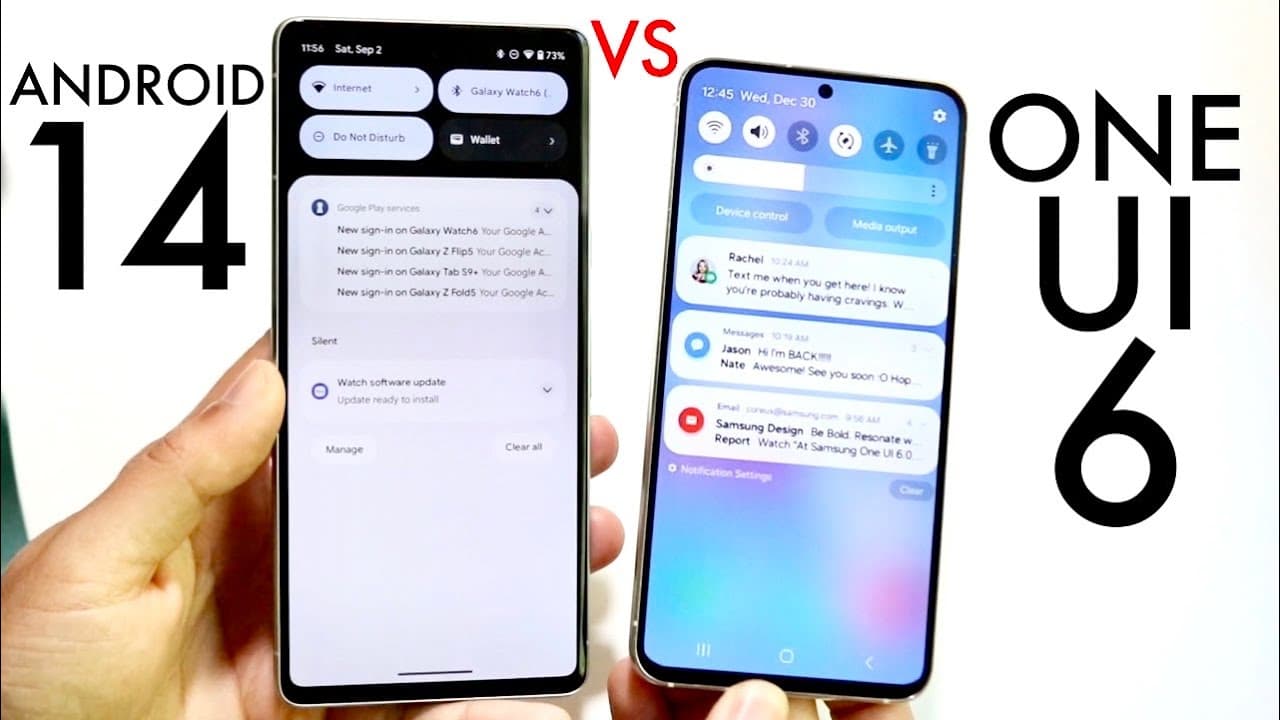
Samsung's One UI 6 enhances Android 14 with extensive customization options, particularly for lock screens and the quick panel design, making it ideal for users seeking personalization. In contrast, Android 14 offers a cleaner and more stable experience, appealing to those who prefer a straightforward interface. Overall, One UI 6 tends to be better for customization, while Android 14 excels in stability.
Transcript
so one ui6 has just officially came out in a beta format not officially out yet and Android 14 is still in the beta as well so I wanted to go and hit on some of the differences between stock Android on Android 14 and the one UI 6 beta that we have and see which specific version of software is technically the one that you should probably use or you ... Read More
Key Insights
- 👤 One UI 6 retains the features of Android 14 while adding Samsung-specific enhancements that cater to customization and user experience.
- 👤 The quick panel change in One UI 6 introduces a more visually appealing and accessible user interface compared to stock Android.
- 👤 Customization options in One UI 6, particularly for lock screens, significantly surpass those offered in Android 14, appealing to users who favor personal personalization.
- 😆 While One UI 6 offers a rich feature set, users may experience occasional bugs, highlighting a trade-off between functionality and stability.
- 👤 Android 14 is recognized for its cleanliness and smooth performance, making it ideal for users who prefer a straightforward Android experience.
- 💱 The default font change in One UI 6 reflects Samsung's commitment to aesthetic changes, although font modification capabilities remain in both systems.
- 👻 Users can enjoy keyboard flexibility across both interfaces, allowing for personalization in typing experience regardless of the operating system.
Install to Summarize YouTube Videos and Get Transcripts
Explore YouTube Video Summarizer or Get YouTube Transcript Extractor
Questions & Answers
Q: What improvements does One UI 6 offer over stock Android 14?
One UI 6 enhances Android 14 by adding a new quick panel layout, dedicated buttons for Wi-Fi and Bluetooth, and more customizable lock screen options. These features aim to provide a more user-friendly interface tailored to Samsung device users, promoting an engaging experience over the stock Android version.
Q: How does the customization capability of One UI 6 compare to Android 14?
One UI 6 allows for extensive customization, especially concerning lock screens where users can personalize their devices significantly. In contrast, Android 14 offers limited options in this area. Therefore, those who prioritize personalization will find One UI 6 to be the better choice.
Q: What are some of the design changes in One UI 6?
One UI 6 introduces a refreshed quick panel with a modern layout, allowing users to access settings more intuitively. Furthermore, it comes with a new default font, enhancing the overall aesthetic of the interface while still permitting font changes similar to Android 14 customization.
Q: Is One UI 6 more stable than Android 14?
While One UI 6 provides a feature-rich experience, some users find it can be buggy at times. In contrast, Android 14 is viewed as more stable and clean, making it preferable for those who prioritize a seamless and uncluttered operating system experience.
Q: Can users switch the default keyboard in both software versions?
Yes, users can switch between Samsung's keyboard on One UI 6 and Google's keyboard on both One UI 6 and the stock Android 14. This flexibility allows users to choose the typing experience that best suits their preferences without missing out on essential features.
Q: What device types benefit more from One UI 6 features?
One UI 6's rich feature set is primarily beneficial for Samsung smartphone users, as it integrates seamlessly with the Samsung ecosystem. It provides enhanced functionality that capitalizes on the hardware capabilities of Samsung devices, making it less impactful for stock Android users.
Summary & Key Takeaways
-
One UI 6 is built on Android 14 and retains core features while incorporating enhancements, particularly in the quick panel's design and functionality.
-
Samsung's One UI 6 offers greater customization options for lock screens and overall user experience compared to the stock Android 14, making it appealing for users seeking a personalized interface.
-
Both software versions have unique strengths, with One UI 6 focusing on features and customizability while Android 14 emphasizes stability and cleanliness in its user experience.
Read in Other Languages (beta)
Share This Summary 📚
Summarize YouTube Videos and Get Video Transcripts with 1-Click
Try YouTube Summary with ChatGPT & Claude or YouTube Transcript Generator
Explore More Summaries from Simple Alpaca 📚
Summarize YouTube Videos and Get Video Transcripts with 1-Click
Try YouTube Summary with ChatGPT & Claude or YouTube Transcript Generator