ESSENTIAL Logo Design Tools Revealed! [EP 4/44]
TL;DR
Organize your tools for effective logo design.
Transcript
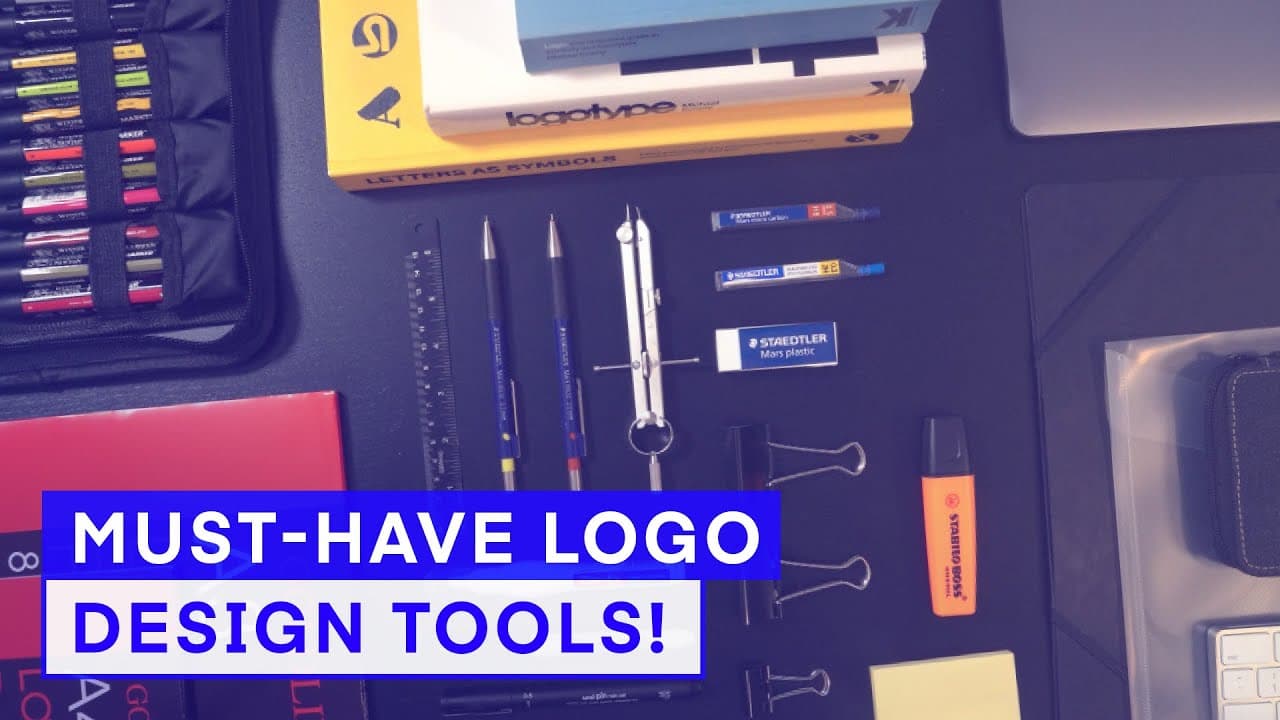
- Now, before we start any design project, it's really good to be as organized as you possibly can. And you'll want to make sure you have all your tools and equipment in place and ready. Now, as obvious as this may be, when you begin a project and start to build a creative momentum, the last thing you will want to do is run out of a... Read More
Key Insights
- Being organized with your tools and equipment is crucial to maintaining creative momentum during logo design projects.
- A design brief is not always provided, so having tools to create one can be essential for understanding client needs.
- Stationery tools such as drawing pads, pencils, and markers are fundamental for sketching and developing logo ideas.
- Reference materials like logo books can provide inspiration and guidance in the early stages of logo design.
- Hardware and software tools, including computers and vector-based applications, are necessary for digital logo creation.
- A printer is useful for producing physical copies of designs and reference materials for better visualization.
- Creating a project space with display boards can help keep research and development materials organized and accessible.
- Drawing tablets offer an alternative to traditional paper sketching, providing flexibility in the design process.
Install to Summarize YouTube Videos and Get Transcripts
Explore YouTube Video Summarizer or Get YouTube Transcript Extractor
Questions & Answers
Q: Why is organization important in logo design?
Organization is crucial in logo design because it helps maintain creative momentum. Being organized ensures that all necessary tools and equipment are ready, preventing disruptions that can interfere with the creative flow. This preparation allows designers to focus on the design process without interruptions.
Q: What should you do if no design brief is provided?
If no design brief is provided, it's important to create one using brief builder tools. These tools help extract key information from the client, ensuring that the designer understands the client's needs and expectations. This step is essential for guiding the design process and delivering a successful logo.
Q: What stationery tools are recommended for logo design?
Recommended stationery tools for logo design include drawing pads, pencils, rulers, compasses, and markers. These tools are essential for sketching and developing logo ideas. Drawing pads allow for easy sketching and tracing, while markers help refine sketches into polished drawings.
Q: How can reference materials aid in logo design?
Reference materials, such as logo books, provide inspiration and guidance in the early stages of logo design. They offer examples of successful designs and can spark new ideas. Reference materials can also serve as a benchmark for quality and creativity, helping designers create unique and effective logos.
Q: What hardware and software tools are necessary for logo design?
Necessary hardware and software tools for logo design include a computer, creative software tools like Adobe Illustrator, a printer, and potentially a drawing tablet. These tools facilitate digital logo creation, allowing designers to develop, refine, and present their designs effectively.
Q: Why is a printer useful in the logo design process?
A printer is useful in the logo design process because it allows designers to produce physical copies of designs and reference materials. This helps in better visualization and evaluation of designs at various sizes. Printing also aids in organizing and displaying research materials for inspiration.
Q: How can creating a project space benefit logo design?
Creating a project space with display boards benefits logo design by keeping research and development materials organized and accessible. It allows designers to surround themselves with inspiration and stay focused on the project. Display boards also facilitate easy reference to key materials during the design process.
Q: What are the benefits of using a drawing tablet in logo design?
Using a drawing tablet in logo design offers flexibility and an alternative to traditional paper sketching. It allows for easy editing and refinement of designs and can integrate seamlessly with digital tools. Drawing tablets also enable designers to experiment with different styles and techniques efficiently.
Summary & Key Takeaways
-
Being organized is essential for maintaining creative momentum in logo design. Ensure all necessary tools and equipment are ready before starting a project to avoid disruptions. A design brief may not always be provided, so having tools to create one is crucial for understanding client needs.
-
Stationery tools like drawing pads, pencils, and markers are vital for sketching and developing ideas. Reference materials, such as logo books, can provide inspiration. Hardware and software tools, including computers and vector-based applications, are necessary for digital logo creation.
-
A printer is useful for producing physical copies of designs and reference materials. Creating a project space with display boards helps keep research and development materials organized. Drawing tablets offer an alternative to traditional paper sketching, providing flexibility in the design process.
Read in Other Languages (beta)
Share This Summary 📚
Summarize YouTube Videos and Get Video Transcripts with 1-Click
Try YouTube Summary with ChatGPT & Claude or YouTube Transcript Generator
Explore More Summaries from Gareth David Studio 📚
![UNLOCK Pro Logo Design Secrets with my Entire Logo Design Process! [EP 2/44] thumbnail](/_next/image?url=https%3A%2F%2Fi.ytimg.com%2Fvi%2F2rMbRW2zU7E%2Fhqdefault.jpg&w=750&q=75)
![Extract WINNING Ideas From a Design Brief [EP 5/44] thumbnail](/_next/image?url=https%3A%2F%2Fi.ytimg.com%2Fvi%2FTkGxTeVqLVs%2Fhqdefault.jpg&w=750&q=75)

![Education to be a Graphic designer? Ep28/45 [Beginners Guide to Graphic Design] thumbnail](/_next/image?url=https%3A%2F%2Fi.ytimg.com%2Fvi%2FrqCPJKHxPUk%2Fhqdefault.jpg&w=750&q=75)
Summarize YouTube Videos and Get Video Transcripts with 1-Click
Try YouTube Summary with ChatGPT & Claude or YouTube Transcript Generator