Which Camera App is Better: iPhone or Samsung?
TL;DR
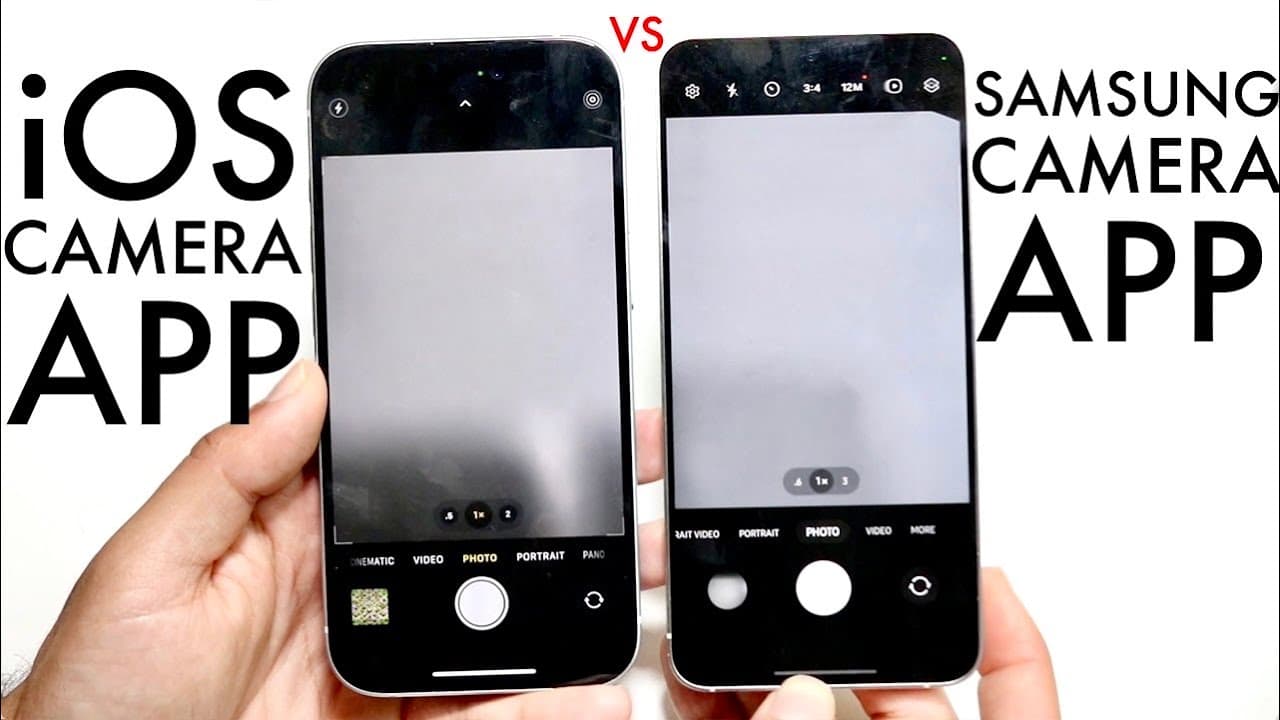
The iPhone camera app offers superior speed and smoothness, making it easier for users to take quick photos without delays. In contrast, the Samsung camera app provides more features and shooting modes, although it may be glitchier. Your choice depends on whether you prioritize a stable, user-friendly experience or extensive functionality.
Transcript
well everyone it's time for us to go and take a look at two different camera applications the stock iOS camera app that we have inside of our iPhones and the Samsung Galaxy stock camera app that we have inside of our I inside of our Samsung Galaxy phones now both are very great I like both a lot but I will say there's one that is probably better fo... Read More
Key Insights
- 😀 The iPhone camera app excels in speed and smoothness, providing a consistent photography experience for users.
- 😀 Samsung's camera app features a larger variety of modes and functionalities, catering to those who desire advanced editing and shooting options.
- 😀 Stability is a crucial factor for casual photographers, making the iPhone app a preferred choice for quick snapshots.
- 😀 The design and layout of the camera interface in Samsung's app offer easy access to settings, enhancing user control over photography.
- 😀 iPhone users may benefit from a more intuitive experience despite having fewer features, as the app is designed for simplicity.
- 😀 Regular updates to both apps contribute to improved functionalities and camera performance over time.
- 😀 The choice between the two apps often depends on user priorities: simplicity versus feature richness.
Install to Summarize YouTube Videos and Get Transcripts
Explore YouTube Video Summarizer or Get YouTube Transcript Extractor
Questions & Answers
Q: What are the main similarities between the iPhone and Samsung camera apps?
Both camera apps offer core functionalities such as photo and video capabilities, including options like portrait and panorama modes. They share similar basic features, allowing users to capture images and videos effortlessly, demonstrating that despite platform differences, the essential photographic experience remains quite comparable.
Q: Which camera app is noted for its speed and stability?
The iPhone camera app is highlighted for its incredible speed and stability. Users can take photos without worrying about delays, ensuring that capturing the moment is quick and reliable. This stability is a key advantage for those who prioritize quick access to photography experiences during spontaneous moments.
Q: What unique features does the Samsung camera app provide?
Samsung's camera app is noted for having a broader range of features, including slow-motion options and various photography modes. The constant top bar on the app allows easy access to these additional functions without needing to click through multiple menus, enhancing usability for those interested in exploring various options.
Q: How does user experience differ between the two camera apps?
Users of the iPhone app often report a smoother experience when taking photos and zooming in and out, which can impact the overall satisfaction with the app. In contrast, some users find that the Samsung app can feel glitchy at times, which may detract from the usability, especially during critical moments.
Q: In terms of photo quality, how do the two camera apps compare?
While both camera apps deliver high-quality photos, the fundamental differences arise more from software and handling than actual image quality. Users find that iPhone's app offers a more seamless experience, while Samsung's extensive features may appeal to those looking for versatility in photography.
Q: What is a notable disadvantage of the iPhone camera app compared to Samsung's?
A disadvantage of the iPhone camera app is the hidden features associated with its top menu access. Users must click to view additional settings, which can be less convenient compared to Samsung's approach, where options are readily available at the top, making it easier for users to navigate freely.
Summary & Key Takeaways
-
The video compares the stock camera apps of iPhone and Samsung Galaxy phones, highlighting their similarities and differences in functionality.
-
iPhone's camera app is praised for its stability, speed, and smoothness, making it easy to take photos quickly without delay.
-
Samsung's camera app offers more features and functionalities, such as additional modes and constant top menu access, though it can be glitchier during use.
Read in Other Languages (beta)
Share This Summary 📚
Summarize YouTube Videos and Get Video Transcripts with 1-Click
Try YouTube Summary with ChatGPT & Claude or YouTube Transcript Generator
Explore More Summaries from Simple Alpaca 📚
Summarize YouTube Videos and Get Video Transcripts with 1-Click
Try YouTube Summary with ChatGPT & Claude or YouTube Transcript Generator