EcoStruxure PME : Table Gadget | Schneider Electric
TL;DR
Learn to configure and use the Table Gadget for real-time data.
Transcript
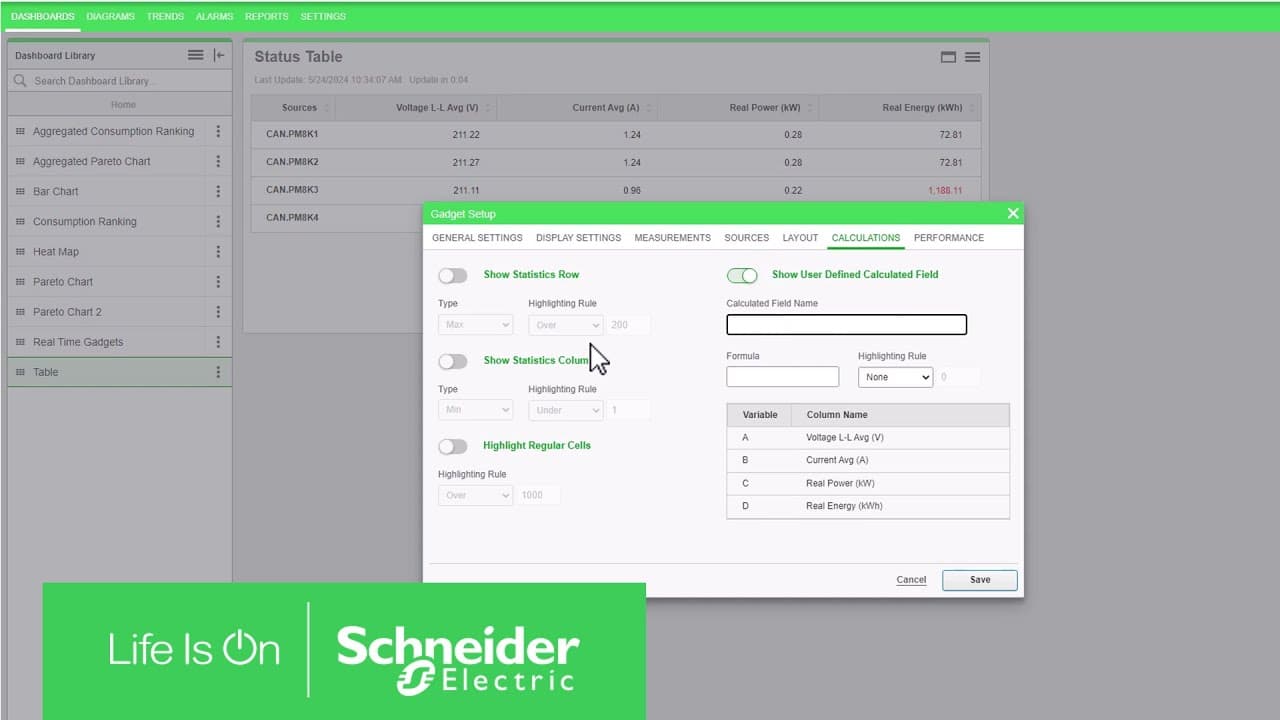
Welcome back to another video in our Dashboards Series! In this video, you'll explore how to set up the Table gadget. You will also gain an understanding of how to analyze and make sense of the data they furnish. How about we begin? The Table and KPI gadgets are the sole tools that present real-time information. Unlike other gadgets that retrieve d... Read More
Key Insights
- The Table Gadget is unique in providing real-time data, unlike other gadgets that rely on historical data. It is crucial for immediate insights and decision-making.
- Configuration of the Table Gadget involves adding it to a dashboard, selecting measurements, and customizing its appearance, including font and color settings.
- With access to over 7000 measurements, users can filter and search through 25 categories to find relevant data, ensuring compatibility with their devices.
- The gadget allows for customization in data presentation, including sorting, filtering, and applying highlighting rules to emphasize specific data thresholds.
- Users can choose between organizing tables by sources or measurements, offering flexibility in data visualization and interpretation.
- Performance settings, such as update intervals and simple rendering, are essential for optimizing the gadget's functionality, especially with large datasets.
- Advanced features include statistical calculations and user-defined fields, enabling users to perform complex data analyses directly within the gadget.
- Highlighting rules and calculated fields enhance data clarity by visually distinguishing critical data points and performing real-time calculations.
Install to Summarize YouTube Videos and Get Transcripts
Explore YouTube Video Summarizer or Get YouTube Transcript Extractor
Questions & Answers
Q: How does the Table Gadget differ from other gadgets in PME?
The Table Gadget is unique because it provides real-time data from system devices or hierarchy components, unlike other gadgets that rely on historical data. This real-time capability makes it essential for immediate insights and decision-making, allowing users to respond quickly to changing conditions.
Q: What are the steps to configure the Table Gadget?
To configure the Table Gadget, start by adding it to a dashboard. Select measurements from the PME database, customize the gadget's appearance, and choose data presentation options. Advanced settings include statistical calculations and user-defined fields, allowing for comprehensive data analysis.
Q: How can users efficiently find and select measurements in the Table Gadget?
Users can efficiently find and select measurements by utilizing the search box and filters within the Show Advanced option. The PME database offers over 7000 measurements across 25 categories, enabling users to filter by type, such as Electricity, and refine their selection using predefined templates.
Q: What customization options are available for data presentation in the Table Gadget?
Customization options for data presentation include organizing tables by sources or measurements, adjusting column widths, and applying highlighting rules to emphasize specific data thresholds. Users can also enable statistics for rows and columns and add calculated fields for complex analyses.
Q: How do performance settings impact the Table Gadget's functionality?
Performance settings, such as update intervals and simple rendering, are crucial for optimizing the Table Gadget's functionality. These settings determine how often data is polled from devices and improve browser performance by removing unnecessary elements like sorting and styling, especially with large datasets.
Q: What advanced features does the Table Gadget offer for data analysis?
Advanced features of the Table Gadget include statistical calculations, highlighting rules, and user-defined fields. These allow users to perform complex data analyses, visually distinguish critical data points, and conduct real-time calculations using mathematical expressions for deeper insights.
Q: How do highlighting rules enhance data clarity in the Table Gadget?
Highlighting rules enhance data clarity by visually distinguishing critical data points. Users can define thresholds for values, which are then highlighted in red when exceeded. This visual distinction helps users quickly identify and focus on significant data changes or anomalies.
Q: What is the role of user-defined fields in the Table Gadget?
User-defined fields allow users to perform custom calculations within the Table Gadget. By entering mathematical expressions, users can create new data columns that display calculated values. This feature enables more sophisticated data analyses and provides additional insights directly within the gadget.
Summary & Key Takeaways
-
The video provides a detailed tutorial on configuring and using the Table Gadget to access and analyze real-time data. It covers the setup process, customization options, and advanced features for enhanced data visualization and analysis.
-
Users learn to navigate the extensive PME database, selecting relevant measurements for their devices. The tutorial emphasizes the importance of compatibility and offers strategies to efficiently filter and sort data.
-
Advanced functionalities include statistical calculations, highlighting rules, and user-defined fields, empowering users to conduct sophisticated data analyses and derive actionable insights from real-time data.
Read in Other Languages (beta)
Share This Summary 📚
Summarize YouTube Videos and Get Video Transcripts with 1-Click
Try YouTube Summary with ChatGPT & Claude or YouTube Transcript Generator
Explore More Summaries from Schneider Electric 📚


Summarize YouTube Videos and Get Video Transcripts with 1-Click
Try YouTube Summary with ChatGPT & Claude or YouTube Transcript Generator