MS 365 how to insert a table, name the table in excel and find the list of the table within excel
TL;DR
Learn how to insert, name, and list tables in Excel.
Transcript
okay today i will show you how to insert table into excel and how to get the name and set up the name of the table and also how to list all the tables within the excel files so first let's insert a table click one of the cell you want insert table go to insert find this table and select if you you want the headers so select my table has the headers... Read More
Key Insights
- 💁 Inserting tables in Excel improves data organization and presentation, making information easier to analyze.
- 🪪 Naming tables distinctly helps in better identification and accessibility, especially when managing multiple datasets in a workbook.
- 💨 Excel's name box feature provides a quick way to navigate between multiple tables, enhancing user experience and efficiency.
- 😫 The tutorial sets a foundation for more advanced features, such as automating data input using Power Flow with Microsoft 365.
- 😒 Properly use headers in your tables to ensure clarity in data representation and understanding.
- 🤝 Understanding how to rename tables effectively can help maintain clarity when dealing with large datasets or collaborative projects.
- 🚰 Mastering basic Excel skills like table management can significantly improve productivity and streamline workflows.
Install to Summarize YouTube Videos and Get Transcripts
Explore YouTube Video Summarizer or Get YouTube Transcript Extractor
Questions & Answers
Q: How do I insert a table into Excel?
To insert a table, first select a cell where you want the table to begin. Then, navigate to the "Insert" tab on the Excel ribbon, choose "Table," and select whether your table has headers. You can define the number of columns and rows by dragging your cursor over the required cells before confirming the selection.
Q: Can I change the headers of a table after it has been created?
Yes, you can change the headers of a table at any time. Simply double-click the header cell you want to modify, and enter the new text. This allows you to keep your data organized and accurately represent the information contained in the table.
Q: How do I name a table in Excel?
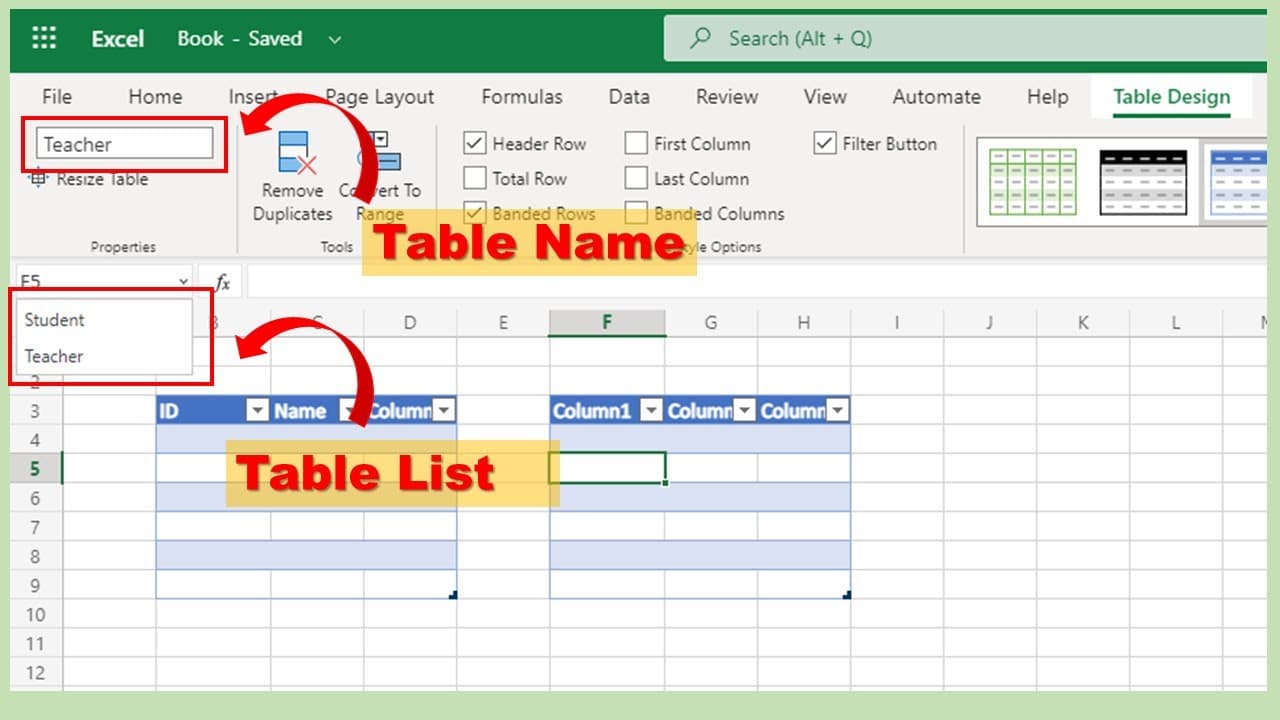
To name a table, click anywhere within the table to activate the Table Design tab. In this tab, you will see the option for naming your table. For example, you can change the default name "Table1" to something descriptive like "Students" or "Teachers" by typing directly into the “Table Name” field.
Q: How can I view all the tables in an Excel file?
You can easily view all the tables in your Excel file by clicking on the name box located above cell A1. Clicking the dropdown arrow will display a list of all tables present in the workbook. Selecting a table from this list will automatically highlight the corresponding area in the worksheet.
Q: What is the purpose of using Power Flow in Microsoft 365?
Power Flow is a tool that allows users to automate workflows within Microsoft 365. For example, it can be used to automatically save form submissions directly into an Excel table. This automation can save time and reduce manual data entry, enhancing efficiency in data management.
Summary & Key Takeaways
-
This video tutorial demonstrates the step-by-step process of inserting a table into Excel, including selecting the desired cell and defining header rows.
-
It explains how to name the tables effectively using the Table Design feature, as well as how to quickly access different tables from the name box dropdown menu.
-
The tutorial concludes with a hint about the next video, which will cover Microsoft 365's Power Flow for saving form information into Excel tables.
Read in Other Languages (beta)
Share This Summary 📚
Summarize YouTube Videos and Get Video Transcripts with 1-Click
Try YouTube Summary with ChatGPT & Claude or YouTube Transcript Generator
Explore More Summaries from E Micro Tech 📚

Summarize YouTube Videos and Get Video Transcripts with 1-Click
Try YouTube Summary with ChatGPT & Claude or YouTube Transcript Generator