DIY Thermal Camera using AMG8833 Thermal Image Array Temperature Sensor & Raspberry Pi
TL;DR
This video demonstrates how to build a thermal camera using affordable components like Raspberry Pi and the AMG 8823 thermal image sensor.
Transcript
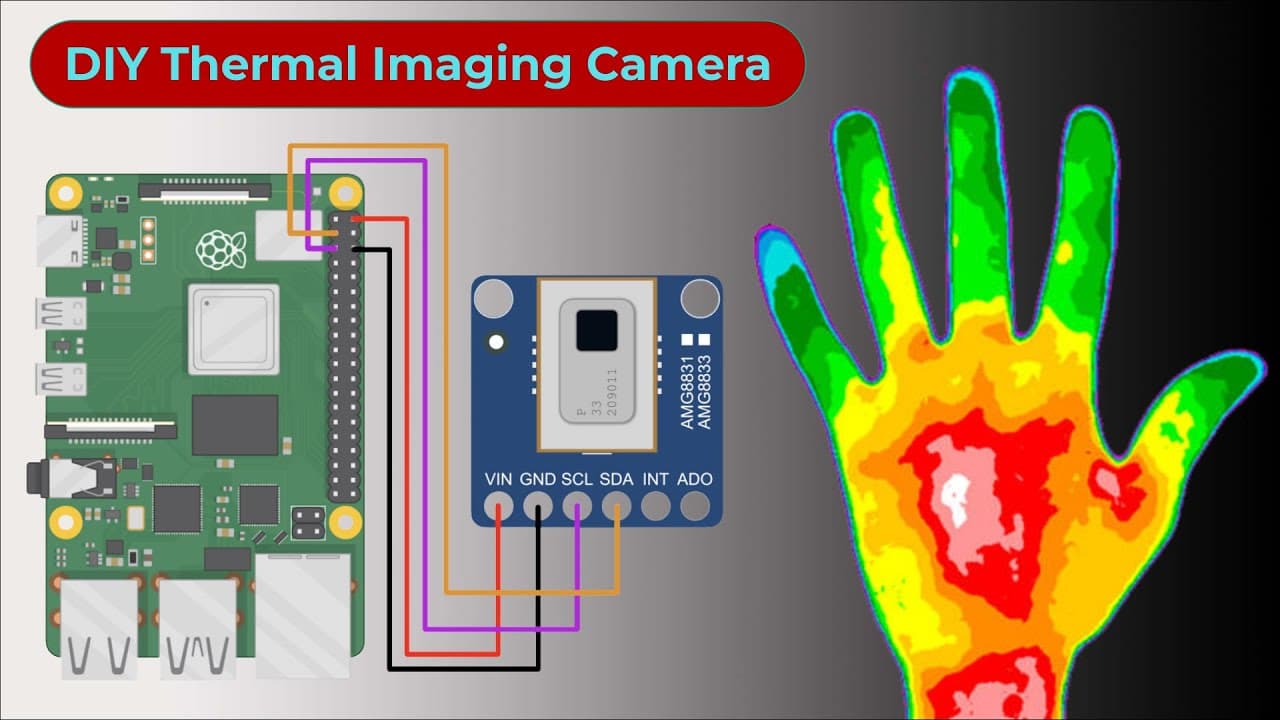
this is the AMG 8823 thermal image added temperature sensor from Panasonic using this sensor you can build a thermal camera and detect an object on the basis of heat emitted by it thermal cameras are widely used for a variety of applications such as detecting temperature anomalies monitoring thermal performance and even capturing thermal images how... Read More
Key Insights
- 🎥 Thermal cameras have various practical applications, including temperature anomaly detection and thermal imaging.
- 🟠 The AMG 8823 thermal image sensor offers 8x8 resolution and a temperature range of 0°C to 80°C.
- 🏛️ Building a DIY thermal camera using Raspberry Pi and affordable components is a cost-effective alternative.
- 🤌 The AMG 8823 sensor can be easily connected to the Raspberry Pi, and the 7-inch LCD display provides a convenient viewing experience.
- ☠️ Enabling I2C communication and configuring the sampling rate are necessary steps for using the sensor.
- 📚 The Adafruit Python GPIO library and modified AMG 8823 library provide different methods for visualizing thermal images.
- 🪡 The cost of commercial thermal cameras is mainly due to the expensive lens, circuitry, and the need for materials like germanium or charcoal genads.
Install to Summarize YouTube Videos and Get Transcripts
Explore YouTube Video Summarizer or Get YouTube Transcript Extractor
Questions & Answers
Q: What are some applications of thermal cameras?
Thermal cameras can be used for detecting temperature anomalies, monitoring thermal performance, capturing thermal images, and detecting heat leaks in walls.
Q: Why are thermal cameras expensive?
The high cost of thermal cameras is due to the expensive materials required for detecting higher waves and the complicated lens and circuitry.
Q: What are the specifications of the 7-inch LCD display?
The 7-inch LCD display has a resolution of 1024x600 pixels, a working voltage of DC 5V, and a rated power of 3.5 watts. It also features Five Point touch control.
Q: How can I visualize the thermal images captured by the DIY thermal camera?
There are two methods demonstrated in the video. One method uses the Adafruit Python GPIO library, Pi game, and sci-fi to display the thermal images. The other method involves modifying the AMG 8823 library and using Matplotlib and SciPy for better visualization.
Key Insights:
- Thermal cameras have various practical applications, including temperature anomaly detection and thermal imaging.
- The AMG 8823 thermal image sensor offers 8x8 resolution and a temperature range of 0°C to 80°C.
- Building a DIY thermal camera using Raspberry Pi and affordable components is a cost-effective alternative.
- The AMG 8823 sensor can be easily connected to the Raspberry Pi, and the 7-inch LCD display provides a convenient viewing experience.
- Enabling I2C communication and configuring the sampling rate are necessary steps for using the sensor.
- The Adafruit Python GPIO library and modified AMG 8823 library provide different methods for visualizing thermal images.
- The cost of commercial thermal cameras is mainly due to the expensive lens, circuitry, and the need for materials like germanium or charcoal genads.
- The DIY thermal camera project detailed in the video can be replicated by following the instructions, source code, and guide provided on the How To Electronics website.
Summary & Key Takeaways
-
The video explains how thermal cameras are used for various applications and their high cost.
-
It introduces the AMG 8823 thermal image sensor and its features, including resolution, temperature range, and cost.
-
It demonstrates the process of assembling the Raspberry Pi, 7-inch LCD display, and AMG 8823 sensor to create a DIY thermal camera.
Read in Other Languages (beta)
Share This Summary 📚
Summarize YouTube Videos and Get Video Transcripts with 1-Click
Try YouTube Summary with ChatGPT & Claude or YouTube Transcript Generator
Explore More Summaries from How To Electronics 📚
Summarize YouTube Videos and Get Video Transcripts with 1-Click
Try YouTube Summary with ChatGPT & Claude or YouTube Transcript Generator