Products
Features
YouTube Video Summarizer
Summarize YouTube videos
Web & PDF Highlighter
Highlight web pages & PDFs
Chat with PDF
Ask any PDF questions with AI
Ask AI Clone
Chat with your highlights & memories
Audio Transcriber
Transcribe audio files to text
Glasp Reader
Read and highlight articles
Kindle Highlight Export
Export your Kindle highlights
Idea Hatch
Hatch ideas from your highlights
Integrations
Obsidian Plugin
Notion Integration
Pocket Integration
Instapaper Integration
Medium Integration
Readwise Integration
Snipd Integration
Hypothesis Integration
Apps & Extensions
Chrome Extension
Safari Extension
Edge Add-ons
Firefox Add-ons
iOS App
Android App
Discover
Discover
Ideas
Discover new ideas and insights
Articles
Curated articles and insights
Books
Book recommendations by great minds
Posts
Essays and notes from readers
Quotes
Inspiring quotes collection
Videos
Curated videos and summaries
Explore Glasp
Glasp Newsletter
Weekly insights and updates
Glasp Talk
Interview series with great minds
Glasp Blog
Latest news and articles
Glasp Use Cases
Learn how others use Glasp
Build & Support
Glasp API
Access Glasp's API for developers
MCP Connector
Connect Glasp to Claude & ChatGPT
Community
Glasp Reddit Community
Students
Student discount and benefits
FAQs
Frequently Asked Questions
AboutPricing
DashboardLog inSign up

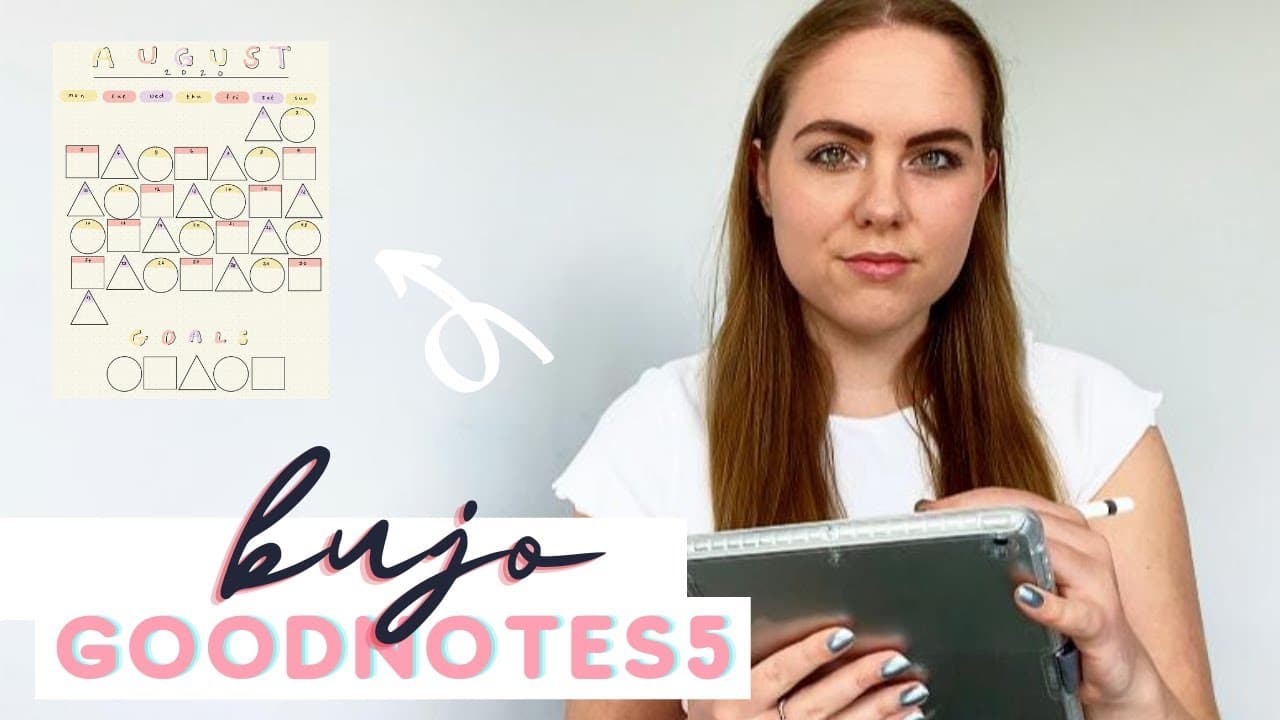
Digital Plan With Me August 2020 iPad GoodNotes 5 | PhD Student Bullet Journal Setup
August 1, 2020
by
PhD and Productivity
YouTube video player
Digital Plan With Me August 2020 iPad GoodNotes 5 | PhD Student Bullet Journal Setup

TL;DR

In this video, the content creator shares their digital bullet journal setup for August 2020 using the Apple iPad, GoodNotes 5 app, and an Apple Pencil.

Transcript

hello everyone and welcome back to my channel today i'm going to be sharing with you my digital bullet journal setup for august 2020 i'm using the apple ipad in the 10.2 inch the standard ipad and i also use the goodnotes 5 app and an apple pencil i'll have everything linked down below if you're interested if you want to see a specific spread i hav... Read More

Key Insights

  • 😀 The Apple iPad and GoodNotes 5 app provide an efficient and convenient way to create a digital bullet journal setup.
  • 🪜 The content creator's geometric theme adds a unique touch to their monthly layout.
  • ♿ Access to the content creator's exclusive PDF of spreads is a valuable resource for members.
  • 👻 Time blocking in the weekly spread allows for effective planning and organization.
  • 🚄 Customizability is an important aspect of the digital bullet journal setup, catering to individual preferences.
  • 👤 The habit tracker helps users track their progress and maintain healthy habits.
  • 🫠 The papers to read spread assists in organizing and managing academic or research-related tasks.

Install to Summarize YouTube Videos and Get Transcripts

Explore YouTube Video Summarizer or Get YouTube Transcript Extractor

Questions & Answers

Q: What tools does the content creator use for their digital bullet journal setup?

The content creator uses the Apple iPad, GoodNotes 5 app, and an Apple Pencil for their digital bullet journal setup.

Q: How can viewers access the spreads created by the content creator?

Viewers can access the spreads by joining the content creator's membership community, where they will receive a new version of the spreads every month.

Q: Can the spreads be customized to suit individual preferences?

Yes, the spreads can be customized by viewers using GoodNotes 5, allowing them to personalize their own digital bullet journal setup.

Q: How does the habit tracker work in the digital bullet journal setup?

The habit tracker consists of different calendars for each habit, and viewers can fill in each day once they have completed the habit. The goal is to have a fully colored-in calendar by the end of the month.

Summary & Key Takeaways

  • The content creator showcases their color palette for the month and explains their geometric theme for the monthly layout.

  • They demonstrate how to create a monthly layout, habit tracker, weekly overviews, and other spreads using GoodNotes 5.

  • The content creator offers access to their exclusive PDF of all the spreads for their members and provides a preview of how they use the spreads.


Read in Other Languages (beta)

English

Share This Summary 📚

Summarize YouTube Videos and Get Video Transcripts with 1-Click

Download browser extensions on:

Try YouTube Summary with ChatGPT & Claude or YouTube Transcript Generator

Explore More Summaries from PhD and Productivity 📚
Sunday Reset Vlog - My Productive Weekly Cleaning and Planning Routine thumbnail
Sunday Reset Vlog - My Productive Weekly Cleaning and Planning Routine
PhD and Productivity
What Are the Different Types of Machine Learning? thumbnail
What Are the Different Types of Machine Learning?
PhD and Productivity
March 2022 Reset - Goals, Planning, Budgeting - Get Organised With Me thumbnail
March 2022 Reset - Goals, Planning, Budgeting - Get Organised With Me
PhD and Productivity
Pros and Cons of Doing a PhD in Lockdown / Online PhD Student Advice thumbnail
Pros and Cons of Doing a PhD in Lockdown / Online PhD Student Advice
PhD and Productivity
PhD Student Advice: Starting 2nd Year | Livestream Q&A with a Computer Science PhD Student thumbnail
PhD Student Advice: Starting 2nd Year | Livestream Q&A with a Computer Science PhD Student
PhD and Productivity
PhD Student Life Update - why I haven't been making videos - PhD Project Pipeline thumbnail
PhD Student Life Update - why I haven't been making videos - PhD Project Pipeline
PhD and Productivity

Summarize YouTube Videos and Get Video Transcripts with 1-Click

Download browser extensions on:

Try YouTube Summary with ChatGPT & Claude or YouTube Transcript Generator

Apps & Extensions

  • Chrome Extension
  • Safari Extension
  • Edge Add-ons
  • Firefox Add-ons
  • iOS App
  • Android App

Key Features

  • YouTube Video Summarizer
  • Web & PDF Summarizer
  • Web & PDF Highlighter
  • Chat with PDF
  • Ask AI Clone
  • Audio Transcriber
  • Glasp Reader
  • Kindle Highlight Export
  • Idea Hatch

Integrations

  • Obsidian Plugin
  • Notion Integration
  • Pocket Integration
  • Instapaper Integration
  • Medium Integration
  • Readwise Integration
  • Snipd Integration
  • Hypothesis Integration

More Features

  • APIs
  • MCP Connector
  • Blog & Post
  • Embed Links
  • Image Highlight
  • Personality Test
  • Quote Shots

Company

  • About us
  • Blog
  • Community
  • FAQs
  • Job Board
  • Newsletter
  • Pricing
Terms

•

Privacy

•

Guidelines

© 2026 Glasp Inc. All rights reserved.