How to digitally sign a pdf with adobe reader dc
TL;DR
This content explains methods for signing PDF documents digitally.
Transcript
hello today i will show you how to sign a pdf document may you open a pdf document with a pdf reader and the document is not edible so you want to sign it you have two options one option is use on the right side you have field on the side and another option is here on top manual you also have the field and sign here you can use this one it's the sa... Read More
Key Insights
- 👤 Digital signing of PDF documents can be accomplished through built-in features of a PDF reader, making it accessible for users.
- 👻 Customization of the signature allows for personalization, enabling users to choose font styles or draw their signatures.
- 😒 The video explains the convenience of saving signatures within the PDF reader for repeated use across multiple documents.
- 🔒 There are security risks associated with digital signatures, as they can be easily copied if not properly protected.
- 🫥 Using a digital signature provides an additional layer of authenticity compared to simply inserting a visible signature.
- 📼 The video sets the stage for further discussion on how to create verifiable digital signatures for enhanced security.
- 🥺 Understanding the tools available within PDF readers can lead to more efficient document management and processing.
Install to Summarize YouTube Videos and Get Transcripts
Explore YouTube Video Summarizer or Get YouTube Transcript Extractor
Questions & Answers
Q: What are the two main methods to sign a PDF document mentioned in the video?
The video outlines two primary methods for signing a PDF document: using the designated signature fields found on the side panel, and accessing the sign options available at the top of the PDF reader. Both methods lead to similar functionalities, allowing users to create and insert their digital signatures.
Q: How can users customize their signatures in a PDF document?
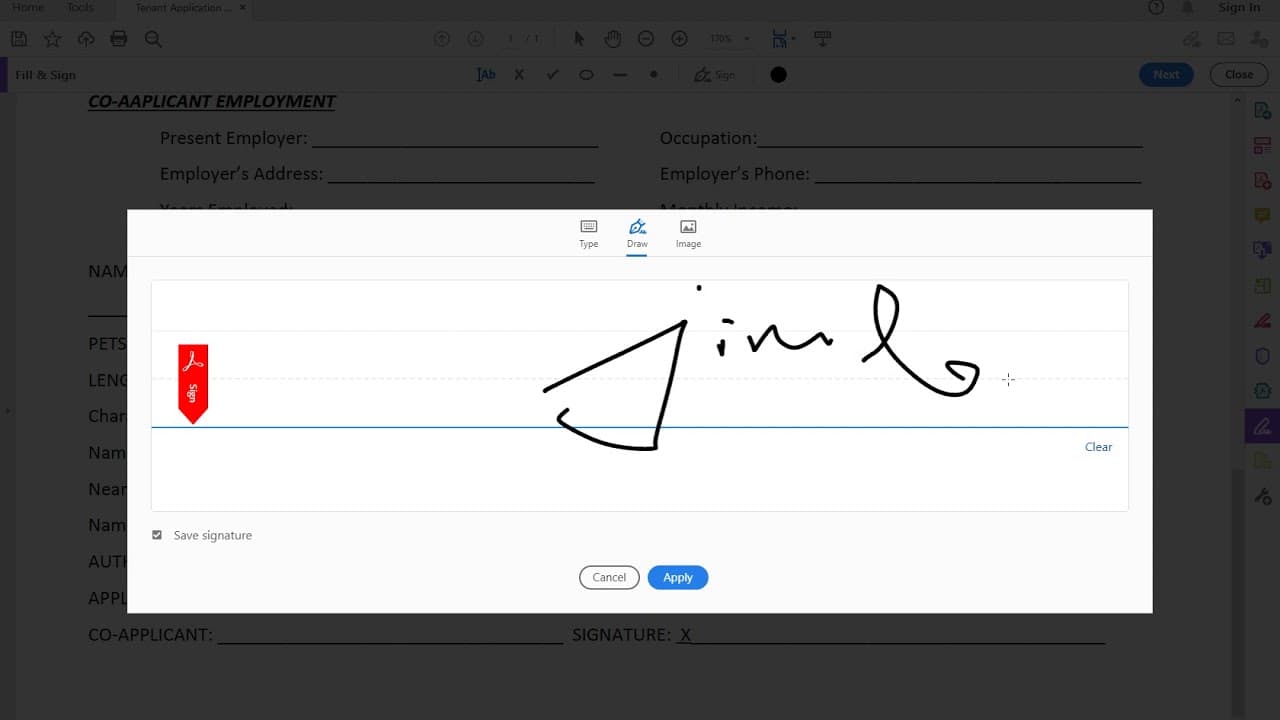
Users can customize their signatures by clicking the ‘sign’ button which presents the ‘add signature’ options. Here, they can type their name and choose from several font styles. Additionally, the option to draw their signature using a mouse or touch screen is available, providing flexibility in how the signature appears.
Q: What precautions should users take regarding the security of their signatures?
Users need to be cautious as digital signatures can be vulnerable to unauthorized capture. Recipients could potentially take a screenshot of the signature and use it elsewhere. The video emphasizes the importance of creating a document with a digital signature to ensure authenticity, ensuring that it can be verified as genuine.
Q: Will the signature once created be available for future PDF documents?
Yes, once a signature is created and applied in the PDF reader, it saves for future use. This means the user can easily access and utilize the same signature on any other PDF document they need to sign, enhancing efficiency during the signing process.
Summary & Key Takeaways
-
The video provides a step-by-step guide for digitally signing a PDF document using available tools within a PDF reader.
-
Users can create their signature by typing, selecting stylistic options, or drawing it manually with a mouse or tablet.
-
It also highlights the importance of safeguarding digital signatures against unauthorized reuse.
Read in Other Languages (beta)
Share This Summary 📚
Summarize YouTube Videos and Get Video Transcripts with 1-Click
Try YouTube Summary with ChatGPT & Claude or YouTube Transcript Generator
Explore More Summaries from E Micro Tech 📚

Summarize YouTube Videos and Get Video Transcripts with 1-Click
Try YouTube Summary with ChatGPT & Claude or YouTube Transcript Generator