How to Model and Simulate a Robotic Arm in MATLAB
TL;DR
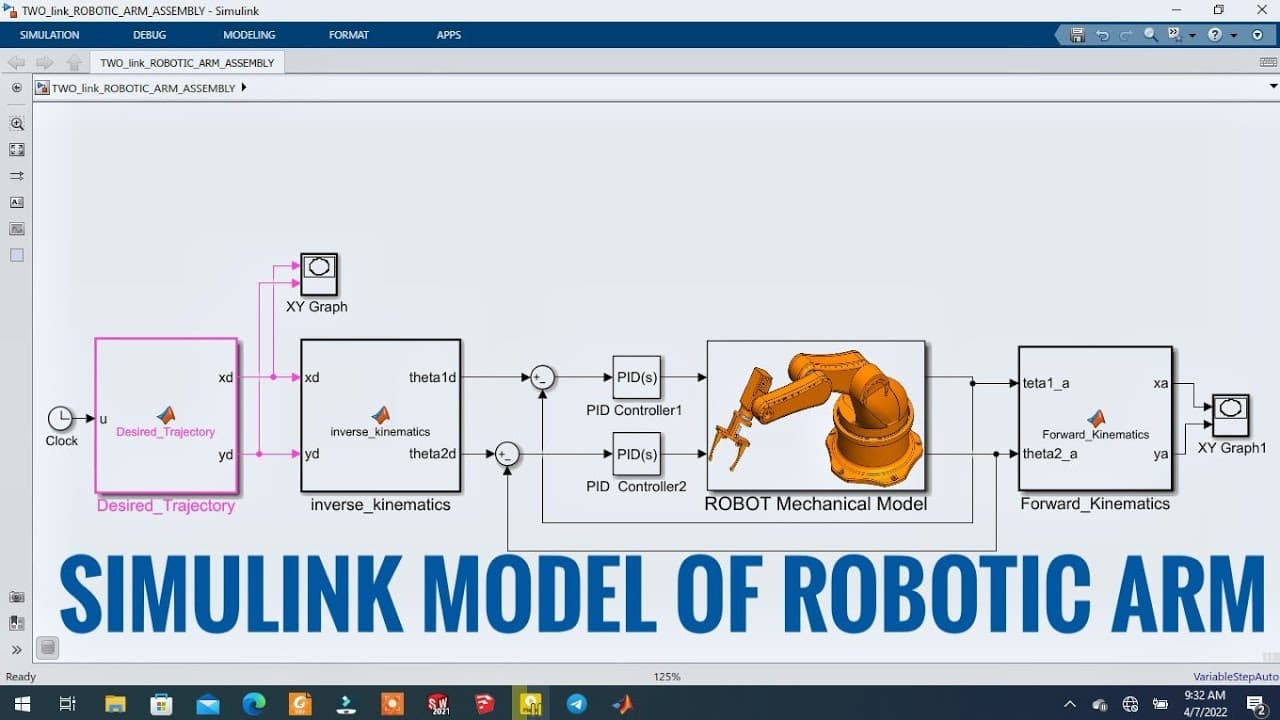
This video details the process of modeling a tooling planner robotic arm in SOLIDWORKS and exporting it to MATLAB using SimScape Multibody Links. A control algorithm is built in MATLAB for simulating the robot's behavior, requiring no advanced MATLAB knowledge for viewers.
Transcript
hello folks welcome to empty junk here in this video we come up with an interesting mechatronics project that is a tooling planner robotic arm so to do this first we will model it using solox we will export the model into matlab using simscape multibody links so that we can build a control algorithm and simulate the real behavior of the robots both... Read More
Key Insights
- 🦾 The video showcases the modeling and simulation of a tooling planner robotic arm using SOLIDWORKS, MATLAB, and Simulink.
- 🥳 The process involves creating individual parts, assembling them, and exporting the model into MATLAB using SimScape Multibody Links.
- 🤖 A control algorithm is developed in MATLAB to simulate the behavior of the robot arm, and real-time graphical simulation is achieved using MATLAB Explorer.
- 🎁 The video emphasizes that no in-depth knowledge of MATLAB is necessary to understand the concepts presented.
Install to Summarize YouTube Videos and Get Transcripts
Explore YouTube Video Summarizer or Get YouTube Transcript Extractor
Questions & Answers
Q: What is the purpose of modeling and simulation in robotics?
Modeling and simulation allows engineers to design and test robotics systems virtually before building physical prototypes. It helps in understanding the behavior and performance of robots in different scenarios, optimizing their design, and testing control algorithms.
Q: How is the robot arm modeled using SOLIDWORKS?
The video demonstrates the process of creating individual parts of the robot arm using SOLIDWORKS, starting with sketching and extruding features. The parts are assembled in the assembly workspace, ensuring proper mating and connections.
Q: What control algorithm is used for simulating the robot's behavior?
The control algorithm implemented in MATLAB utilizes a clock signal to determine the desired trajectory of the robot arm. Inverse kinematics is used to calculate the robot's angular positions based on the desired trajectory, and a PID controller is employed to minimize the error between the desired and actual positions.
Q: Can the simulation results be visualized in real-time?
Yes, MATLAB Explorer is used to simulate the robot arm's behavior graphically in real-time. This allows for a better understanding of how the robot moves and performs based on the control algorithm.
Key Insights:
- The video showcases the modeling and simulation of a tooling planner robotic arm using SOLIDWORKS, MATLAB, and Simulink.
- The process involves creating individual parts, assembling them, and exporting the model into MATLAB using SimScape Multibody Links.
- A control algorithm is developed in MATLAB to simulate the behavior of the robot arm, and real-time graphical simulation is achieved using MATLAB Explorer.
- The video emphasizes that no in-depth knowledge of MATLAB is necessary to understand the concepts presented.
- The combination of modeling, simulation, and control algorithms enables engineers to optimize robot design, test different scenarios, and validate performance before physical implementation.
Summary & Key Takeaways
-
The video showcases the step-by-step process of modeling a tooling planner robotic arm using SOLIDWORKS and exporting it to MATLAB with SimScape Multibody Links.
-
The control algorithm for simulating the behavior of the robot is built in MATLAB, and the real-time graphical simulation is done using MATLAB Explorer.
-
No in-depth knowledge of MATLAB is required to understand the content.
-
The video also covers the assembly of the robot, including creating individual parts using SOLIDWORKS and importing them into the assembly.
Read in Other Languages (beta)
Share This Summary 📚
Summarize YouTube Videos and Get Video Transcripts with 1-Click
Try YouTube Summary with ChatGPT & Claude or YouTube Transcript Generator