How to Calculate Mean, Median, Mode, and Range in Excel?
TL;DR
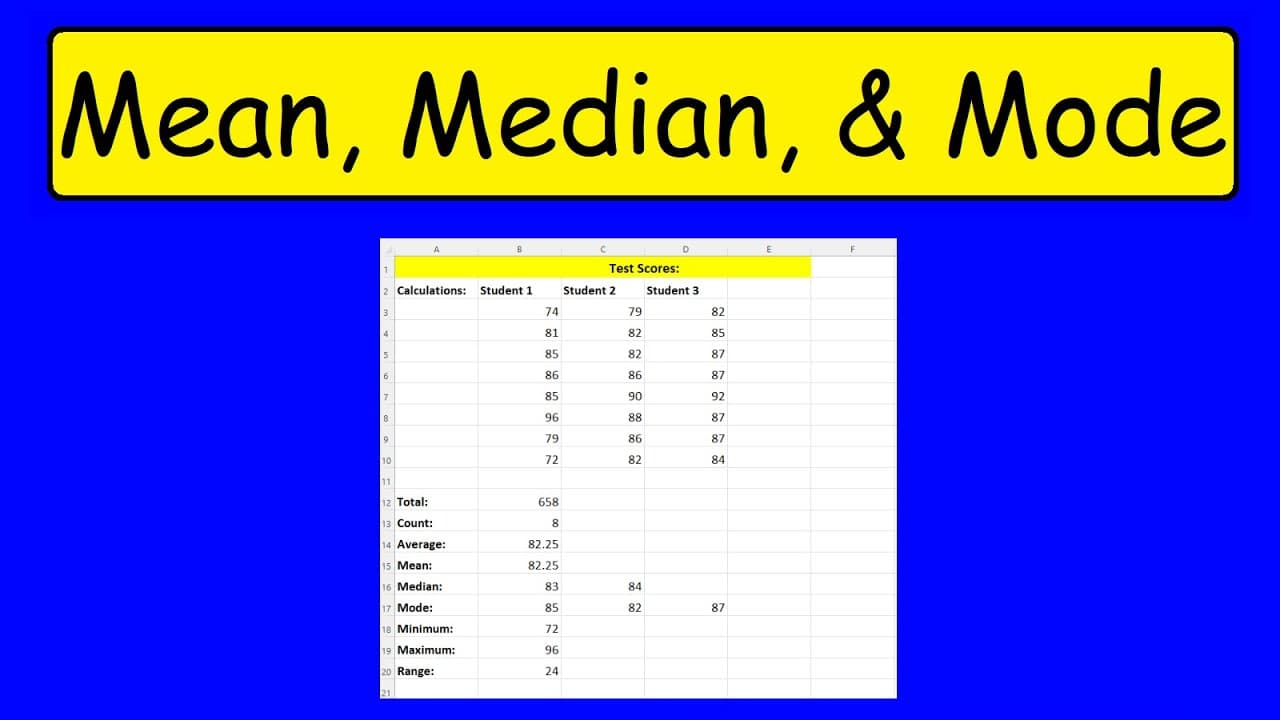
To calculate the mean, median, mode, and range in Excel, use the AVERAGE, MEDIAN, MODE, MIN, and MAX functions. The mean is the sum divided by the count of numbers, the median is the middle value of an ordered dataset, the mode is the most frequently occurring number, and the range is the difference between the maximum and minimum values.
Transcript
in this video we're going to talk about how to calculate the mean the median the mode and the range as well so we have the test scores of three different students and we're going to calculate the average first to calculate the average the average is the sum divided by the number of numbers or the number of test scores in this column so let's calcul... Read More
Key Insights
- 🍹 The average (mean) is calculated by dividing the sum of numbers by the count.
- 🖕 The median is the middle value, which changes depending on the size of the dataset.
- ✋ The mode is the number with the highest frequency in a dataset.
- ❓ Excel provides formulas (AVERAGE, MEDIAN, MODE) that make it easy to calculate these measures.
- 😘 The range is obtained by finding the difference between the highest and lowest values in a set of numbers.
- 🧡 Excel does not have a specific formula for range, but it can be calculated using the MIN and MAX formulas.
- ❓ Understanding these statistical measures is essential in data analysis and decision-making.
Install to Summarize YouTube Videos and Get Transcripts
Explore YouTube Video Summarizer or Get YouTube Transcript Extractor
Summary & Key Takeaways
-
The average (mean) of a set of numbers can be calculated by dividing the sum of the numbers by the count of numbers.
-
The median is the middle number in an ordered set of numbers. If there is an even count, the median is the average of the two middle numbers.
-
The mode is the number that appears most frequently in a set of data.
-
The range is the difference between the highest and lowest values in a set of numbers.
Read in Other Languages (beta)
Share This Summary 📚
Summarize YouTube Videos and Get Video Transcripts with 1-Click
Try YouTube Summary with ChatGPT & Claude or YouTube Transcript Generator
Explore More Summaries from The Organic Chemistry Tutor 📚
Summarize YouTube Videos and Get Video Transcripts with 1-Click
Try YouTube Summary with ChatGPT & Claude or YouTube Transcript Generator