How to build an AI chatbot: step-by-step guided walkthrough tutorial
TL;DR
Learn how to create a simple chat bot using Bot Press, with step-by-step instructions and examples.
Transcript
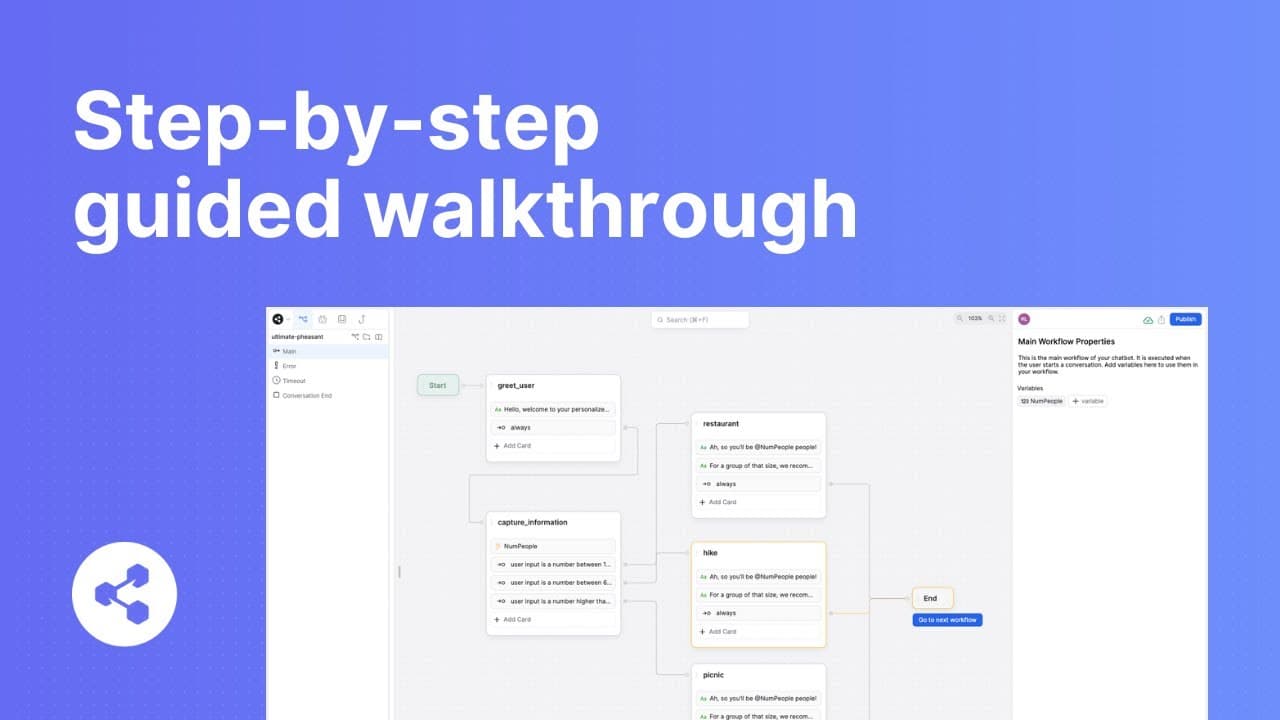
in this video I'm going to show you how to build a basic chat bot using bot press if you want to learn more about any of the terms I'll use throughout this video be sure to check out our dictionary playlist linked below the first thing I'll do from my bot press dashboard is Click create chatbot for the purposes of this video I'm going to start from... Read More
Key Insights
- 🇧🇼 Bot Press is a platform for building chat bots, providing a graphical interface and AI capabilities.
- 😫 Creating a chat bot involves setting up nodes, transitions, and capturing information from the user.
- 🎴 Flow logic cards can be used to segment the user's path and provide personalized recommendations.
- 👤 Variables can be used to store user responses and reference them later in the conversation flow.
- 🇧🇼 The chat bot can be tested using the emulator provided by Bot Press.
- 🇧🇼 This tutorial only scratches the surface of what is possible with Bot Press, with additional resources available for advanced features and integrations.
- 🇧🇼 Bot Press automates conversations, making it easier for developers to build chat bots.
Install to Summarize YouTube Videos and Get Transcripts
Explore YouTube Video Summarizer or Get YouTube Transcript Extractor
Questions & Answers
Q: What is Bot Press and how does it work?
Bot Press is a platform for building chat bots. It provides a graphical interface where you can create nodes and define the flow of conversations. It uses AI to handle logic and responses, making it easier for developers to automate conversations.
Q: How can I start building a chat bot in Bot Press?
To start building a chat bot in Bot Press, you need to create a new chat bot from the dashboard. You can choose to start from a blank canvas or follow a guided tutorial. The video recommends following the guided tutorial if you are new to Bot Press.
Q: What is the purpose of the start and end nodes in Bot Press?
The start and end nodes define the boundaries of the conversation flow. Everything that happens during the user's conversation is handled between these two nodes. The start node is where the chat bot greets the user, and the end node is where the conversation concludes.
Q: How can I capture information from the user in Bot Press?
To capture information, you can create a node and use the appropriate capture card, such as the number card in this example. You can set up the question to ask the user and define a variable to store their response. This allows you to reference the information later in the conversation flow without asking the user again.
Q: How can I recommend different activities based on the user's response?
In Bot Press, you can use flow logic cards to divert the user's path based on their answer. In this example, three different expression cards are used to segment the flow based on the number range. Each option leads to a separate recommendation node, where a message is sent with the appropriate recommendation.
Key Insights:
- Bot Press is a platform for building chat bots, providing a graphical interface and AI capabilities.
- Creating a chat bot involves setting up nodes, transitions, and capturing information from the user.
- Flow logic cards can be used to segment the user's path and provide personalized recommendations.
- Variables can be used to store user responses and reference them later in the conversation flow.
- The chat bot can be tested using the emulator provided by Bot Press.
- This tutorial only scratches the surface of what is possible with Bot Press, with additional resources available for advanced features and integrations.
- Bot Press automates conversations, making it easier for developers to build chat bots.
- The end node is where the conversation concludes, with a final message sent to the user.
Summary & Key Takeaways
-
The video provides a guided tutorial on creating a basic chat bot using Bot Press.
-
The chat bot starts with a greeting message and then asks the user about the number of people going on a trip.
-
Based on the user's response, the chat bot recommends different activities and provides personalized recommendations.
-
The tutorial covers setting up nodes, transitions, capturing information, and creating flow logic.
Read in Other Languages (beta)
Share This Summary 📚
Summarize YouTube Videos and Get Video Transcripts with 1-Click
Try YouTube Summary with ChatGPT & Claude or YouTube Transcript Generator
Explore More Summaries from Botpress 📚
Summarize YouTube Videos and Get Video Transcripts with 1-Click
Try YouTube Summary with ChatGPT & Claude or YouTube Transcript Generator