How To Implement A Chatbot For Your Webinar Campaign
TL;DR
Natasha Takahashi explains integrating chatbots into webinar campaigns to boost engagement and conversions.
Transcript
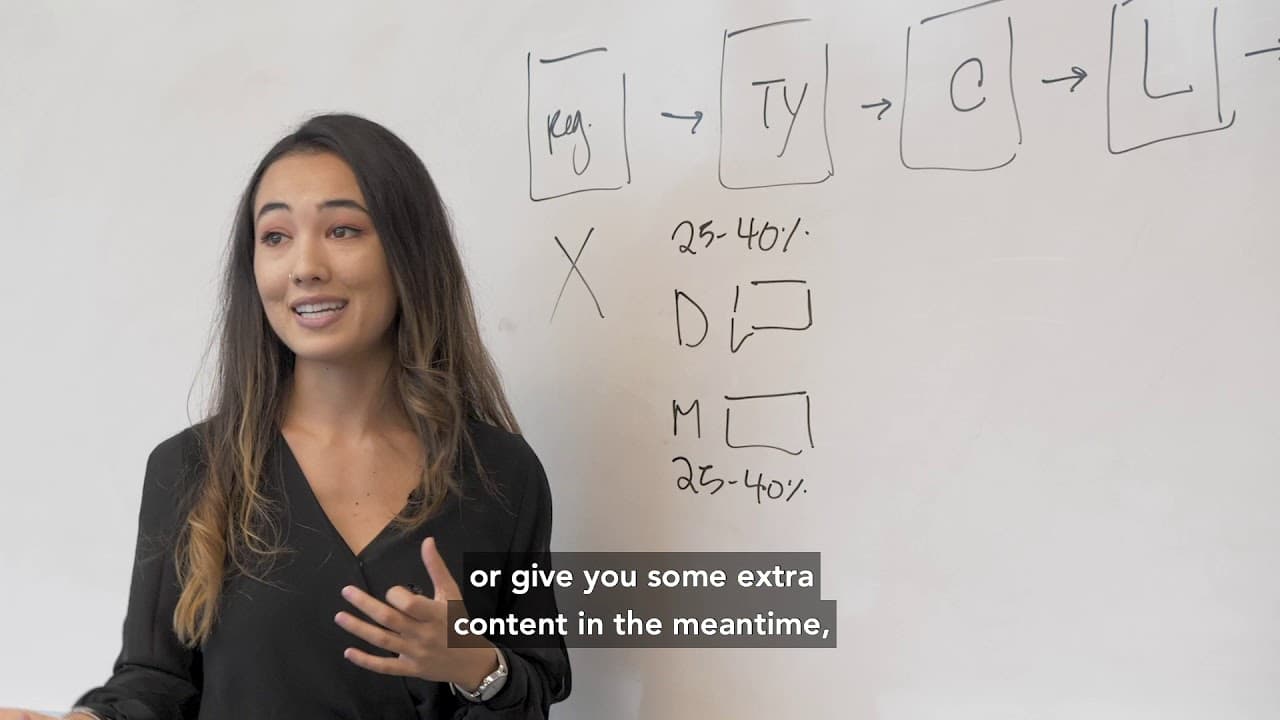
hey guys I'm Natasha takahashi co-founder and chief marketing officer at school bots and in this video I'm gonna walk you through how to implement a chopped-up for your webinar campaign let's get into it so any given webinar is probably gonna have the following steps we've got our registration page which I'm gonna write reg we've got our Thank You ... Read More
Key Insights
- Webinar campaigns typically include a registration page, Thank You page, countdown page, live webinar, and replay, followed by a follow-up sequence via email or SMS.
- The primary goal on the registration page is to capture contact details, preferably without a chatbot to avoid distractions from the main call-to-action.
- On the Thank You page, a chat widget can be added on desktop, achieving a 25-40% opt-in rate by offering workbooks or reminders.
- For mobile users, a button linked to a ref URL can direct them to the Facebook Messenger app, maintaining engagement and interaction.
- The countdown page can have chat widgets on both desktop and mobile, capturing additional opt-ins before the live webinar starts.
- During the live webinar, a desktop chat widget on Messenger is recommended, while a website bot is suggested for mobile to keep users engaged without leaving the page.
- Replay pages follow a similar strategy to live webinars, using chat widgets to maintain engagement and facilitate follow-up communications.
- Post-webinar follow-ups can include up to six messages, potentially increasing conversion rates by two to three times compared to email follow-ups.
Install to Summarize YouTube Videos and Get Transcripts
Explore YouTube Video Summarizer or Get YouTube Transcript Extractor
Questions & Answers
Q: What are the main stages of a typical webinar campaign?
A typical webinar campaign includes several key stages: the registration page where users sign up, the Thank You page that confirms their registration, a countdown page for early joiners, the live webinar itself, and a replay page for those who missed the live event. Each stage offers opportunities for engagement and interaction.
Q: Why is it recommended not to use a chatbot on the registration page?
It is recommended not to use a chatbot on the registration page to avoid distracting users from the main call-to-action, which is to register for the webinar. The primary focus should be on capturing essential contact information, such as email or phone number, without any additional elements that might reduce conversion rates.
Q: How can chatbots be effectively used on the Thank You page?
On the Thank You page, chatbots can be effectively used by adding a chat widget on desktop, which typically achieves a 25-40% opt-in rate. This can be used to offer users additional resources, such as workbooks or reminders, enhancing their experience and maintaining engagement post-registration.
Q: What is the role of ref URLs in mobile chatbot implementation?
Ref URLs are crucial in mobile chatbot implementation as they direct users to the Facebook Messenger app, ensuring a seamless interaction experience. By converting these URLs into deep links, users are taken directly to the app rather than a web page, facilitating easier engagement and reducing friction in the opt-in process.
Q: How do chat widgets contribute to engagement during the live webinar?
During the live webinar, chat widgets on desktop, particularly through Messenger, provide an easy opt-in opportunity for users to interact and ask questions. For mobile users, using a website bot is suggested to ensure they can engage without leaving the webinar page, maintaining their focus and enhancing the overall experience.
Q: What strategies are recommended for the replay page?
The replay page should employ similar strategies to the live webinar, using chat widgets to capture additional opt-ins. This approach ensures that users who missed the live event can still engage and receive follow-up communications, maintaining the momentum of the campaign and increasing conversion opportunities.
Q: How can follow-up messages enhance webinar campaign success?
Follow-up messages, limited to six to avoid user annoyance, can significantly enhance webinar campaign success by providing additional value, reminders, and promotional offers. These messages can be strategically timed to maintain engagement and lead to conversion increases, making them a critical component of the overall strategy.
Q: What impact do follow-up messages have on conversion rates?
Follow-up messages can lead to a two to three times increase in conversion rates compared to traditional email follow-ups. By maintaining engagement and providing timely, relevant content, these messages help convert interested users into customers, demonstrating the effectiveness of integrating chatbots into webinar campaigns.
Summary & Key Takeaways
-
Natasha Takahashi outlines a comprehensive strategy for integrating chatbots into webinar campaigns, emphasizing the importance of capturing contact information efficiently while maintaining user engagement. Key stages include the registration, Thank You, countdown, live webinar, and replay pages, each with tailored chatbot implementations.
-
The strategy involves using chat widgets on desktop and buttons on mobile to facilitate easy opt-ins and interaction. Special attention is given to ensuring seamless transitions for mobile users, particularly through the use of ref URLs that direct users to Facebook Messenger.
-
Post-webinar follow-ups are crucial, with up to six messages recommended to enhance user experience and boost conversion rates. These follow-ups, when executed effectively, can lead to significant increases in conversion rates, making the chatbot integration a valuable component of any webinar campaign.
Read in Other Languages (beta)
Share This Summary 📚
Summarize YouTube Videos and Get Video Transcripts with 1-Click
Try YouTube Summary with ChatGPT & Claude or YouTube Transcript Generator
Explore More Summaries from DigitalMarketer 📚
Summarize YouTube Videos and Get Video Transcripts with 1-Click
Try YouTube Summary with ChatGPT & Claude or YouTube Transcript Generator