My Minimal iPhone Setup: Full Customisation Guide for iOS & iPad!
TL;DR
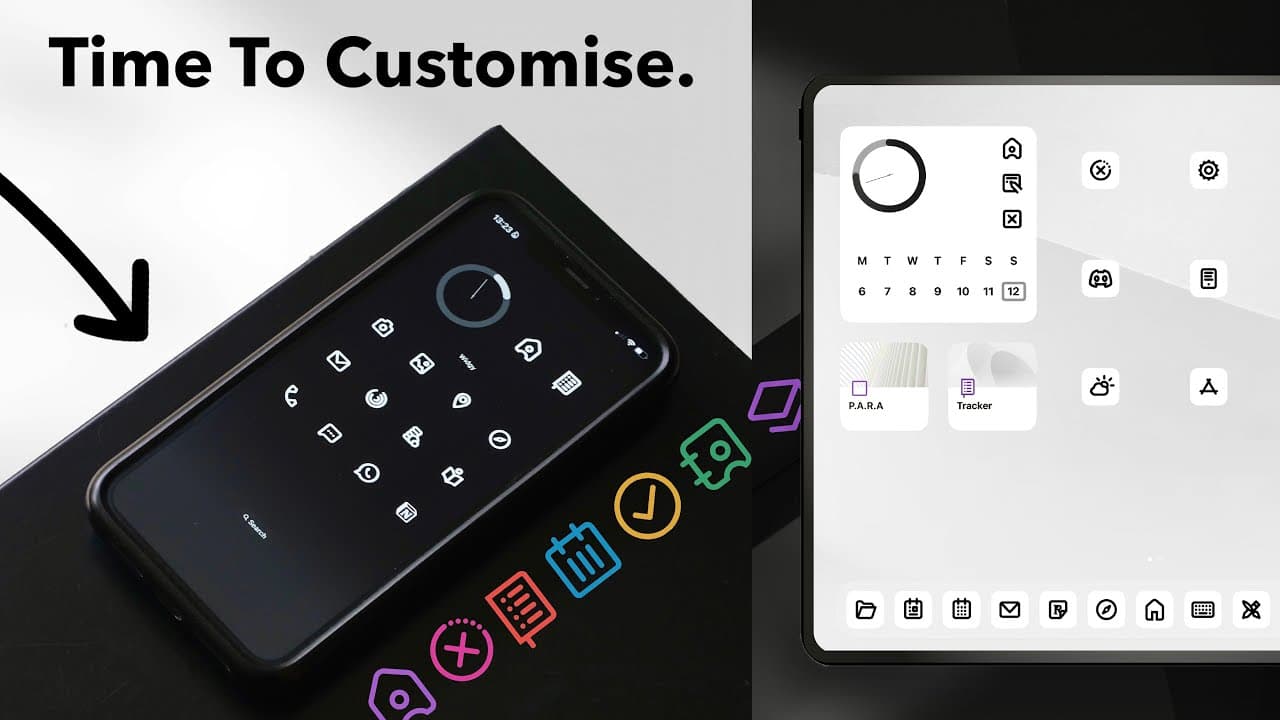
Learn how to create minimalistic designs for your iPhone and iPad using custom icons and widgets.
Transcript
want to know how to make your iPad and iPhone look like this in this video I'll show you the minimal iPhone and iPad designs I've created in iOS 16 and exactly how you can get this look yourself for a truly custom home screen aesthetic that I think looks awesome we'll cover everything you need to know from customization hacks the apps that could he... Read More
Key Insights
- 👀 The introduction of iOS 16 welcomes enhanced customization options, appealing to users looking for personalized device aesthetics.
- 🥺 Collaborations between graphic designers and content creators can lead to unique product offerings, like custom icon packs that fulfill user demand for cleaner visuals.
- 👪 Customizing home screens involves more than just icons; employing widgets helps create a functional interface that complements the minimalist design philosophy.
- 😀 Removing app titles not only declutters the home screen but also contributes to a cohesive look when combined with transparent icons and compatible backgrounds.
- 🥳 Scheduling focus modes can seamlessly link visual changes with user preferences, automating interfaces to adapt to different contexts throughout the day.
- 😀 The process of customization can be simplified with the right tools and apps, encouraging even novice users to create their desired home screen aesthetic.
- 🎨 Utilizing negative space and minimalist design principles can significantly enhance the visual appeal of devices, aligning with contemporary design trends.
Install to Summarize YouTube Videos and Get Transcripts
Explore YouTube Video Summarizer or Get YouTube Transcript Extractor
Questions & Answers
Q: What are some key customization features available in iOS 16?
iOS 16 enhances customization with features like adjustable wallpapers for both light and dark modes, removable app titles, and the ability to create custom multi-functional widgets. Users can also create automation to switch between light and dark modes, making the interface cleaner and visually appealing.
Q: How did Simon create the minimal icon pack featured in the video?
Simon collaborated with his friend Tom, a graphic designer, to curate a set of minimal icons and backgrounds. They developed six variants of each icon, including solid and gradient options, to offer users flexibility in styling their devices while maintaining a coherent aesthetic throughout the icon pack.
Q: What are some tips for removing app titles on the home screen?
To achieve a clean look without app titles, users can utilize a Unicode character, which can be inserted in the title box of an app shortcut. By copying a blank Unicode character and pasting it as the app title, the device can display the app without any text, enhancing the minimalistic design.
Q: Can the designs created in the video be implemented for both iPhone and iPad?
Yes, the customization techniques demonstrated in the video apply to both iPhone and iPad. The host details how to establish unique designs for each device while utilizing the same icon packs and wallpapers, ensuring a cohesive aesthetic across all Apple devices.
Q: How does the automation feature work for switching between light and dark modes?
Users can set up automations in the Shortcuts app to link focus modes with light and dark modes. This involves creating a personal automation that changes the device’s appearance when toggling between light and dark modes, allowing custom wallpapers and icon layouts to adjust automatically.
Q: What tools or apps can be used to enhance widget customization?
The video mentions several apps like Widgetsmith for designing custom widgets and Iconboard for a streamlined icon import process. These tools allow users to create personalized widget layouts and link them to specific apps, adding functionality to the overall aesthetic while ensuring smooth navigation.
Summary & Key Takeaways
-
The video provides a comprehensive guide on customizing iOS 16 devices, emphasizing the creation of minimalist and aesthetically pleasing home screens through unique icon packs and widgets.
-
Viewers learn how to set wallpapers for both light and dark mode, choose icons, and remove app titles for a cleaner look, facilitating a seamless transition between custom designs.
-
The host collaborates with graphic designer Tom to create downloadable icon packs, offering step-by-step instructions for implementing automation and utilizing various apps to perfect the home screen layout.
Read in Other Languages (beta)
Share This Summary 📚
Summarize YouTube Videos and Get Video Transcripts with 1-Click
Try YouTube Summary with ChatGPT & Claude or YouTube Transcript Generator
Explore More Summaries from Better Creating 📚

Summarize YouTube Videos and Get Video Transcripts with 1-Click
Try YouTube Summary with ChatGPT & Claude or YouTube Transcript Generator