Create a Clickable US Map for FREE - Quick!
TL;DR
Create a clickable map for your website with this free online tool that allows you to manually enter links for each state and customize colors and options.
Transcript
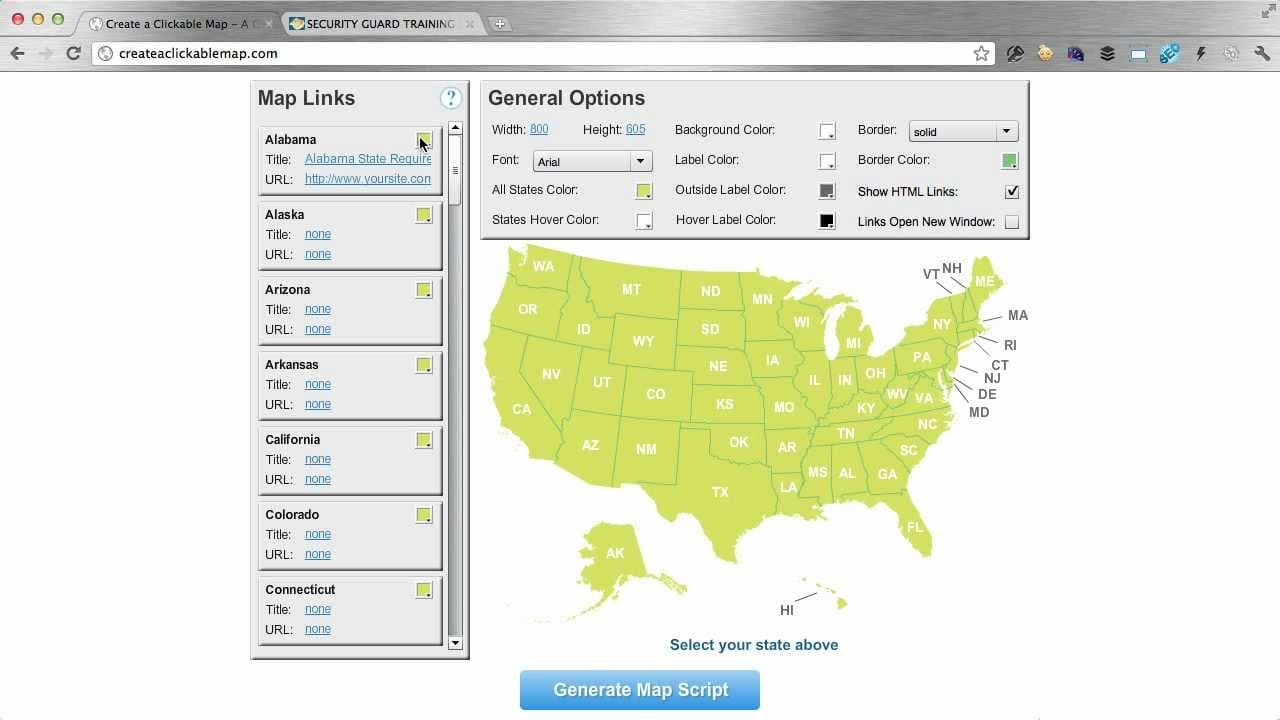
hey my name is pat flynn and welcome to create a clickable map calm a totally 100% free online tool i created to help you make clickable maps for your website let me show you how this works on the left hand side you'll see the map links area and this is where you're going to manually enter the links for each state that correspond to that page on yo... Read More
Key Insights
- 🥶 Create a Clickable Map is a free online tool created by Pat Flynn to help users make clickable maps for their websites.
- 👨🦱 Users can manually enter the URLs for each state and customize the colors and options of the map.
- 👻 The general options area allows users to adjust various settings, including width, height, font, and colors.
- 🍻 The tool also offers additional features like HTML links and the ability to open links in a new window.
- 🍁 Leaving a state's URL blank will make it non-clickable on the map.
- 👤 The tool is designed for website owners who want to create interactive maps for better user experience and SEO purposes.
- 🤑 Pat Flynn created the tool based on his own experience and wanted to provide it for free to help others save time and money.
Install to Summarize YouTube Videos and Get Transcripts
Explore YouTube Video Summarizer or Get YouTube Transcript Extractor
Questions & Answers
Q: How does Create a Clickable Map work?
Create a Clickable Map is a free online tool that allows you to manually enter the URLs for each state on your website. It generates a clickable map where users can hover over states to see the title and click on them to be taken to the corresponding state's page.
Q: Can I customize the colors of each state on the map?
Yes, you can change the color of each state individually by clicking on the state and selecting a color. Alternatively, you can change all states' colors at once by using the general options area.
Q: What options are available in the general options area?
In the general options area, you can change the width and height of the map, select a different font, change the color of the states when hovered over, customize the background color, label color, outside label color, hover label color, border color, and more. You can also enable HTML links and choose whether the links open in a new window.
Q: What happens if I don't have a URL for all states?
If you leave a state's URL blank, the flash map will still display that state, but it won't be clickable. Users can still hover over it, but clicking on it won't have any effect.
Summary & Key Takeaways
-
Use the map links area to manually enter the URLs for each state page on your website.
-
Customize the color of each state individually or change all states' colors at once.
-
Adjust the width, height, font, background color, label color, and more in the general options area.
Read in Other Languages (beta)
Share This Summary 📚
Summarize YouTube Videos and Get Video Transcripts with 1-Click
Try YouTube Summary with ChatGPT & Claude or YouTube Transcript Generator
Explore More Summaries from Pat Flynn 📚



Summarize YouTube Videos and Get Video Transcripts with 1-Click
Try YouTube Summary with ChatGPT & Claude or YouTube Transcript Generator