How to calculate work days exclude weekend and holidays in MS excel
TL;DR
This video demonstrates how to calculate workdays omitting public holidays using Excel.
Transcript
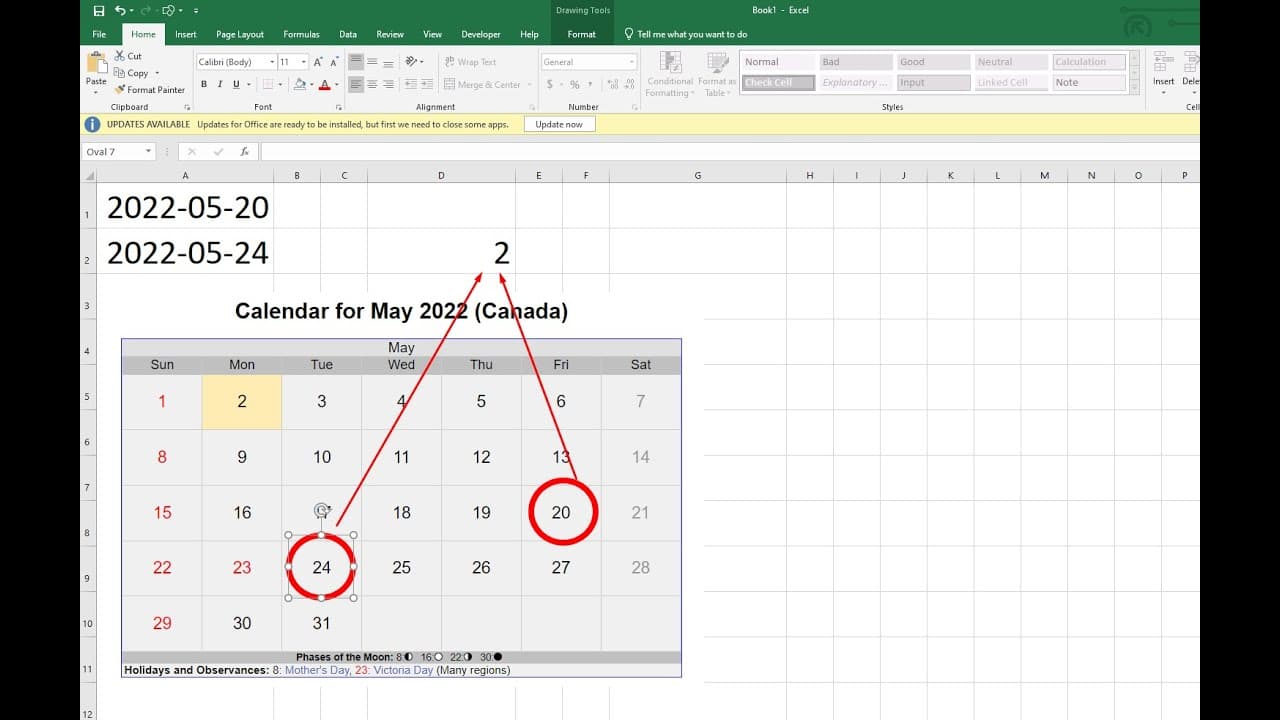
hello in this video i will talk about how to calculate workdays between these two numbers so now we can see the first one a1 is may 20th it's a friday and the second one a2 is may 24 it's a tuesday and there should be one day friday monday and tuesday three days but 23 is public holidays we have the whole holiday list needs in another sheet so may ... Read More
Key Insights
- 🥳 Understanding how to calculate workdays in Excel helps streamline project management and planning by accurately reflecting available working days.
- 👻 The NETWORKDAYS function simplifies the calculation by inherently considering weekends while allowing for the exclusion of additional holidays through a specified range.
- 🥺 Proper cell formatting is essential; inaccurate date formats can lead to errors in calculations, highlighting the importance of data integrity in Excel.
- 🥳 Users can extend calculations by including multiple holidays, enabling comprehensive scheduling that reflects all days off relevant to their local context.
- 🦮 The tutorial's step-by-step guide helps beginners grasp not only the function usage but also the necessary precautions to ensure accurate calculations.
- 🥰 Knowledge of Excel functions like WORKDAY or NETWORKDAYS can enhance workplace efficiency, especially for HR and administration tasks involving employee schedules.
- 👤 By excluding holidays such as Victoria Day, users can make more informed decisions regarding project timelines and workforce management.
Install to Summarize YouTube Videos and Get Transcripts
Explore YouTube Video Summarizer or Get YouTube Transcript Extractor
Questions & Answers
Q: What is the main function used in Excel for calculating workdays?
The main function utilized for calculating workdays in Excel is the NETWORKDAYS or WORKDAY function. These functions allow users to define a start date and an end date while also factoring in a range of holidays. By using this, employees and teams can efficiently determine the number of workdays available for project timelines.
Q: How does the video address public holidays in the calculations?
In the video, public holidays are factored into the workday calculations by including a range of holiday dates as an argument in the WORKDAY function. This ensures that the resulting count of workdays accurately reflects the number of days off, excluding Saturdays, Sundays, and designated public holidays such as Victoria Day.
Q: What troubleshooting tips does the video provide regarding date formats?
The video emphasizes that errors in calculating workdays often stem from incorrect date formats. It advises viewers to ensure that the cells containing the dates are formatted correctly as dates. To do this, one should select the relevant cells, navigate to 'Format Cells,' and choose the date format to avoid any issues in calculations.
Q: Why is it important to calculate workdays instead of total days?
Calculating workdays is crucial as it gives a realistic picture of available working time within a specific period. This is especially important for project planning, resource allocation, and scheduling tasks, where only weekdays are relevant and public holidays might significantly impact productivity and timelines.
Summary & Key Takeaways
-
The video explains how to determine the number of workdays between two dates in Excel, including the exclusion of weekends and public holidays.
-
It specifically walks viewers through using the WORKDAY function, providing step-by-step instructions on how to input the start and end dates along with any relevant holidays.
-
Viewers are cautioned about potential errors due to incorrect date formats and are advised to ensure proper formatting for accurate calculations.
Read in Other Languages (beta)
Share This Summary 📚
Summarize YouTube Videos and Get Video Transcripts with 1-Click
Try YouTube Summary with ChatGPT & Claude or YouTube Transcript Generator
Explore More Summaries from E Micro Tech 📚

Summarize YouTube Videos and Get Video Transcripts with 1-Click
Try YouTube Summary with ChatGPT & Claude or YouTube Transcript Generator