Unreal Engine 5 Beginner Tutorial - UE5 Starter Course
TL;DR
Learn basics of Unreal Engine 5, including Lumen and Nanite.
Transcript
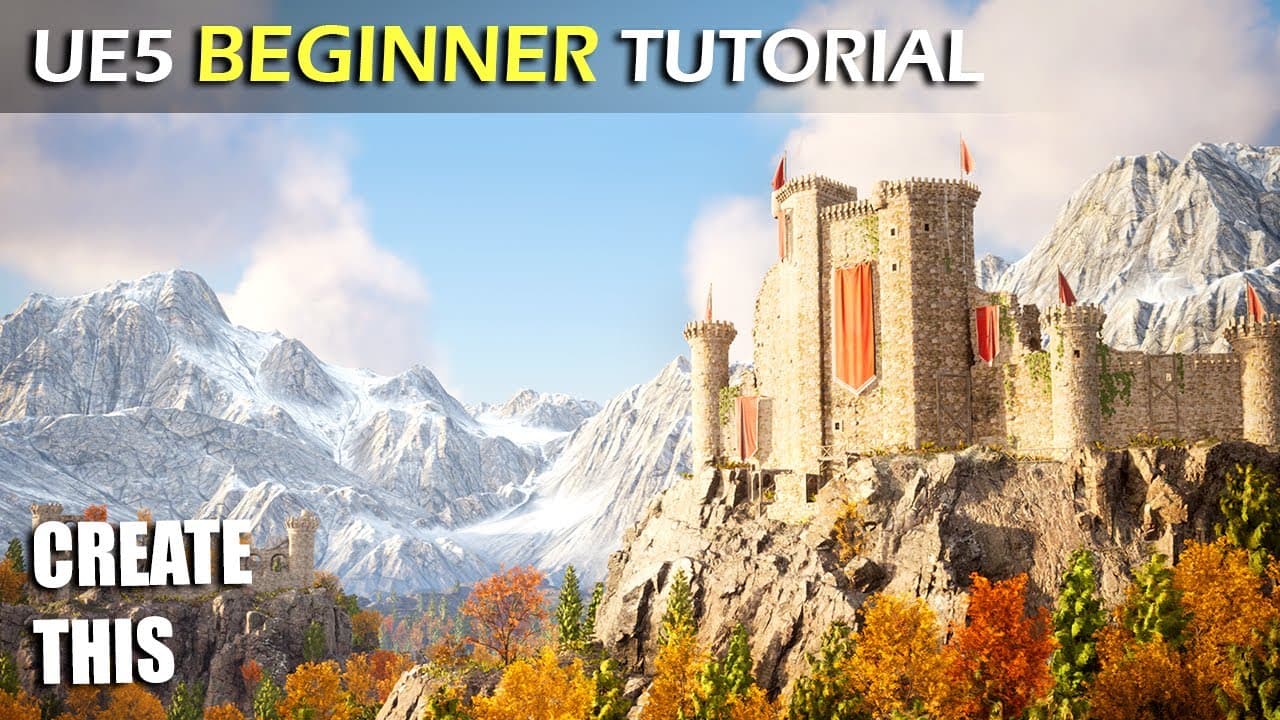
hello everyone if you are completely new to Unreal Engine 5 then this tutorial Was Made For You in This tutorial you will go from knowing nothing about Unreal Engine 5 to creating this beautiful world you see right here now I know this might look intimidating but do not worry every step in this process from sculpting the landscape to creating the c... Read More
Key Insights
- This tutorial guides beginners through Unreal Engine 5, covering installation, navigation, and project creation, ensuring a solid foundation for new users.
- Detailed instructions on using the 3D viewport, creating materials, and sculpting landscapes are provided, making complex tasks approachable for beginners.
- The tutorial introduces Unreal Engine 5's new features, Lumen and Nanite, highlighting their capabilities in real-time global illumination and high-detail rendering.
- Users learn to import and manage assets, create static meshes, and move assets between projects, enhancing workflow efficiency.
- Material creation and manipulation are explored, including PBR principles, material parameters, and creating master materials for versatile asset use.
- Comprehensive lighting techniques are covered, from basic light types to advanced Lumen settings, ensuring realistic scene illumination.
- The tutorial includes programming basics with Blueprints, enabling users to create interactive and dynamic game elements.
- A step-by-step guide to building a photorealistic environment, integrating foliage, water, and modular structures, showcases Unreal Engine 5's capabilities.
Install to Summarize YouTube Videos and Get Transcripts
Explore YouTube Video Summarizer or Get YouTube Transcript Extractor
Questions & Answers
Q: How do you install Unreal Engine 5?
To install Unreal Engine 5, download the Epic Games Launcher from the Epic Games website. Once installed, navigate to the Unreal Engine tab in the launcher, click on library, and select the engine version you wish to install. Click on the plus icon next to engine versions, select version 5, and click install. You can choose the default install location or select a new one. After installation, you can launch Unreal Engine 5 directly from the launcher.
Q: What are the key features of Unreal Engine 5 highlighted in the tutorial?
The tutorial highlights Unreal Engine 5's key features, including Lumen and Nanite. Lumen provides real-time global illumination, allowing for dynamic lighting and realistic scenes without precomputed light maps. Nanite is a virtualized geometry system that enables high-detail rendering of complex assets without a significant performance hit. These features enhance the visual fidelity and performance of Unreal Engine 5, making it a powerful tool for creating photorealistic environments.
Q: How does the tutorial explain the use of materials in Unreal Engine 5?
The tutorial explains materials in Unreal Engine 5 by introducing the concept of PBR (Physically Based Rendering) materials. It covers creating and editing materials using the material graph, adding textures, and adjusting properties like metallic and roughness. The tutorial also demonstrates creating material instances and master materials, allowing for efficient reuse and customization of materials across different assets. This approach simplifies material management and enhances visual consistency.
Q: What is the role of Blueprints in Unreal Engine 5 as per the tutorial?
Blueprints play a crucial role in Unreal Engine 5 by providing a visual scripting system that allows users to create interactive and dynamic game elements without writing code. The tutorial introduces Blueprints as a way to program game logic, enabling users to develop gameplay mechanics, control character behavior, and manage game events. This approach makes game development accessible to non-programmers and streamlines the creation of complex systems within Unreal Engine 5.
Q: How does Lumen enhance lighting in Unreal Engine 5?
Lumen enhances lighting in Unreal Engine 5 by providing real-time global illumination, allowing for dynamic lighting changes without precomputed light maps. It simulates realistic light behavior, including light bounce and color bleeding, creating more immersive and visually accurate scenes. Lumen's real-time capabilities enable developers to see immediate lighting adjustments, improving the workflow and allowing for more creative lighting setups. This technology is a significant advancement over traditional static lighting methods.
Q: What are the benefits of using a master material in Unreal Engine 5?
Using a master material in Unreal Engine 5 offers several benefits, including streamlined material management and increased efficiency. A master material serves as a template from which multiple material instances can be derived, allowing for consistent material properties across different assets. It enables quick customization through exposed parameters, reducing the need to create separate materials for each asset. This approach enhances project organization and allows for flexible and rapid adjustments to material properties.
Q: How does the tutorial address asset management in Unreal Engine 5?
The tutorial addresses asset management in Unreal Engine 5 by teaching users how to import and organize assets effectively. It covers importing 3D models, textures, and materials, and demonstrates how to create static meshes. The tutorial also explains the process of migrating assets between projects, ensuring efficient reuse of resources. Proper asset management is emphasized to maintain project organization and streamline the development process.
Q: What is the significance of the landscape tool in Unreal Engine 5?
The landscape tool in Unreal Engine 5 is significant for creating large, detailed terrains within a project. The tutorial demonstrates how to use the landscape tool to sculpt terrain, paint foliage, and apply landscape materials. This tool allows developers to create expansive outdoor environments with realistic topography and vegetation. By leveraging the landscape tool, users can build immersive worlds that enhance the visual depth and realism of their projects, supporting both gameplay and cinematic experiences.
Summary & Key Takeaways
-
This comprehensive Unreal Engine 5 tutorial is designed for beginners, covering everything from installation to creating a photorealistic world. Users will learn to navigate the 3D viewport, create materials, and sculpt landscapes while exploring new features like Lumen and Nanite.
-
Key topics include importing assets, creating static meshes, and understanding PBR materials. The tutorial also covers lighting techniques, both dynamic and baked, ensuring users can achieve realistic scene illumination with Lumen.
-
Programming with Blueprints and creating interactive game elements are introduced, culminating in a detailed guide to building a photorealistic environment. The tutorial equips users with essential skills for Unreal Engine 5 development.
Read in Other Languages (beta)
Share This Summary 📚
Summarize YouTube Videos and Get Video Transcripts with 1-Click
Try YouTube Summary with ChatGPT & Claude or YouTube Transcript Generator
Explore More Summaries from Unreal Sensei 📚

Summarize YouTube Videos and Get Video Transcripts with 1-Click
Try YouTube Summary with ChatGPT & Claude or YouTube Transcript Generator