2D Shearing with example | Transformation | CG | Computer Graphics | Lec-24 | Bhanu Priya
TL;DR
This content explains how to calculate new coordinates after applying 2D shearing transformations to a triangle.
Transcript
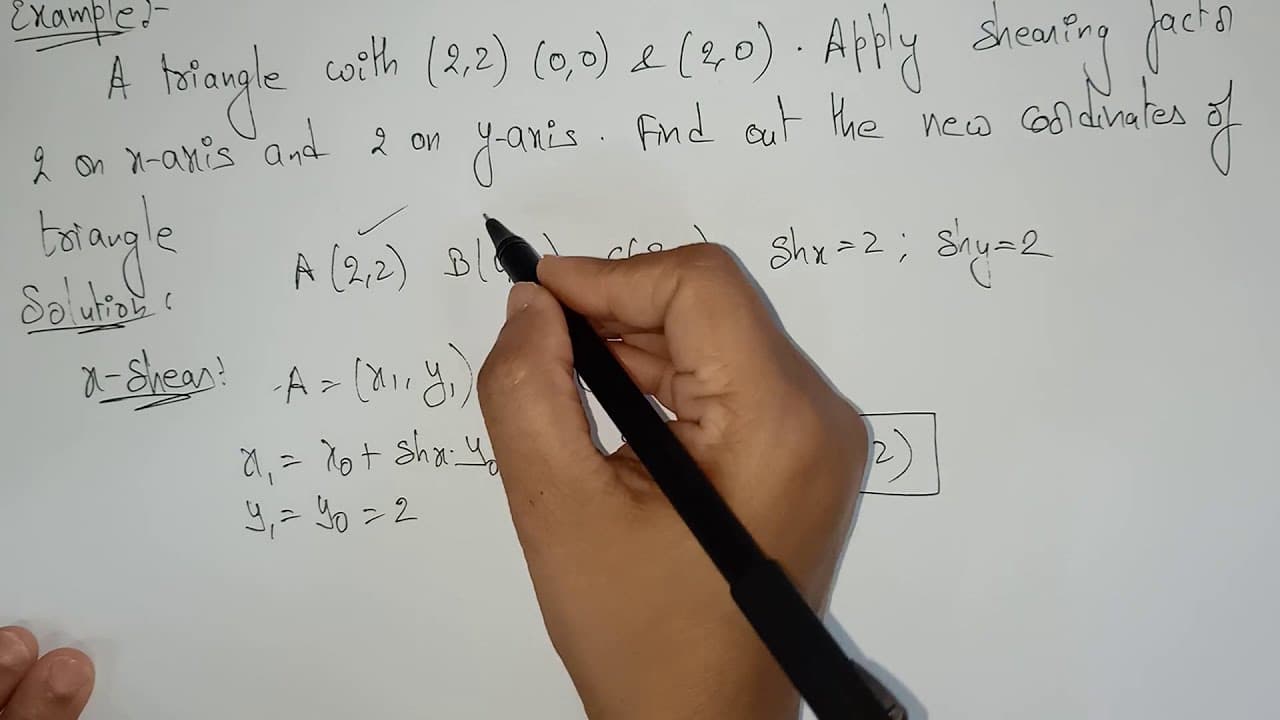
hi students welcome back let's continue with the 2d sharing in the previous video i explained the introduction part of the 2d sharing now let's have a look on the example so here is the example they are given a triangle with 2 comma 2 0 comma 0 and 2 comma 0 because this is a triangle you need 3 points to point plot a triangle in 2d plane apply sha... Read More
Key Insights
- 💁 2D shearing transformation adjusts the position of shapes along defined axes, influencing their final form and coordinates.
- 🧑🏭 The shearing factor determines how drastically a shape is transformed; larger values yield more pronounced effects on the object’s dimensions.
- ❣️ The formula for x-axis shearing keeps the y-coordinate static, while the formula for y-axis shearing keeps the x-coordinate static, leading to specific behaviors of transformed points.
- 👻 This transformation is particularly useful in computer graphics and modeling, allowing for versatile shape manipulation.
- 😥 Points originally defined at the origin will not change their positions during shearing transformations, serving as a fixed reference point for coordinate calculations.
- 💠 Visual representations are vital for understanding how the shearing transformations distort shapes in two dimensions.
- 🔺 Each vertex of the triangle undergoes calculations separately, demonstrating the effect of transformations on individual points within geometric shapes.
Install to Summarize YouTube Videos and Get Transcripts
Explore YouTube Video Summarizer or Get YouTube Transcript Extractor
Questions & Answers
Q: What is 2D shearing in the context of geometry?
2D shearing is a transformation that distorts the shape of an object in a two-dimensional plane. It alters the position of points in the object along a specific axis while maintaining the object's dimensions. This process is defined by a shearing factor that determines how much the object is pushed or drawn along an axis, resulting in a skewed appearance.
Q: How are new coordinates calculated after applying x-axis shearing?
New coordinates resulting from x-axis shearing are calculated using the formula x1 = x0 + sh_x * y0, where x0 and y0 are the original coordinates, and sh_x is the shearing factor along the x-axis. The y-coordinate remains unchanged, so y1 = y0. This calculation shows how the object expands or skews horizontally while retaining its vertical position.
Q: Why do the coordinates of point B remain unchanged after shearing?
Point B, starting at coordinates (0,0), remains unchanged during both x-axis and y-axis shearing because the original coordinates are (0,0). The formulas yield the same results since any multiplication involving zero remains zero. Hence, regardless of the shearing factors applied, point B does not move from the origin.
Q: What happens to the shape of the triangle after performing both x- and y-axis shearing?
After applying both x- and y-axis shearing, the shape of the triangle changes dramatically; it stretches based on the shearing factors. For the x-axis transformation, the triangle’s vertices move horizontally, while the y-axis transformation causes a vertical shift. The combination of both transformations creates a skewed triangle, altering its dimensions significantly while maintaining its basic triangular form.
Summary & Key Takeaways
-
The video details a practical example of 2D shearing transformations applied to a triangle defined by three points in a plane.
-
It explains how to compute the new coordinates of triangle vertices using specific formulas for both x-axis and y-axis shearing factors.
-
The content emphasizes understanding how the shape of a triangle changes after the application of these shearing transformations.
Read in Other Languages (beta)
Share This Summary 📚
Summarize YouTube Videos and Get Video Transcripts with 1-Click
Try YouTube Summary with ChatGPT & Claude or YouTube Transcript Generator