DevOps Project: Video to Audio Python Microservices App on Kubernetes
TL;DR
Learn how to deploy Python microservices to convert videos to audio on AWS.
Transcript
microservices a very popular architectural style that is used by many big companies including Netflix Google Spotify Amazon Uber and pretty much every company these days are using microservices to deploy their application so in this devops project we are going to learn how you can create python microservices application which is going to convert vi... Read More
Key Insights
- 👻 Microservices architecture allows for modularization of applications, enabling independent development, deployment, and scaling of services.
- 😒 The use of Docker streamlines the building and running of applications in containers, ensuring consistency across different environments.
- ✋ Kubernetes orchestrates the deployment, scaling, and management of containerized applications, offering robust features for high availability.
- 👷 Helm simplifies the deployment process by using charts, making it easier to manage complex Kubernetes applications.
- 🥳 Authentication through JWT tokens enhances security by ensuring that only authorized users can interact with sensitive parts of the application.
- 👻 RabbitMQ provides an efficient method for handling background tasks, allowing the system to process operations asynchronously.
- 😶🌫️ The integration of cloud services such as AWS enables scalable resource allocation while reducing the overhead of managing physical servers.
Install to Summarize YouTube Videos and Get Transcripts
Explore YouTube Video Summarizer or Get YouTube Transcript Extractor
Questions & Answers
Q: What are the primary technologies used in this project?
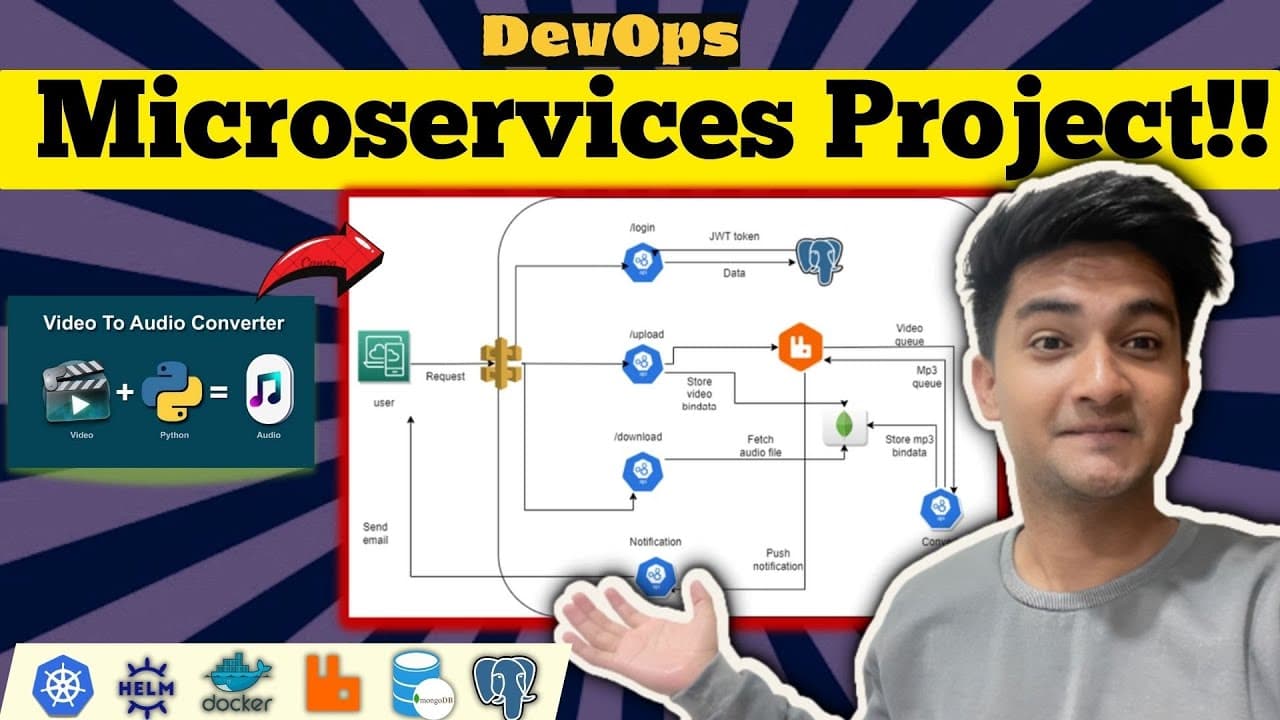
The project utilizes several key technologies including Python for writing microservices, Kubernetes for orchestration, Helm for managing Kubernetes applications, Docker for containerization, RabbitMQ for messaging, and databases like MongoDB and PostgreSQL for data storage. Each technology plays a vital role in ensuring that the application is scalable, efficient, and modern, aligning with current cloud-native development practices.
Q: How does user authentication work in the application?
User authentication is managed through a dedicated service that checks user credentials against the PostgreSQL database. Upon successful login, the service issues a JSON Web Token (JWT) which is required for further actions like uploading videos. This enhances security by ensuring that only authenticated users can access sensitive operations in the application, such as uploading and downloading files.
Q: What is the role of RabbitMQ in this microservice architecture?
RabbitMQ serves as a message broker facilitating the communication between different microservices. In this project, after a user uploads a video, the file is placed into a queue managed by RabbitMQ. The conversion service then consumes this message, retrieves the video, and processes it to convert it into audio. This asynchronous processing ensures that the application can efficiently handle multiple requests without blocking.
Q: Can you explain the steps involved in deploying the application to AWS?
To deploy the application on AWS, users must first set up an Elastic Kubernetes Service (EKS) cluster. After that, necessary tools like Docker, Helm, and the AWS CLI need to be installed. The project code, including Helm charts for MongoDB, RabbitMQ, and services, are then deployed. Finally, microservices are built as Docker images and pushed to a container registry, making them available for deployment on the Kubernetes cluster.
Summary & Key Takeaways
-
This project focuses on deploying a Python application using microservices architecture to convert videos into audio files, utilizing the AWS cloud.
-
Key technologies involved include Kubernetes, Helm, Docker, RabbitMQ, and databases like MongoDB and PostgreSQL, ensuring a scalable and resilient application setup.
-
The project offers a detailed deployment process, covering user authentication, video upload, conversion, notification via email, and downloading the converted audio file.
Read in Other Languages (beta)
Share This Summary 📚
Summarize YouTube Videos and Get Video Transcripts with 1-Click
Try YouTube Summary with ChatGPT & Claude or YouTube Transcript Generator
Explore More Summaries from Cloud Champ 📚
![AWS Interview Questions and Answers 2025 [Updated!] thumbnail](/_next/image?url=https%3A%2F%2Fi.ytimg.com%2Fvi%2FULiPYBLcCiw%2Fhqdefault.jpg&w=750&q=75)
Summarize YouTube Videos and Get Video Transcripts with 1-Click
Try YouTube Summary with ChatGPT & Claude or YouTube Transcript Generator