Products
Features
YouTube Video Summarizer
Summarize YouTube videos
Web & PDF Highlighter
Highlight web pages & PDFs
Chat with PDF
Ask any PDF questions with AI
Ask AI Clone
Chat with your highlights & memories
Audio Transcriber
Transcribe audio files to text
Glasp Reader
Read and highlight articles
Kindle Highlight Export
Export your Kindle highlights
Idea Hatch
Hatch ideas from your highlights
Integrations
Obsidian Plugin
Notion Integration
Pocket Integration
Instapaper Integration
Medium Integration
Readwise Integration
Snipd Integration
Hypothesis Integration
Apps & Extensions
Chrome Extension
Safari Extension
Edge Add-ons
Firefox Add-ons
iOS App
Android App
Discover
Discover
Ideas
Discover new ideas and insights
Articles
Curated articles and insights
Books
Book recommendations by great minds
Posts
Essays and notes from readers
Quotes
Inspiring quotes collection
Videos
Curated videos and summaries
Explore Glasp
Glasp Story
How we grew from 0 to 3 million users
Glasp Newsletter
Weekly insights and updates
Glasp Talk
Interview series with great minds
Glasp Blog
Latest news and articles
Glasp Use Cases
Learn how others use Glasp
Build & Support
Glasp API
Access Glasp's API for developers
MCP Connector
Connect Glasp to Claude & ChatGPT
Community
Glasp Reddit Community
Students
Student discount and benefits
FAQs
Frequently Asked Questions
AboutPricing
DashboardLog inSign up

How to Shade with Markers for Realistic Illustrations
21.0K views
•
December 9, 2016
by
Zoe Hong
YouTube video player
How to Shade with Markers for Realistic Illustrations

TL;DR

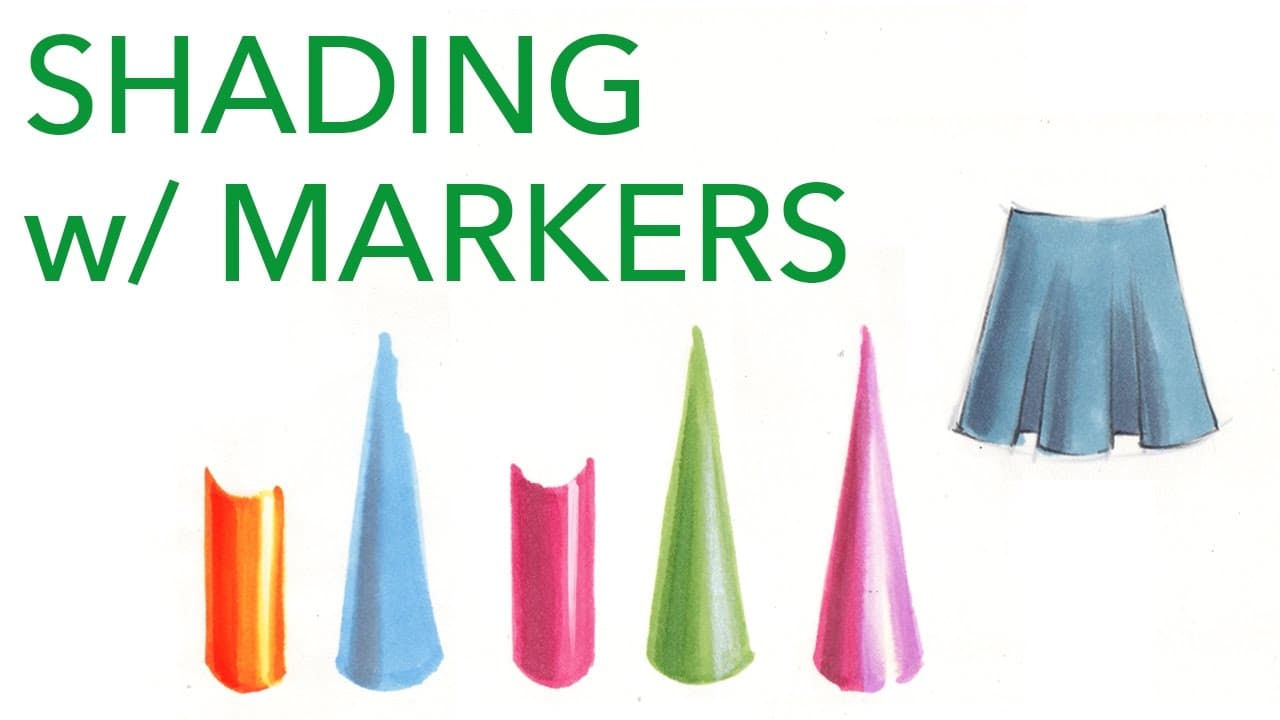
To shade with markers effectively, start by applying a base color, then add darker shades to create depth. Use a colorless blender to soften edges and introduce highlights, ensuring shadows are placed opposite the highlights for a 3D effect. Selecting the right shades, including grays that match your base color, is crucial for achieving a polished look.

Transcript

welcome back to fundamentals Friday last week we talked about light sources shadows where to place your shadows and in this video we're going to talk about how to shadow using markers I have a list of all the markers used in this video in the description box the main method would be to lay down your base color this random rosy pink and to take a da... Read More

Key Insights

  • ❓ Layering different shades of the same color can create depth and intensity in shadows.
  • 🦔 A colorless blender can be used to soften edges and create smooth transitions in highlights.
  • ⚾ Gray markers should be chosen carefully to match the base color and achieve the desired effect.
  • ✨ Adding highlights with markers or other tools can enhance the shiny appearance of an illustration.
  • 🎨 Shading techniques with markers can be applied to various subjects, not just clothing designs.

Install to Summarize YouTube Videos and Get Transcripts

Explore YouTube Video Summarizer or Get YouTube Transcript Extractor

Questions & Answers

Q: How many shades of the same color should be used for shadowing?

It is recommended to use at least two shades of shadow, a regular shadow and a slightly more intense darker shadow for a more developed look.

Q: What can be used to highlight with markers?

To highlight, you can leave the white of the paper and use a colorless blender. Soften the edges of the highlight by running the colorless blender over the area and blending it with the base color.

Q: Can gray markers be used for shadowing?

Gray markers can be used for shadowing, but it is important to choose the right shade of gray that matches the base color. Cool grays may not work well with warm colors and can give a greenish appearance.

Q: How can a shiny effect be achieved with markers?

To create a shiny effect, you can use a white marker or white pencil to add highlights on top of the base color. Make sure the marker is completely dry before applying dry media.

Summary & Key Takeaways

  • The main method for shadowing with markers is to lay down a base color and then use a darker shade of that color to add shadows.

  • Adding multiple shades of shadow can create a more 3D and intense look.

  • A colorless blender can be used to create highlights by blending the base color and softening the edges.


Read in Other Languages (beta)

English

Share This Summary 📚

Summarize YouTube Videos and Get Video Transcripts with 1-Click

Download browser extensions on:

Try YouTube Summary with ChatGPT & Claude or YouTube Transcript Generator

Explore More Summaries from Zoe Hong 📚
How to Choose the Right Fabrics for Fashion Collections thumbnail
How to Choose the Right Fabrics for Fashion Collections
Zoe Hong
My Old Sketches: Improving Over the Years thumbnail
My Old Sketches: Improving Over the Years
Zoe Hong
Interview: Sewing Factory Owner & Pattern Maker Kathleen Fasanella Part 2 thumbnail
Interview: Sewing Factory Owner & Pattern Maker Kathleen Fasanella Part 2
Zoe Hong
Interviews with Fashion Industry Professionals thumbnail
Interviews with Fashion Industry Professionals
Zoe Hong
My Series on Drawing and Rendering Faces thumbnail
My Series on Drawing and Rendering Faces
Zoe Hong
Watch Me Design 14: Do Fashion Designers Need to Learn How to Sew? thumbnail
Watch Me Design 14: Do Fashion Designers Need to Learn How to Sew?
Zoe Hong

Summarize YouTube Videos and Get Video Transcripts with 1-Click

Download browser extensions on:

Try YouTube Summary with ChatGPT & Claude or YouTube Transcript Generator

Apps & Extensions

  • Chrome Extension
  • Safari Extension
  • Edge Add-ons
  • Firefox Add-ons
  • iOS App
  • Android App

Key Features

  • YouTube Video Summarizer
  • Web & PDF Summarizer
  • Web & PDF Highlighter
  • Chat with PDF
  • Ask AI Clone
  • Audio Transcriber
  • Glasp Reader
  • Kindle Highlight Export
  • Idea Hatch

Integrations

  • Obsidian Plugin
  • Notion Integration
  • Pocket Integration
  • Instapaper Integration
  • Medium Integration
  • Readwise Integration
  • Snipd Integration
  • Hypothesis Integration

More Features

  • APIs
  • MCP Connector
  • Blog & Post
  • Embed Links
  • Image Highlight
  • Personality Test
  • Quote Shots
  • Open Graph Checker

Company

  • About us
  • Our Story
  • Blog
  • Community
  • FAQs
  • Job Board
  • Newsletter
  • Pricing
Terms

•

Privacy

•

Guidelines

© 2026 Glasp Inc. All rights reserved.