How to Create Summary Tables in R Using GT Summary
TL;DR
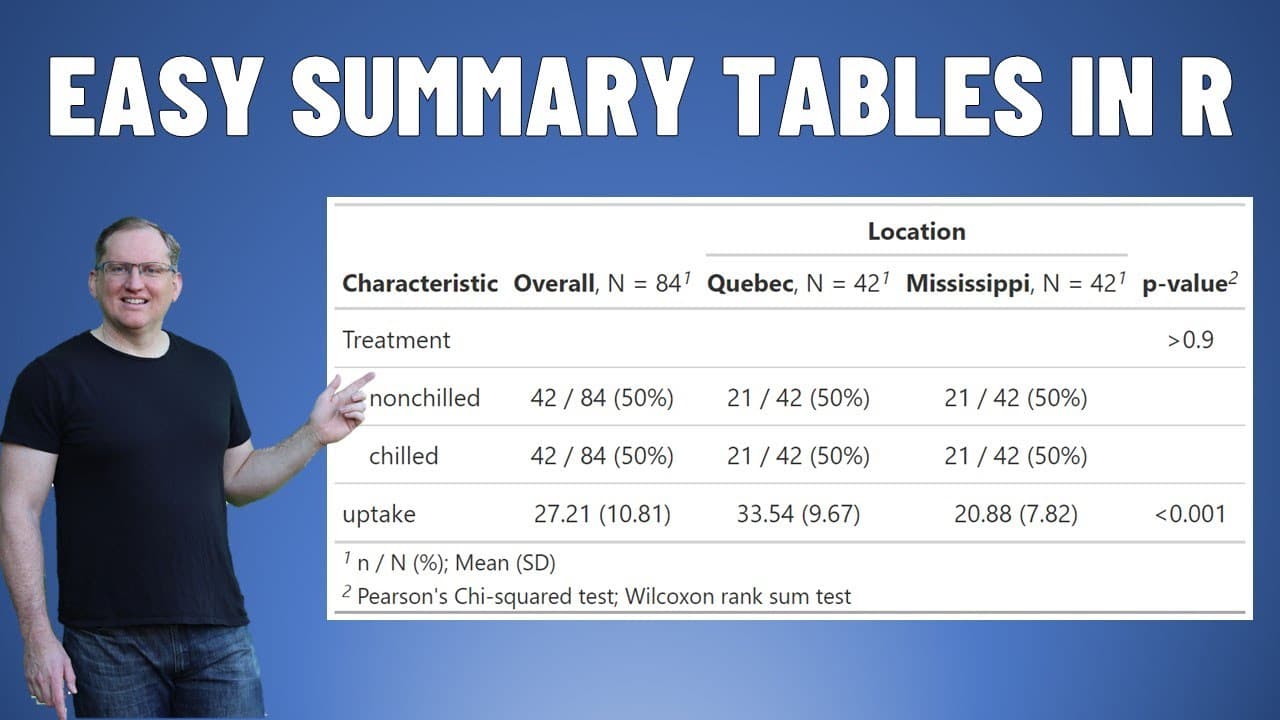
To create summary tables in R with GT Summary, use the TBL_summary function on your dataset for quick statistical insights. You can split data by categorical variables, include p-values for comparisons, and customize the table with various statistical measures. This package simplifies data presentation, making it ideal for researchers.
Transcript
hi friends welcome back to the channel today we are looking at a package called GT summary which provides really nice succinct summary tables for our data so we need to use a tidy verse and we need GT summary if we don't have those packages installed we go to the packages tab hit install and then the data that we're going to use is just one of the ... Read More
Key Insights
- 📦 The GT Summary package enhances data analysis by enabling the generation of visually appealing summary tables quickly.
- 🤗 Users can analyze built-in datasets like CO2, facilitating hands-on learning about statistical analysis in R.
- 👥 Distribution of results can be customized by adding statistical tests to compare different groups and treatments effectively.
- ❓ With the ability to display various statistical measures, GT Summary caters to diverse analytical requirements for researchers.
- 📦 The package supports detailed presentations by incorporating overall results alongside categorical breakdowns.
- 🚰 P-values included in tables help researchers identify significant differences, strengthening the validity of their findings.
- 🚰 GT Summary improves the workflow for researchers by simplifying the process of creating professional-grade tables without extensive coding.
Install to Summarize YouTube Videos and Get Transcripts
Explore YouTube Video Summarizer or Get YouTube Transcript Extractor
Questions & Answers
Q: What is the purpose of the GT Summary package?
The GT Summary package is designed to streamline the creation of concise summary tables in R, especially for datasets analyzed within the tidyverse framework. It provides users with tools to present statistical data clearly and efficiently, allowing for easy integration into reports and documentation.
Q: How does GT Summary handle different types of data?
GT Summary can analyze various categorical variables by splitting data from datasets like CO2 into separate summary tables. Users can specify which categorical variable to divide by—for example, types of plants—creating distinct columns for each type along with their respective statistics for clearer comparisons.
Q: What types of statistical measures can be generated using GT Summary?
Users can generate various statistical measures such as means, standard deviations, medians, and interquartile ranges. Additionally, it allows for the inclusion of p-values for testing differences between groups, enhancing the analytic depth of the summary tables produced.
Q: What steps should be taken if the necessary packages are not installed?
If the required packages (tidyverse and GT Summary) are not installed in R, users should navigate to the packages tab in their R environment and select the option to install these packages. This process is crucial to enable the functionalities discussed in the video.
Q: Can users customize the output tables in GT Summary?
Yes, users have considerable flexibility in customizing the output of summary tables. They can specify different statistics to include, such as maximums, minimums, and further statistical measures like kurtosis, tailoring the presentation to their specific analytical needs.
Q: What is the significance of using the p-value in the summaries?
The p-value is crucial as it helps determine the statistical significance of the differences observed between groups within the data. By adding p-values to summary tables, users can communicate whether the differences in uptake among various treatments or plant types are statistically meaningful.
Q: How can users ensure they are working with the correct dataset?
Users need to be cautious when selecting datasets, as there are similarly named datasets in R (like CO2 and co2). Ensuring the correct case sensitivity (using uppercase CO2) is vital to avoid confusion and ensure accuracy in data analysis.
Q: What are some potential applications of GT Summary in research?
GT Summary can be extensively utilized in research to create formatted tables for experiment reports, presentations, or academic papers. Its ease of use enables researchers to focus on analysis rather than formatting, providing efficient and effective communication of findings.
Summary & Key Takeaways
-
The GT Summary package in R allows users to create succinct summary tables for datasets, enhancing data analysis presentations. It integrates seamlessly with tidyverse, making it a valuable tool for statistical examination.
-
By using built-in datasets like CO2, users can perform categorically divided analyses based on different plant types and treatments. The package provides key statistics, including p-values, to facilitate comparisons.
-
Users can customize summary outputs with various statistical measures and formatting options, allowing for detailed interpretations of experimental data and easy integration into research documents.
Read in Other Languages (beta)
Share This Summary 📚
Summarize YouTube Videos and Get Video Transcripts with 1-Click
Try YouTube Summary with ChatGPT & Claude or YouTube Transcript Generator
Explore More Summaries from Dr Lyndon Walker 📚






Summarize YouTube Videos and Get Video Transcripts with 1-Click
Try YouTube Summary with ChatGPT & Claude or YouTube Transcript Generator