Create Stunning Films with a Free AI Tool
TL;DR
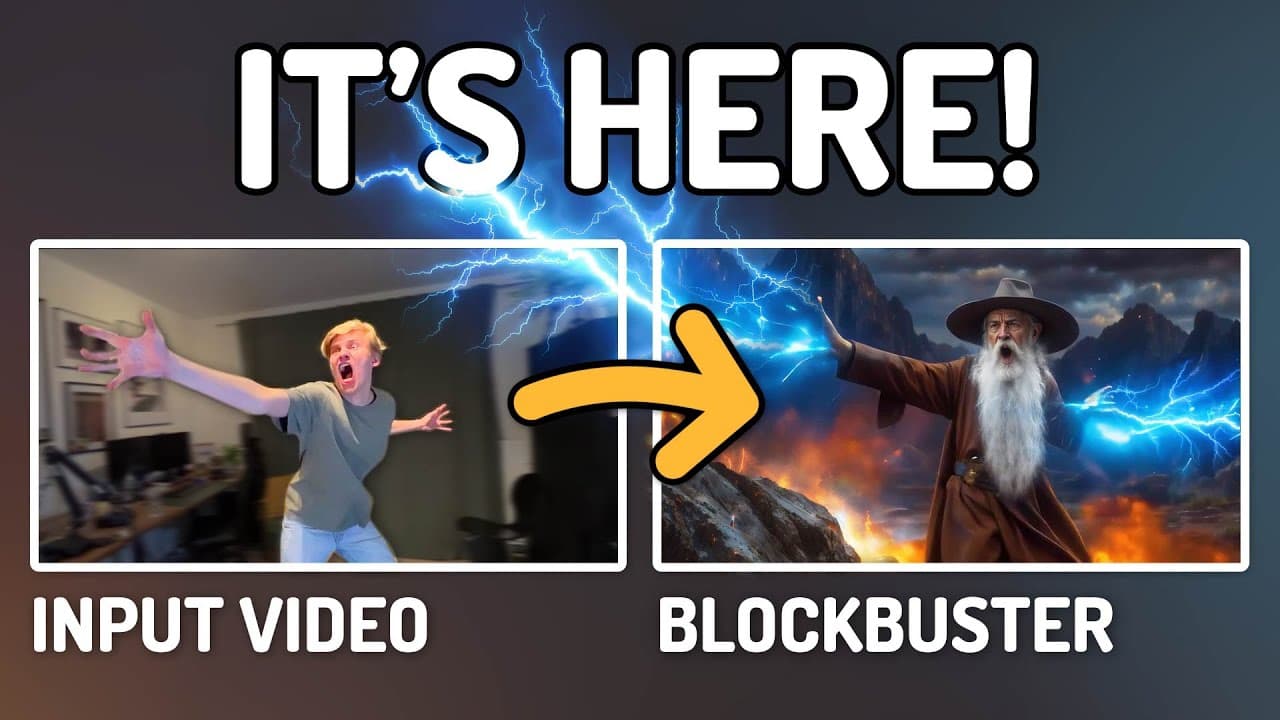
Transform your home videos into stunning films using a free AI workflow. This tutorial highlights how to efficiently utilize various AI video models to achieve cinematic quality while maintaining character consistency. Discover advanced features like Control Nets that enhance creativity in filmmaking without the need for expensive equipment.
Transcript
you can now shoot entire movies in your living room and turn them into epic cinematic scenes using nothing but your own computer and this free AI workflow and to prove it I'm going to walk you through all the steps necessary to create a full short film using this technique which I'm going to show at the end of this video the workflo... Read More
Key Insights
- This tutorial demonstrates how to create cinematic scenes using a free AI workflow, transforming ordinary footage into epic movie sequences.
- The tutorial covers various open-source AI video models, highlighting their strengths and limitations in creating high-quality video outputs.
- Control Nets are introduced as a tool for precise control over AI-generated images, allowing for detailed customization and enhancement.
- The workflow includes steps for video upscaling and maintaining character consistency through face preservation techniques.
- The tutorial emphasizes the potential of AI in democratizing filmmaking, enabling creators to produce high-quality films without expensive equipment.
- Different AI models like LTX Video, Machi One, and H are compared, with each offering unique features and challenges in video generation.
- The advanced workflow provides additional tools for enhanced video quality and creative control, available through Patreon support.
- The tutorial concludes with a demonstration of a short film created using the discussed techniques, showcasing the practical application of AI in filmmaking.
Install to Summarize YouTube Videos and Get Transcripts
Explore YouTube Video Summarizer or Get YouTube Transcript Extractor
Questions & Answers
Q: What is the main purpose of the tutorial?
The main purpose of the tutorial is to demonstrate how to use a free AI workflow to transform ordinary home footage into epic cinematic scenes. It provides a comprehensive guide on setting up and using the workflow, covering various AI video models and their applications in filmmaking.
Q: How does Control Net contribute to the AI video generation process?
Control Net allows for precise control over the AI image generation process by using specific information extracted from the original image. This enables users to maintain the composition and structure of their scenes while giving the AI freedom to enhance and transform the visuals, ensuring character consistency and quality.
Q: What are the limitations of the AI models discussed in the tutorial?
The AI models discussed, such as LTX Video, Machi One, and H, each have limitations like speed, quality, and control over the output. While they offer promising results, they often require fine-tuning and additional techniques like RF inversion or un-sampling to achieve precise acting performance transfer.
Q: How does the advanced workflow differ from the basic one?
The advanced workflow includes additional tools and features for enhanced video quality and creative control, such as more detailed prompts, face swapping, and multiple upscaling passes. It provides more flexibility and options for filmmakers looking to achieve higher-quality results, and it's available through Patreon support.
Q: What role does the CogVideo Reward Lora play in the workflow?
The CogVideo Reward Lora is used to enhance the quality of the video generation without slowing down the process. It helps maintain high-quality outputs by rewarding the AI for producing visually appealing results, making it a valuable tool for filmmakers using the workflow.
Q: How does the tutorial address the issue of character consistency?
The tutorial addresses character consistency by using techniques like face preservation and Control Net to maintain the original character's appearance throughout the video. It also provides detailed prompts and uses tools like Live Portrait to swap original acting performances back onto generated videos for consistent results.
Q: What are the benefits of using AI in independent filmmaking?
AI in independent filmmaking democratizes the creative process by enabling filmmakers to produce high-quality films without expensive equipment or a large team. It offers creative freedom, allowing for the transformation of ordinary footage into cinematic scenes, and provides tools for precise control and enhancement of video quality.
Q: What is the significance of the short film demonstration in the tutorial?
The short film demonstration showcases the practical application of the discussed AI techniques in creating a coherent and visually appealing film. It highlights the potential of AI in filmmaking, demonstrating how the workflow can be used to achieve professional-quality results with minimal resources, inspiring filmmakers to explore AI-driven creativity.
Summary & Key Takeaways
-
This tutorial explores how to use a free AI workflow to transform ordinary footage into epic cinematic scenes. It covers various AI video models, their features, and limitations, and demonstrates how to set up and use the workflow effectively.
-
Control Nets are introduced as a tool for precise control over AI-generated images, allowing users to maintain character consistency and enhance video quality. The tutorial provides a step-by-step guide for setting up and using the workflow.
-
The tutorial concludes with a demonstration of a short film created using the discussed techniques, showcasing the potential of AI in independent filmmaking and the creative possibilities it offers to filmmakers without access to expensive equipment.
Read in Other Languages (beta)
Share This Summary 📚
Summarize YouTube Videos and Get Video Transcripts with 1-Click
Try YouTube Summary with ChatGPT & Claude or YouTube Transcript Generator
Explore More Summaries from Mickmumpitz 📚
![Create HYPERREALISTIC Consistent AI Characters - FREE & LOCAL! [Full ComfyUI Masterclass 2025] thumbnail](/_next/image?url=https%3A%2F%2Fi.ytimg.com%2Fvi%2FPhiPASFYBmk%2Fhqdefault.jpg&w=750&q=75)
Summarize YouTube Videos and Get Video Transcripts with 1-Click
Try YouTube Summary with ChatGPT & Claude or YouTube Transcript Generator