How to Train Stable Diffusion XL for Free and Fast
TL;DR
You can train Stable Diffusion XL for free on your local machine, Google Colab, or Hugging Face Spaces by using Auto Train Advanced. Simply set up the environment, specify your training parameters, and run the training command. After training, generate high-quality images and enhance them with a refiner model for improved results.
Transcript
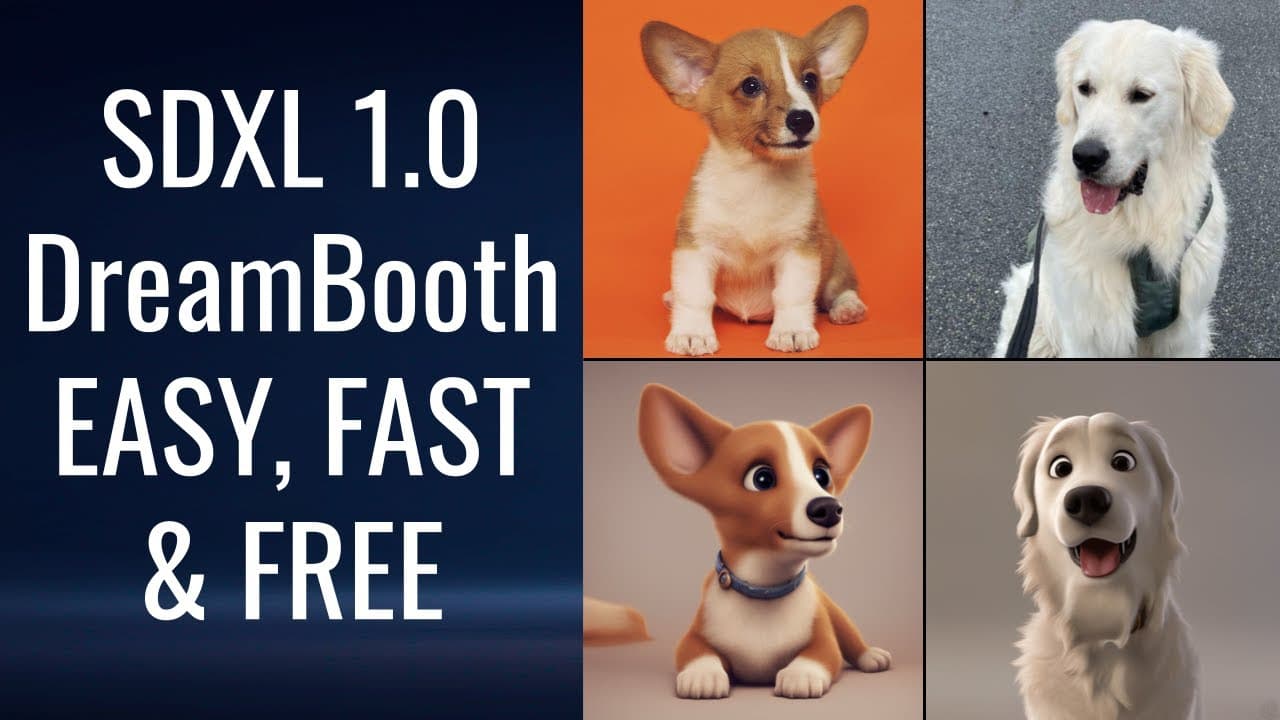
hello everyone and welcome to my YouTube channel in this video I'm going to show you the easiest way to train stable diffusion Excel on your local machine or on Google collab or on hugging create spaces in the end you will get something like this so if I go to images I have some pictures and these are pictures of my dog and the prompt that I used w... Read More
Key Insights
- 🚂 Stable Diffusion Excel is a powerful image generation model that can be trained on various platforms.
- 😫 The training process involves installing and setting up Auto Train Advanced, specifying parameters such as model name, output path, prompt, and image path, and running the training command.
- 🚄 The trained model can be used to generate high-quality images, and the output can be further improved using a refiner model.
- 😫 Training Stable Diffusion Excel is possible on a local machine, Google Colab, or Hugging Face Spaces, each with its own set of installation and setup steps.
- 🥺 Experimentation with different parameters and prompts can lead to customized image generation results.
- 🫷 Trained models can be shared with others by pushing them to the Hub.
Install to Summarize YouTube Videos and Get Transcripts
Explore YouTube Video Summarizer or Get YouTube Transcript Extractor
Questions & Answers
Q: What is Stable Diffusion Excel, and why is it being trained in this video?
Stable Diffusion Excel is an image generation model. The video demonstrates training it to generate images of dogs using a prompt.
Q: Can Stable Diffusion Excel be trained on a local machine?
Yes, the video shows how to install and set up Auto Train Advanced on a local machine to train Stable Diffusion Excel.
Q: What are some important parameters to consider when training Stable Diffusion Excel?
Some important parameters are the model name, output path, image path, prompt, resolution, batch size, learning rate, and inference steps. The video advises experimenting with different values to suit individual needs.
Q: How can trained models be shared with others?
Trained models can be pushed to the Hub with the "push to HUB" command. The video suggests using a Hub model ID for sharing purposes.
Q: Can Stable Diffusion Excel be trained on Google Colab? What are the necessary steps?
Yes, the video shows how to install the required packages and run the training process on Google Colab. The steps include upgrading torch, setting up Auto Train Advanced, and providing the image path and other parameters.
Q: Is it possible to train Stable Diffusion Excel on Hugging Face Spaces?
Yes, the video explains how to create a Hugging Face Spaces project, upload images, set up parameters, and create a job for training Stable Diffusion Excel.
Q: How can the output images be improved after training?
The video suggests using a refiner model called Stable Diffusion Image-to-Image Pipeline to enhance the output images generated by Stable Diffusion Excel.
Q: Can the trained model be used for generating images of other objects or styles?
Yes, the video mentions that the trained model can be used with different prompts and image datasets to generate images of pets, people, objects, or different styles.
Summary & Key Takeaways
-
The video demonstrates the process of training Stable Diffusion Excel on various platforms such as local machine, Google Colab, and Hugging Face Spaces.
-
The instructor provides step-by-step instructions, including installing and setting up Auto Train Advanced, running training commands with different parameters, and saving the trained model.
-
The video also covers the process of generating images using the trained model and enhancing the output with a refiner model.
Read in Other Languages (beta)
Share This Summary 📚
Summarize YouTube Videos and Get Video Transcripts with 1-Click
Try YouTube Summary with ChatGPT & Claude or YouTube Transcript Generator
Explore More Summaries from Abhishek Thakur 📚
Summarize YouTube Videos and Get Video Transcripts with 1-Click
Try YouTube Summary with ChatGPT & Claude or YouTube Transcript Generator